

BadHealth - Smart Recipes
Life Satisfaction LLC Health & Fitness iPhoneiPadiPod touch
BadHealth - Smart Recipes is a free Health & Fitness app for iPhone and iPad by Life Satisfaction LLC. Rated 4.7/5 from 92 ratings. Requires iOS 16.4.
- Rating
- 4.7
- 92 ratings
- Price
- Free
- on the App Store
- Size
- 153 MB
- Age 4+
- Updated
- Jun 10
- 2026 · v2.8.2
Screenshots

About BadHealth - Smart Recipes
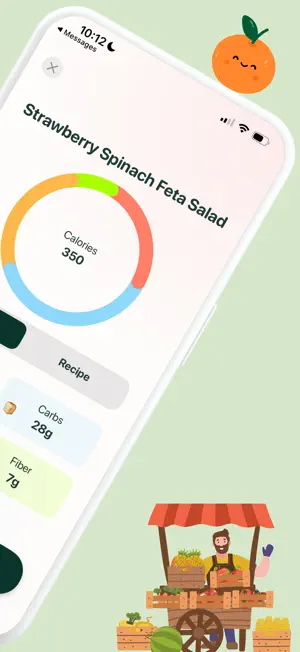
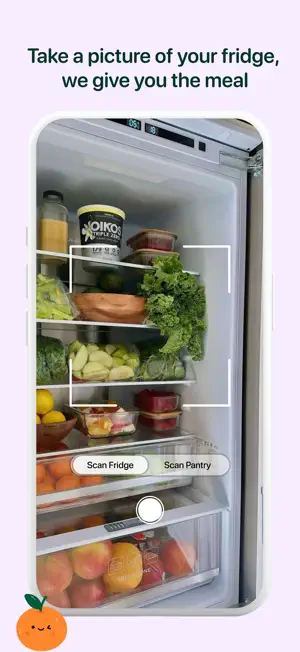
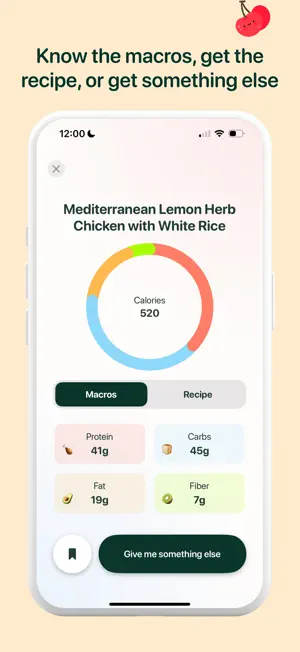
HOW TO USE BADHEALTH: 1) Open the App 2) Launch BadHealth on your device. You’ll land on the home screen after answering some lifestyle questions, where you’ll see a big green "Scan" button. 3) Tap the green "Scan" button to activate your camera. 4) Point your camera at the inside of your fridge or pantry and take a clear picture of your ingredients. BadHealth will automatically scan and detect all the ingredients in your fridge. After scanning, you’ll be taken to a new screen where you can: 5) Add or remove ingredients that were detected. 6) Specify dietary preferences (e.g., vegan, gluten-free, low-carb). Add comments (e.g., “I don’t like spicy food” or “Use up the chicken first”). Get Your Meal 7) Once you’re happy with your selections, tap the "Get Meal" button. BadHealth will generate a delicious meal idea based on the ingredients you have and your preferences. You’ll see: A recipe with step-by-step instructions. Nutritional information to help you stay on track. Serving suggestions to make your meal even better. Not Satisfied? Try Again! If the meal suggestion doesn’t excite you, simply tap the "Make Me Something Else" button. BadHealth will instantly generate a new meal idea for you to explore. Disclaimer: This app is not a substitute for professional medical advice, diagnosis, or treatment. Always consult with a qualified healthcare provider before making any decisions about your health. If you have a medical emergency, contact your doctor or emergency services immediately. MEAL SUGGESTIONS REQUIRE A SUBSCRIPTION. TERMS: https://www.apple.com/legal/internet-services/itunes/dev/stdeula/ For more information review: https://www.badhealthy.com/privacy-policy.html
Ratings & reviews
4.7
92 ratings
What’s new
Version 2.8.2 · Updated June 10, 2026
Improved onboarding and small bug fixes
App privacy
The developer, Life Satisfaction LLC, reported these privacy practices to Apple.
Data Used to Track You
The following data may be used to track you across apps and websites owned by other companies:
- Purchases: Purchase History
- Identifiers: User ID
Data Not Linked to You
The following data, which may be collected but is not linked to your identity, may be used for the following purposes:
- Purchases: Purchase History
- Identifiers: User ID
- User Content: Photos or Videos
Used for: Third-Party Advertising, Developer’s Advertising or Marketing, Product Personalization
Alternatives to BadHealth - Smart Recipes
Looking for apps like BadHealth - Smart Recipes? Here are 6 similar apps on the App Store. The highest rated is Goldion AI Calorie Tracker (4.8/5), and all 6 are free to download.
-
 Cravr: Craving Companion
4.4
Cravr: Craving Companion
4.4
-
 Goldion AI Calorie Tracker
4.8
Goldion AI Calorie Tracker
4.8
-
 Thelo: AI Workout Planner
4.6
Thelo: AI Workout Planner
4.6
-
 Shelog: Food Log, Diet tracker
4.7
Shelog: Food Log, Diet tracker
4.7
-
 Thora: Stop binge eating
4.6
Thora: Stop binge eating
4.6
-
 Cofactor: Nutrient Tracker
4.7
Cofactor: Nutrient Tracker
4.7
| App | Rating | Price | Last updated | Compare |
|---|---|---|---|---|
| BadHealth - Smart Recipes | 4.7 / 5 (92 ratings) | Free | June 10, 2026 | |
| Cravr: Craving Companion | 4.4 / 5 (359) | Free | Oct 18, 2026 | Compare |
| Goldion AI Calorie Tracker | 4.8 / 5 (1,022) | Free | Jan 23, 2026 | Compare |
| Thelo: AI Workout Planner | 4.6 / 5 (2,327) | Free | Sep 26, 2026 | Compare |
| Shelog: Food Log, Diet tracker | 4.7 / 5 (1,100) | Free | Sep 17, 2026 | Compare |
| Thora: Stop binge eating | 4.6 / 5 (68) | Free | Oct 20, 2026 | Compare |
| Cofactor: Nutrient Tracker | 4.7 / 5 (130) | Free | Oct 14, 2026 | Compare |