

Converter.App
Converter App Utilities iPhoneiPadiPod touch
Converter.App is a free Utilities app for iPhone and iPad by Converter App. Requires iOS 15.0. Updated September 20, 2026.
- Price
- Free
- on the App Store
- Size
- 43 MB
- Age 4+
- Updated
- Sep 20
- 2026 · v2.1.3
Screenshots

About Converter.App
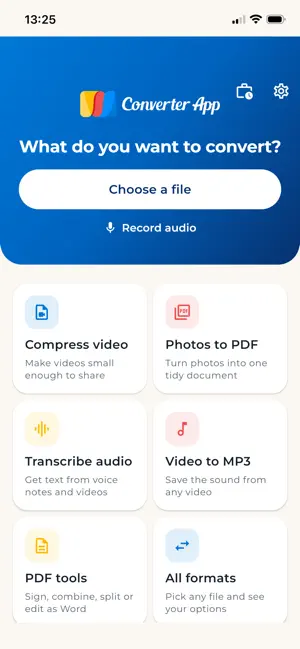
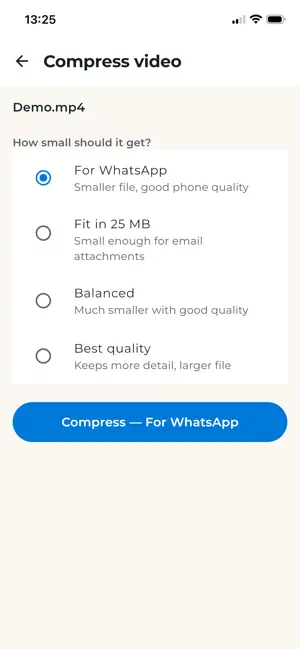
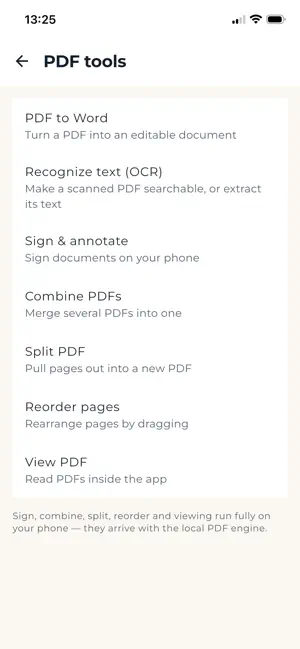
Turn the file you have into the file you need — in two taps. Converter App brings the converter trusted by millions on converter.app to iPhone and iPad. Pick a file and the app instantly shows what it can do with it. No format jargon, no account, no fiddling. CONVERT BETWEEN 2000+ FORMATS • Videos: MP4, MOV, AVI, MKV, WebM and more • Audio: MP3, WAV, M4A, OGG, FLAC and more • Images: JPG, PNG, WebP, HEIC and more • Documents & ebooks: PDF, Word, EPUB and more Not sure what format you need? Tap "All formats", pick your file, and choose from what's possible — the app only ever offers conversions that actually work. MAKE BIG VIDEOS SMALL Compress videos until they actually send. Pick "Fits in an email", "Good for chat" or fine-tune quality yourself — then share straight from the app. TURN SPEECH INTO TEXT Transcribe voice notes, interviews, lectures and videos into text or subtitles (SRT). Record directly in the app, or drop in any audio or video file. A COMPLETE PDF TOOLBOX • Sign documents with your finger — no printer, no scanner • Highlight and mark up pages • Combine several PDFs into one • Split a PDF and keep only the pages you need • Convert PDFs to editable Word documents, with OCR for scans • Photos to PDF: turn receipts, whiteboards and IDs into tidy documents BUILT FOR REAL LIFE • Share any file from any app straight into Converter App • Conversions keep running when you switch apps — you get a notification when they're done • Big files? Uploads stream efficiently, and you can require Wi-Fi for uploads • Signing, splitting, combining, trimming and PDF viewing happen entirely on your device • Works with the Files app, iCloud Drive and your cloud storage PRIVATE BY DESIGN No account. No signup. Files you convert in the cloud are encrypted in transit and automatically deleted from our servers within two hours. Files you sign, split or combine never leave your phone at all. Converter App is the official app of converter.app — the conversion service millions rely on in the browser. If a file can be converted, this app converts it. Download Converter App now and stop worrying about file formats forever.
What’s new
Version 2.1.3 · Updated September 20, 2026
Pinch to zoom while signing and annotating PDFs, so you can place a signature or mark exactly where you want it. The save button is now always visible.
App privacy
The developer, Converter App, reported these privacy practices to Apple.
Data Used to Track You
The following data may be used to track you across apps and websites owned by other companies:
- Identifiers: Device ID
- Usage Data: Advertising Data
Data Linked to You
The following data, which may be collected and linked to your identity, may be used for the following purposes:
- Usage Data: Advertising Data
Used for: Third-Party Advertising
Data Not Linked to You
The following data, which may be collected but is not linked to your identity, may be used for the following purposes:
- Identifiers: Device ID
- Diagnostics: Crash Data
- User Content: Photos or Videos, Audio Data, Other User Content
Used for: Third-Party Advertising, Analytics, App Functionality
Alternatives to Converter.App
Looking for apps like Converter.App? Here are 6 similar apps on the App Store. The highest rated is Media Converter - video to mp3 (4.7/5), and all 6 are free to download.
-
 File Converter
3.8
File Converter
3.8
-
 Media Converter - video to mp3
4.7
Media Converter - video to mp3
4.7
-
 The Video Converter
4.5
The Video Converter
4.5
-
 Total files
4.7
Total files
4.7
-
 The Audio Converter
4.6
The Audio Converter
4.6
-
 Transcribe - Speech to Text
4.5
Transcribe - Speech to Text
4.5
| App | Rating | Price | Last updated | Compare |
|---|---|---|---|---|
| Converter.App | – | Free | September 20, 2026 | |
| File Converter | 3.8 / 5 (479) | Free | Aug 18, 2026 | Compare |
| Media Converter - video to mp3 | 4.7 / 5 (24,480) | Free | Oct 19, 2026 | Compare |
| The Video Converter | 4.5 / 5 (10,165) | Free | Apr 4, 2026 | Compare |
| Total files | 4.7 / 5 (134,791) | Free | Sep 11, 2026 | Compare |
| The Audio Converter | 4.6 / 5 (13,664) | Free | Apr 5, 2026 | Compare |
| Transcribe - Speech to Text | 4.5 / 5 (10,908) | Free | Aug 7, 2026 | Compare |
Compare Converter.App with the top alternatives: ratings, updates, ASO score and keyword gaps →