

Clockist: Desk Clock & Days
丹 刘 Utilities iPhoneiPadiPod touch
Clockist: Desk Clock & Days is a free Utilities app for iPhone and iPad by 丹 刘. Rated 5.0/5 from 1 ratings. Requires iOS 17.0. Updated September 28, 2026.
- Rating
- 5.0
- 1 ratings
- Price
- Free
- on the App Store
- Size
- 33 MB
- Age 4+
- Updated
- Sep 28
- 2026 · v2.0.0
Screenshots
About Clockist: Desk Clock & Days
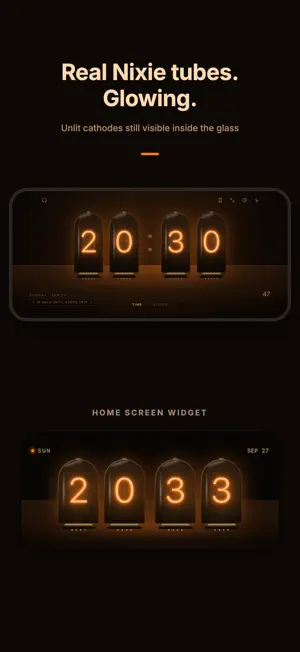
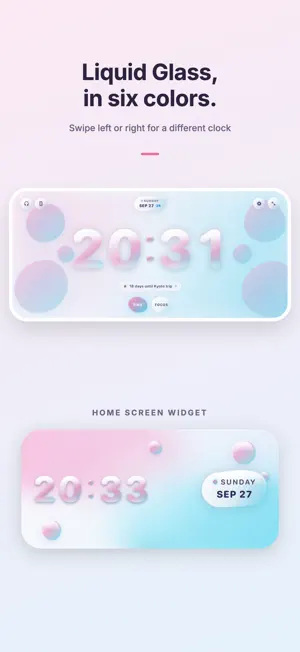
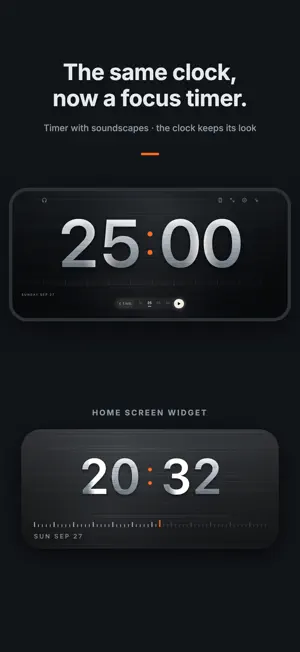
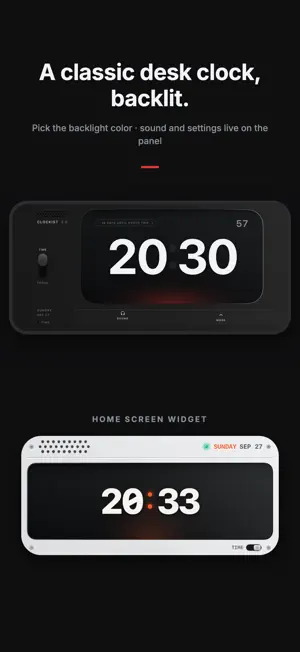
Stand your iPhone or an old iPad sideways on your desk. Now it's a clock. Clockist has six clocks, each a tribute to a real piece of design: the split-flap airport board, the cold-cathode Nixie tube, the German minimalist desk clock, e-ink paper, a titanium instrument dial and Liquid Glass. Swipe left or right for a different clock. The screen stays on. SIX CLOCKS • Mechanical Flip — Solari-style cards that really flip every minute (free) • Paper — big numerals with an ink-on-paper feel (free) • Nixie Tube — unlit cathodes still visible inside the glass, in amber, ice, jade or rose • Classic Desk Clock — a nod to German industrial design, with selectable backlight; sound and settings live on the panel • Titanium — brushed, blasted, weave or guilloché finish • Liquid Glass — six flowing colors Every clock works in landscape and portrait, with a 24-hour option, seconds and a mechanical tick. DAYS: COUNT DOWN OR UP • Count down to a day, or count up from one • Birthdays and anniversaries repeat every year and count to the next one • Days within 30 days, anniversaries and every 100th day show up on the clock face for a while • Show the count in large numerals in place of the time • Get a reminder at 9 AM on the day, or add it to Calendar • Days back up to iCloud and restore on a new phone FOCUS TIMER The same clock becomes a focus timer: 15, 25, 45 or 60 minutes, same look. Add rain, ocean waves, night forest, campfire, café, library, brown noise or a mechanical tick. HOME & LOCK SCREEN WIDGETS • A Home Screen widget for every clock, with its own appearance, Nixie color or titanium finish • Paper Calendar: the month and the time together • Days widgets in small, medium and large (and extra large on iPad); the large one lists all your days; four styles • Lock Screen clock and Days CLOCKIST PRO Free: the Mechanical Flip and Paper clocks with their widgets, the focus timer with every soundscape, and up to 3 days. Pro unlocks all six clocks, every Liquid Glass color, all Pro Home and Lock Screen widgets, and unlimited days. Pro is available as a monthly or yearly subscription or a one-time purchase. Subscriptions renew automatically unless cancelled at least 24 hours before the end of the period; manage them in your Apple ID settings. Privacy Policy: https://tobefun.cn/en/privacy-policy/ Terms of Use: https://tobefun.cn/en/term-of-use/
What’s new
Version 2.0.0 · Updated September 28, 2026
Clockist 2.0 • Six newly designed clocks: Mechanical Flip, Paper, Nixie, Classic Desk, Titanium and Liquid Glass • New: Days — count down or up, yearly repeats, milestones, iCloud backup • New large Days widget, plus extra large on iPad, to see all your days at once • Set appearance, Nixie color and titanium finish per widget • Works on iPhone and iPad, in landscape and portrait
App privacy
The developer, 丹 刘, reported these privacy practices to Apple.
Data Linked to You
The following data, which may be collected and linked to your identity, may be used for the following purposes:
- Purchases: Purchase History
- Identifiers: User ID
Used for: App Functionality
Alternatives to Clockist: Desk Clock & Days
Looking for apps like Clockist: Desk Clock & Days? Here are 6 similar apps on the App Store. The highest rated is Nixie Tube Timer: Countdown (5.0/5), and all 6 are free to download.
-
 Nixie Tube Timer: Countdown
5.0
Nixie Tube Timer: Countdown
5.0
-
 Orbit Now
-
 桌面時鐘-無聲視覺鬧鐘
-
 Binary Clock: Standby
-
 Terminal Tock
1.0
Terminal Tock
1.0
-
 Remindly: Anything Reminder
| App | Rating | Price | Last updated | Compare |
|---|---|---|---|---|
| Clockist: Desk Clock & Days | 5.0 / 5 (1 rating) | Free | September 28, 2026 | |
| Nixie Tube Timer: Countdown | 5.0 / 5 (1) | Free | Sep 18, 2026 | Compare |
| Orbit Now | – | Free | Oct 10, 2026 | Compare |
| 桌面時鐘-無聲視覺鬧鐘 | – | Free | Jul 11, 2026 | Compare |
| Binary Clock: Standby | – | Free | Jul 12, 2026 | Compare |
| Terminal Tock | 1.0 / 5 (1) | Free | Mar 22, 2026 | Compare |
| Remindly: Anything Reminder | – | Free | Apr 7, 2026 | Compare |