

Collage Maker - Picture Editor
Skyraan Technologies Reference iPhoneiPadiPod touch
Collage Maker - Picture Editor is a free Reference app for iPhone and iPad by Skyraan Technologies. Requires iOS 15.6. Updated March 13, 2026.
- Price
- Free
- on the App Store
- Size
- 41 MB
- Age 4+
- Updated
- Mar 13
- 2026 · v1.0.3
Screenshots


About Collage Maker - Picture Editor
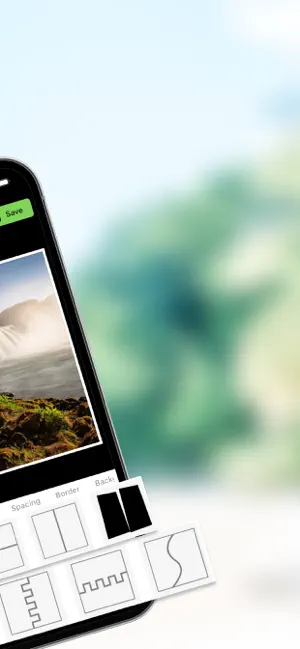
Collage Maker - Create Stunning Collages with Ease In Collage Maker, the Collage option automatically arranges selected photos into a layout. With Frames, you can choose frames for 2-8 photos and add pictures accordingly. All your downloaded collages are saved in My Projects, keeping them organized in one place. Key Features: Canvas: The Canvas option allows you to select from various ratios like 1:1, 16:9, 9:16, 4:3, 3:4, 3:2, and 2:3, giving you the flexibility to create collages in different aspect ratios for any purpose or platform. Layouts: In Collage Maker, the Layouts option provides a variety of pre-designed templates, allowing you to easily arrange your photos in different styles. Choose from grid, freeform, or artistic layouts to create a unique and personalized collage. Spacing: In Collage Maker, the Spacing option lets you adjust the Margin and Padding after selecting a layout. Customize the space between your photos and the edges of the collage to achieve the perfect balance and design. Border: In Collage Maker, the Borders option allows you to customize the border by selecting its color, adjusting the width, changing the opacity, and modifying the radius to create the perfect frame for your collage. Background Color:In Collage Maker, the Background Color option lets you add a solid color background to your collage and adjust its opacity to create the desired effect and blend with your design. Background Image:In Collage Maker, the Background Image option allows you to choose an image from the app’s collection or your device’s gallery. You can also adjust the Opacity and apply a Blur effect to the background image for a more customized and artistic look. Add Image: In Collage Maker, you can add images from your gallery, and by swiping up, you can delete them. The layout will automatically adjust based on the remaining photos, ensuring your collage stays organized and visually appealing. In Collage Maker, you can click on a single image to zoom, Replace, adjust the perspective, rotate, drag it to align with other elements, and use the reset option to return the image to its original state. This allows you to fine-tune your collage for a seamless look. In Collage Maker, you can Shuffle the collage to rearrange the layout and Reset your changes to return to the original design, giving you flexibility and control over your creation. Create, edit, and share beautiful photo collages instantly with Collage Maker! Perfect for photo enthusiasts, content creators, and anyone looking to make their memories even more special.
What’s new
Version 1.0.3 · Updated March 13, 2026
-Bug fixes and performance improvements
App privacy
The developer, Skyraan Technologies, reported these privacy practices to Apple.
Data Used to Track You
The following data may be used to track you across apps and websites owned by other companies:
- Identifiers: Device ID
- Usage Data: Advertising Data
- Diagnostics: Crash Data, Performance Data
Data Linked to You
The following data, which may be collected and linked to your identity, may be used for the following purposes:
- Usage Data: Advertising Data
- Identifiers: Device ID
- Diagnostics: Crash Data, Performance Data
Used for: Third-Party Advertising, Developer’s Advertising or Marketing, Analytics, Product Personalization, App Functionality
Alternatives to Collage Maker - Picture Editor
Looking for apps like Collage Maker - Picture Editor? Here are 6 similar apps on the App Store. The highest rated is Kids Math Game: Add, Subtract (5.0/5), and 5 of the 6 are free to download.
-
 Dictionary-English to English
-
 Kids Math Game: Add, Subtract
5.0
Kids Math Game: Add, Subtract
5.0
-
 Faithline: Bible Chat
5.0
Faithline: Bible Chat
5.0
-
 ABC Kids: Letter Tracing Games
4.7
ABC Kids: Letter Tracing Games
4.7
-
 Relax & Draw: Coloring Book
4.4
Relax & Draw: Coloring Book
4.4
-
 Focus Habit Tracker
4.2
Focus Habit Tracker
4.2
| App | Rating | Price | Last updated | Compare |
|---|---|---|---|---|
| Collage Maker - Picture Editor | – | Free | March 13, 2026 | |
| Dictionary-English to English | – | Free | Mar 18, 2025 | Compare |
| Kids Math Game: Add, Subtract | 5.0 / 5 (1) | Free | Sep 28, 2026 | Compare |
| Faithline: Bible Chat | 5.0 / 5 (21) | Free | Jan 7, 2026 | Compare |
| ABC Kids: Letter Tracing Games | 4.7 / 5 (43) | Free | Aug 5, 2025 | Compare |
| Relax & Draw: Coloring Book | 4.4 / 5 (61) | 0.99 USD | May 20, 2025 | Compare |
| Focus Habit Tracker | 4.2 / 5 (57) | Free | Nov 9, 2025 | Compare |