

Screenshot Deleter & Archive
Morten Punnerud Utilities iPhoneiPadiPod touch
Screenshot Deleter & Archive is a free Utilities app for iPhone and iPad by Morten Punnerud. Rated 5.0/5 from 1 ratings. Requires iOS 17.0.
- Rating
- 5.0
- 1 ratings
- Price
- Free
- on the App Store
- Size
- 4 MB
- Age 4+
- Updated
- Oct 15
- 2026 · v2.1
Screenshots

About Screenshot Deleter & Archive
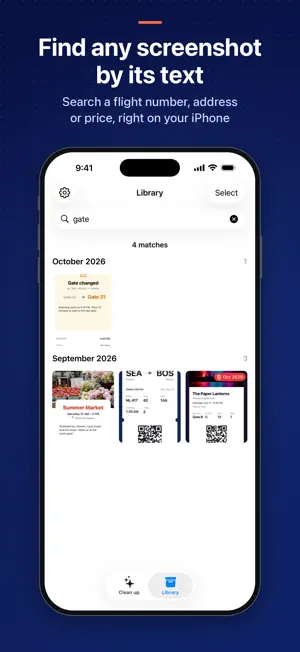
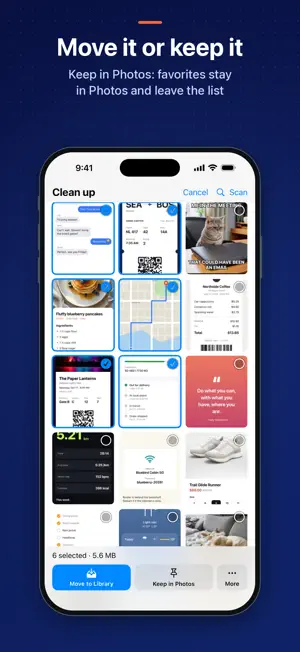
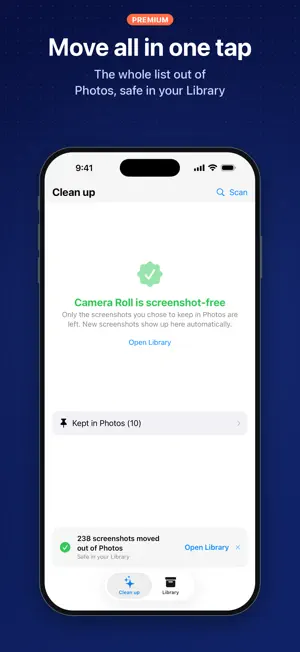
Out of Photos. Not deleted. Boarding passes, receipts, recipes, chat threads, funny memes, things you want to remember – screenshots pile up between your real photos. You don't want to delete them, but you don't want them in your Camera Roll either. Screenshot Deleter & Archive moves your screenshots out of Photos and into a private Library inside the app. Nothing is lost: they stay safe, searchable and synced to your other devices, and Photos is left for real photos. CLEAN UP IN MINUTES Every screenshot in Photos shows up in one Clean up grid, newest first. For each one, choose: • Move to Library – out of Photos, kept in the app at original quality • Keep in Photos – stays in your gallery and is hidden from the list. Good for pictures from Snapchat and other apps that you want in Photos • Delete – for the junk you don't need Or tap Move all to clear the whole list at once. Screenshots marked Keep in Photos are never included. NEW SCREENSHOTS, FOUND AUTOMATICALLY Open the app and your new screenshots are already there, waiting for a decision. No long scans. FIND ANY SCREENSHOT BY ITS TEXT Type a word – a flight number, an address, a price, a name – and the Library finds the screenshot that contains it. Text recognition runs entirely on your iPhone. A LIBRARY THAT STAYS TIDY • Screenshots grouped by month • Full-screen view with pinch to zoom • Share or export whenever you need to • Move any screenshot back to Photos at any time PRIVATE ICLOUD SYNC Your Library syncs through your own private iCloud account. Your screenshots are never uploaded to our servers, and we can't see them. AUTO-DELETE FOR TEMPORARY SCREENSHOTS Give screenshots an expiry date: 1 month, 3 months, 6 months or 1 year. Protect the ones that matter with Never auto-delete. SAFE BY DESIGN • A screenshot is only removed from Photos after its copy is safely saved in the Library • Deleted screenshots go to the Recently Deleted album in Photos, so you have 30 days to change your mind • iOS asks you to confirm before anything is removed from Photos FREE AND PREMIUM These are always free: scanning, deleting, browsing and searching the Library, and moving screenshots back to Photos. Your screenshots are never held hostage. You can also move up to 50 screenshots to the Library for free. Premium unlocks unlimited moves, Move all and auto-delete. Choose a yearly subscription with a 14-day free trial, or Lifetime as a one-time purchase. If you bought Full Access before, you keep Premium. GOOD TO KNOW • Moving cleans up Photos but does not make your screenshots smaller. Library copies keep the original quality and count toward your iCloud storage • Only Delete frees up space on your iPhone, once the screenshots leave Recently Deleted • No account or sign-up. We collect anonymous usage statistics to improve the app, never your images Payment is charged to your Apple ID when you confirm the purchase. The yearly subscription renews automatically unless you cancel it at least 24 hours before the current period ends. Manage or cancel it in Settings > your name > Subscriptions. Terms of Use (EULA): https://www.apple.com/legal/internet-services/itunes/dev/stdeula/ Privacy policy: https://screenshotdeleter.com/privacy-policy/
What’s new
Version 2.1 · Updated October 15, 2026
Version 2.1 – out of Photos, not deleted. NEW - New name: Screenshot Deleter & Archive - Clean up tab: choose Move to Library, Keep in Photos or Delete for each screenshot - Keep in Photos: screenshots that belong in your gallery are hidden from the list - Move all: clear the whole list in one tap - Search your Library by the text inside your screenshots, on your iPhone - Library grouped by month - Never auto-delete lock for the screenshots that matter - Now in Norwegian IMPROVED - New screenshots show up much faster - A screenshot is only removed from Photos after its copy is safely saved in the Library - New Premium: yearly with a 14-day free trial, or Lifetime as a one-time purchase. Your first 50 moves are free. If you bought Full Access before, you keep Premium.
App privacy
The developer, Morten Punnerud, reported these privacy practices to Apple.
Data Not Linked to You
The following data, which may be collected but is not linked to your identity, may be used for the following purposes:
- Usage Data: Product Interaction, Advertising Data, Other Usage Data
- Diagnostics: Crash Data, Performance Data, Other Diagnostic Data
Used for: Analytics, App Functionality
Alternatives to Screenshot Deleter & Archive
Looking for apps like Screenshot Deleter & Archive? Here are 6 similar apps on the App Store. The highest rated is As Cleaner (5.0/5), and 5 of the 6 are free to download.
-
 As Cleaner
5.0
As Cleaner
5.0
-
 QR Extractor
-
 Velta Browser:Secure VPN
-
 PicPoint: Save & Find Nearby
-
 Screenshots - Find, Share, and Delete Screenshots
3.5
Screenshots - Find, Share, and Delete Screenshots
3.5
-
 Eng - Odia (Oriya) Translator
| App | Rating | Price | Last updated | Compare |
|---|---|---|---|---|
| Screenshot Deleter & Archive | 5.0 / 5 (1 rating) | Free | October 15, 2026 | |
| As Cleaner | 5.0 / 5 (1) | Free | Feb 4, 2026 | Compare |
| QR Extractor | – | Free | Jun 20, 2025 | Compare |
| Velta Browser:Secure VPN | – | Free | Sep 27, 2026 | Compare |
| PicPoint: Save & Find Nearby | – | Free | Mar 7, 2026 | Compare |
| Screenshots - Find, Share, and Delete Screenshots | 3.5 / 5 (35) | 0.99 USD | Sep 21, 2015 | Compare |
| Eng - Odia (Oriya) Translator | – | Free | Dec 5, 2025 | Compare |