

Photo to Email
Envy Creative (Apps) Productivity iPhoneiPadiPod touch
Photo to Email is a free Productivity app for iPhone and iPad by Envy Creative (Apps). Rated 3.7/5 from 3 ratings. Requires iOS 18.0.
- Rating
- 3.7
- 3 ratings
- Price
- Free
- on the App Store
- Size
- 47 MB
- Age 4+
- Updated
- Oct 24
- 2026 · v4.0.0
Screenshots



About Photo to Email
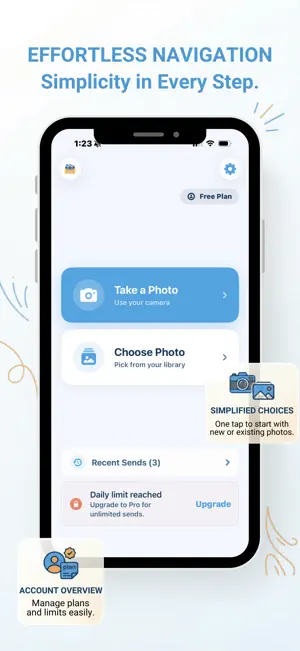
Looking for the fastest way to email photos from your iPhone? Photo to Email makes it incredibly simple to send pictures directly from your camera roll or live camera without the usual hassle. Sending photos via email on your phone should be easy, but the default process is often slow, compresses your images, or makes you take too many steps. We've fixed that. With Photo to Email, you can skip the drafts, previews, and extra confirmation screens. Just select a photo, enter an email, and it's on its way. Key Features: One-Tap Sending: Select a photo and send it instantly. Native iOS Feel: Smooth, lightning-fast experience. History Tracking: Easily keep track of all your previously shared moments. Instant Review: Check your shot before sending, and easily dismiss it to try again. Works with Any Email: You don't need to open a separate mail app to get your photos delivered. Secure & Private: Double-check recipient addresses to ensure your photos go to the right place. Perfect For Every Situation: Quickly email receipts or important documents directly from your camera roll. Instantly share or save family pictures. Back up important images to your own email for safekeeping. Send images for work projects while keeping the process efficient. Upgrade to Pro: Need to send a lot of photos? Upgrade to our Pro plan to unlock unlimited daily photo sends and access to all future premium features. Stop wasting time fighting with complex mail apps. Photo to Email simplifies the entire process, making it the absolute fastest way to share your moments.
What’s new
Version 4.0.0 · Updated October 24, 2026
Photo to Email got a facelift! - New look, cleaner home screen with Take Photo and Choose Photo front and center - Faster, photos get on their way with less waiting - More stable, bug fixes and under the hood improvements throughout - Better upgrade setup, so unlocking Unlimited is smoother than before Same one tap send you know, just better looking and better running.
App privacy
The developer, Envy Creative (Apps), reported these privacy practices to Apple.
Data Used to Track You
The following data may be used to track you across apps and websites owned by other companies:
- Contact Info: Email Address
Data Linked to You
The following data, which may be collected and linked to your identity, may be used for the following purposes:
- Contact Info: Email Address, Name
- Identifiers: User ID
Used for: Third-Party Advertising, Developer’s Advertising or Marketing, Analytics, Product Personalization, App Functionality
Data Not Linked to You
The following data, which may be collected but is not linked to your identity, may be used for the following purposes:
- Purchases: Purchase History
- Usage Data: Product Interaction, Advertising Data, Other Usage Data
- User Content: Photos or Videos
- Other Data: Other Data Types
Used for: Third-Party Advertising, Developer’s Advertising or Marketing, Analytics, Product Personalization, App Functionality