

InvoiceGenie Pro
Invoice Genie LLC Business iPhoneiPadiPod touch
InvoiceGenie Pro is a free Business app for iPhone and iPad by Invoice Genie LLC. Rated 5.0/5 from 2 ratings. Requires iOS 17.0. Updated November 1, 2026.
- Rating
- 5.0
- 2 ratings
- Price
- Free
- on the App Store
- Size
- 74 MB
- Age 4+
- Updated
- Nov 1
- 2026 · v2.5.0
Screenshots



About InvoiceGenie Pro
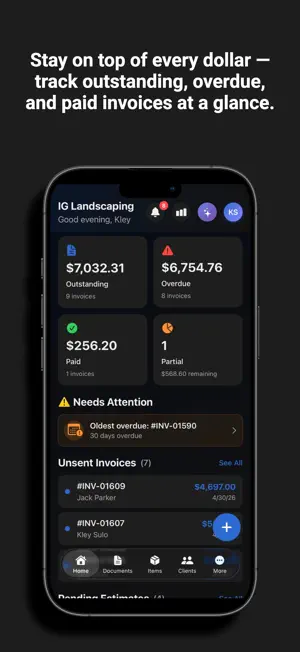
InvoiceGenie Pro – The Invoice App for Contractors Run your business from your phone. InvoiceGenie Pro is the invoice app for contractors, freelancers, and service businesses: create estimates, send invoices, get paid, schedule jobs, and manage crews — all in one mobile app. Built for busy owners who work on-site and want to get paid faster without complicated accounting software. NEW: TAP TO PAY ON IPHONE - Accept contactless credit and debit cards, Apple Pay, and other digital wallets right on your iPhone - No card reader or extra hardware needed - Charge an invoice's balance on the spot, right at the job site - Payments are recorded on the invoice automatically - Email or text your customer a receipt instantly - Powered by Stripe NEW: GENIE AI ASSISTANT - Just ask, by voice or text: Genie creates invoices, estimates, and purchase orders, tracks time, shows business charts, and drafts reminders - Schedule, reschedule, or cancel appointments in plain words - Log expenses and get spending reports by category or merchant - Ask how any feature works and get step-by-step answers - AI receipt scanning extracts expense details with high precision - AI writing drafts or polishes descriptions and notes in one tap CREATE ESTIMATES & INVOICES FAST - Professional invoices and estimates in seconds - Quick Create menu on the home screen - Convert estimates to invoices in one tap - Measure lawns, driveways, and roofs on a satellite map and add them to estimates - Email PDFs to clients and see when they are opened - Accept deposits and partial payments GET PAID FASTER - Apple Pay, Stripe, Square, and PayPal - Built-in payment links and scan-to-pay QR codes on every PDF - Automatic payment reminders and overdue alerts - Collect tips on online payments - Collect client reviews automatically to build trust - Record cash, check, bank transfer, or manual payments BUILT FOR CONTRACTORS & FIELD TEAMS - One-time or recurring appointments with automatic client reminders - Link invoices, estimates, receipts, and time entries to each appointment - Crew time tracking with punch in/out - Turn tracked hours into invoices instantly - Manage multiple jobs, clients, and up to 3 businesses with instant switching MANAGE YOUR ENTIRE BUSINESS - Purchase orders and expense tracking - Expense reports by period, category, and merchant with PDF/CSV export - Receipt scanning with attachments - Business dashboards and analytics - Full client and item management TEAM & CREW MANAGEMENT - Invite team members with role-based access: Admin, Manager, Crew, and Accountant - Crew analytics and activity tracking QUICKBOOKS ONLINE SYNC - Reliable sync of invoices, estimates, clients, and items for error-free accounting AUTOMATED RECURRING INVOICES - Generate and auto-send recurring invoices hands-free - Clients get the PDF and payment link instantly SECURE & RELIABLE - Two-Factor Authentication (2FA) - End-to-end encrypted business data - Full edit history and deleted item recovery - iCloud Backup and full archive export GLOBAL READY - 7 languages; send documents in your client's language while keeping the app in yours - 200+ currencies with localized formatting - Works on iPhone, iPad, and Web Perfect for: Contractors, electricians, plumbers, HVAC, landscapers, freelancers, agencies, consultants, and growing service businesses. Download InvoiceGenie Pro today and simplify the way you run your business. Support: [email protected] Web: https://myinvoicegenie.com Privacy Policy: https://myinvoicegenie.com/privacy-policy/ Terms of Use: https://myinvoicegenie.com/support/
What’s new
Version 2.5.0 · Updated November 1, 2026
- New: Invoice Genie is now optimized for iPhone Duo, with layouts that adapt beautifully whether it's folded or unfolded. - NEW: Tap to Pay on iPhone — accept contactless credit and debit cards, Apple Pay and other digital wallets right on your iPhone, with no extra hardware. - Payment receipts are emailed to your customer for both approved and declined payments. - New: Fresh new look with an indigo accent color and a cleaner Items section. - New: Voice-first Genie AI. Speak your items and Genie AI adds them to your invoice or estimate, discounts included. - New: "Save to Items" toggle when adding line items, so you can reuse them later. - New: Link appointments to your invoices, estimates and purchase orders. - New: Add related documents while creating a new invoice, estimate or purchase order. You no longer have to save it first. - Appointment client names, addresses and notes are now encrypted, like the rest of your data. - Appointment details now show a "Save Changes" button when you edit, and warn you before you leave with unsaved changes. - QuickBooks "Import everything" and "Sync all" now run in the background with real progress. - QuickBooks: documents whose client was deleted still sync. - Your document link is always shown after saving, with a "Link Copied" confirmation. - Privacy & Security now lists Appointments and Receipts & Expenses as protected data, and explains how Tap to Pay on iPhone uses your location. - Updated Privacy Policy and Terms, including appointment encryption and a new Text Messages (SMS) section. - Fixed a blank share sheet when inviting team members. - Fixed a freeze after saving "Complete Your Business" and when opening the profile menu. - General stability and performance improvements
App privacy
The developer, Invoice Genie LLC, reported these privacy practices to Apple.
Data Linked to You
The following data, which may be collected and linked to your identity, may be used for the following purposes:
- Usage Data: Product Interaction
- Diagnostics: Crash Data, Performance Data, Other Diagnostic Data
- Purchases: Purchase History
- Financial Info: Payment Info, Other Financial Info
- Location: Precise Location
- Contact Info: Physical Address, Email Address, Name, Phone Number
- Contacts: Contacts
- User Content: Photos or Videos, Other User Content
- Identifiers: User ID, Device ID
Used for: Analytics, App Functionality
Data Not Linked to You
The following data, which may be collected but is not linked to your identity, may be used for the following purposes:
- Identifiers: Device ID
Used for: Analytics
Alternatives to InvoiceGenie Pro
Looking for apps like InvoiceGenie Pro? Here are 6 similar apps on the App Store. The highest rated is Flipforge Analyzer (5.0/5), and all 6 are free to download.
-
 Flipforge Analyzer
5.0
Flipforge Analyzer
5.0
-
 Tort Terminal
5.0
Tort Terminal
5.0
-
 SNG Connect
-
 Redline For Contractors
5.0
Redline For Contractors
5.0
-
 FlipProfit Reseller Calculator
-
 Jett Pix
| App | Rating | Price | Last updated | Compare |
|---|---|---|---|---|
| InvoiceGenie Pro | 5.0 / 5 (2 ratings) | Free | November 1, 2026 | |
| Flipforge Analyzer | 5.0 / 5 (1) | Free | Aug 4, 2026 | Compare |
| Tort Terminal | 5.0 / 5 (1) | Free | Sep 26, 2026 | Compare |
| SNG Connect | – | Free | Apr 15, 2026 | Compare |
| Redline For Contractors | 5.0 / 5 (11) | Free | Aug 27, 2026 | Compare |
| FlipProfit Reseller Calculator | – | Free | Apr 21, 2026 | Compare |
| Jett Pix | – | Free | Sep 3, 2026 | Compare |
Compare InvoiceGenie Pro with the top alternatives: ratings, updates, ASO score and keyword gaps →