
Lexie: Exam Prep & Study Tutor
Elina Patjas Education iPhoneiPadiPod touch
Lexie: Exam Prep & Study Tutor is a free Education app for iPhone and iPad by Elina Patjas. Requires iOS 15.1. Updated October 12, 2026.
- Price
- Free
- on the App Store
- Size
- 63 MB
- Age 4+
- Updated
- Oct 12
- 2026 · v3.17.0
Screenshots


About Lexie: Exam Prep & Study Tutor
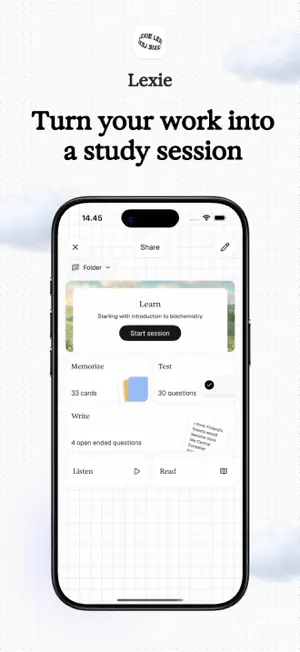
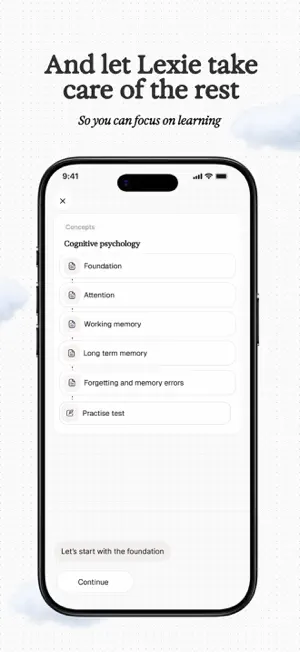
Lexie is a study app that turns photos of your notes and worksheets into flashcards, quizzes, and practice exams. Snap a photo and get a complete study set in under 30 seconds. Built on the FSRS spaced repetition algorithm, the same scheduling science used by Anki, with active recall, six practice modes, and AI feedback on every answer. Used by 4,500+ students worldwide. HOW DOES LEXIE WORK? Take a photo of anything you want to study: handwritten notes, a worksheet, a diagram. Lexie generates flashcards, quiz questions, and open-ended practice questions where AI evaluates your answer like a tutor. No typing, no manual card creation. Two taps from photo to practice. WHAT STUDY MODES LEXIE HAVE? Six ways to practice the same material. Flashcards with audio pronunciation. Multiple choice, fill-in-the-blank, and matching questions. Typed recall where you write the answer from memory. Think questions where you explain concepts in your own words and get AI feedback. Audio review at adjustable speed. Every mode uses active recall. DOES LEXIE USE SPACED REPETITION? Lexie uses the FSRS algorithm (Free Spaced Repetition Scheduler) to track what you know and what you're forgetting. It calculates the optimal moment to review each card, right before you would forget it. Long-term retention with less total study time. Daily reminders when cards are due for review. WHAT SUBJECTS AND EXAMS LEXIE WORKS WITH? Any subject in any language. Biology, chemistry, physics, anatomy, history, languages, literature, medical terminology, law, nursing. Math mode generates novel practice problems. Image occlusion works with diagrams and anatomy charts. Used for SAT, ACT, AP exams, GCSE, A-levels, university finals, medical school, nursing boards, and professional certifications. IS LEXIE GOOD FOR LANGUAGE LEARNING? Lexie works with any language and includes audio pronunciation on every flashcard. Typed recall lets you practice writing in the target language. Listening mode plays audio and you type what you hear. Tap any word for instant translation. WHO IS LEXIE FOR? Students preparing for exams, medical and nursing students, language learners, adult learners, teachers, and homeschool families. Designed for independent use from age 10 and up. Kids photograph their homework and practice on their own. A family plan is available on iOS. Parents don't need to understand the subject because Lexie generates questions and gives feedback automatically. IS LEXIE FREE? HOW ABOUT PRIVACY? 3 free study sets to start, no account required. Pro unlocks unlimited study sets and all practice modes. All study data stored locally on your device. No cloud sync, no ads, no data selling. Your study material is never used to train AI. WHO MADE LEXIE? Built by Interlinear, a learning company from Helsinki, Finland. QUESTIONS OR FEEDBACK [email protected] Privacy Policy: https://www.lexielearn.com/privacy Terms of Use: https://www.lexielearn.com/terms
What’s new
Version 3.17.0 · Updated October 12, 2026
Lexie now knows when your exam is. Tell it the date while it makes your set, and Lexie starts planning your reviews around it, so what you study comes back before the big day. This is the first step, more is coming. - Deleted sets wait in the Trash for 30 days, so you can get them back. - A photo of a page with a labelled figure gives you the notes and a label quiz for the figure. - Courses has a new My courses list with your progress. - Finnish (YKI) flashcards have a language button.
App privacy
The developer, Elina Patjas, reported these privacy practices to Apple.
Data Not Linked to You
The following data, which may be collected but is not linked to your identity, may be used for the following purposes:
- Identifiers: Device ID, User ID
- Purchases: Purchase History
- Contact Info: Email Address
- User Content: Photos or Videos, Other User Content
- Usage Data: Product Interaction
Used for: Analytics, App Functionality