

MP3 Converter - Audio Trimmer
MORIMOTO LIMITED Music iPhoneiPadiPod touch
MP3 Converter - Audio Trimmer is a free Music app for iPhone and iPad by MORIMOTO LIMITED. Rated 4.7/5 from 29,353 ratings. Requires iOS 15.0.
- Rating
- 4.7
- 29.3K ratings
- Price
- Free
- on the App Store
- Size
- 160 MB
- Age 17+
- Updated
- Oct 14
- 2026 · v1.4.9
Screenshots


About MP3 Converter - Audio Trimmer
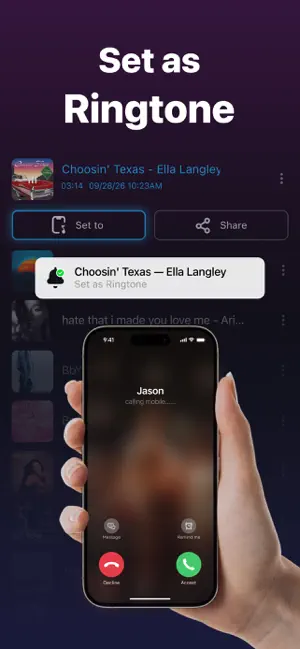
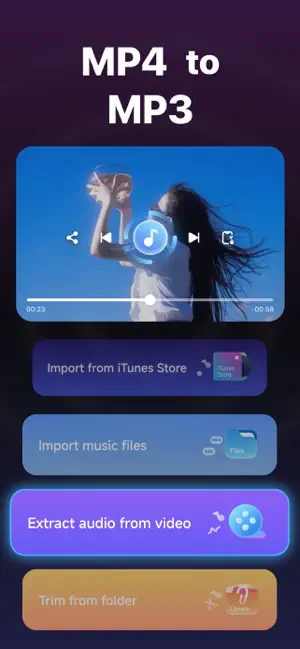
Join Millions of Happy Users! As an all-in-one audio toolkit, MP3 Converter is trusted by millions of users worldwide who rely on its powerful features every day. Whether you're converting files, creating custom ringtones, or fine-tuning your music, everything you need is just a tap away. With an intuitive, user-friendly interface, anyone can start using it right away — no experience required. It's the go-to tool for enhancing your music experience on the go. [MP3 Converter] Easily convert any audio or video file to high-quality MP3 format. Whether it's a favorite song or a video clip, our app delivers a smooth, fast conversion process, giving you portable music anytime, anywhere. Fine-tune your output with customization options like bitrate, sample rate, and audio quality to suit your exact needs. [Ringtone Maker] Extract audio from TikTok, YouTube, Instagram, and other top platforms — catchy snippets, background laughs, viral sounds — and turn them into ringtones. You can also download your favorite songs, then trim and refine the exact part you love to create a one-of-a-kind ringtone that matches your style. [Video to MP3] Extract audio from any video in seconds — MP4, AVI, or MOV, whatever you have. With just a few taps, your videos become high-quality MP3 files you can save to your device, share with friends, or listen to on the go without ever watching the video. Multiple audio quality options let you pick what works best for you. [Audio Trimmer] A complete toolkit for editing and refining your sound. Adjust volume, apply filters, and fine-tune pitch and tempo for precise control. Cut and trim any segment with exact start/end points, then add fade-in/out effects to create custom ringtones, alarms, and music clips — or blend multiple tracks into one seamless song. With batch editing, you can polish several files at once, so every sound comes out just the way you want it. [Free Music] Stream a wide range of free music tracks — Browse genres, discover new tunes to suit your mood, and enjoy them all at your fingertips. [Offline Music] No internet? No problem. Enjoy your music offline anytime — on the go, traveling, or in areas without Wi-Fi. Download tracks and listen without interruptions. [Song Finder] Search, discover, and play music, podcasts, and audiobooks from around the world. Subscription Information: Premium Access:Unlock unlimited audio conversion, ringtone setting, and audio trimming. Plans:Weekly, monthly, and annual subscription options available. Auto-Renewal:Payment is charged to your iTunes Account upon confirmation. Subscriptions auto-renew unless canceled 24 hours before the current period ends. Management:Manage your subscription and disable auto-renewal in your Account Settings after purchase. Thank you for choosing our MP3 Converter! If you have any questions, feedback, or need assistance, feel free to reach out to our support team. Link to the Terms of Use (EULA) : http://markwatermark.com/license_agreement.html Link to the Privacy Policy : http://markwatermark.com/mp3_privacy.html
Ratings & reviews
4.7
29.3K ratings
What’s new
Version 1.4.9 · Updated October 14, 2026
bug fix
App privacy
The developer, MORIMOTO LIMITED, reported these privacy practices to Apple.
Data Used to Track You
The following data may be used to track you across apps and websites owned by other companies:
- Identifiers: Device ID
Data Not Linked to You
The following data, which may be collected but is not linked to your identity, may be used for the following purposes:
- Location: Coarse Location
- Identifiers: Device ID
- Search History: Search History
- Usage Data: Product Interaction
- Diagnostics: Crash Data, Performance Data
- Contact Info: Email Address
- User Content: Photos or Videos, Audio Data
Used for: Third-Party Advertising, Analytics, Product Personalization, App Functionality
Alternatives to MP3 Converter - Audio Trimmer
Looking for apps like MP3 Converter - Audio Trimmer? Here are 6 similar apps on the App Store. The highest rated is LittyTone:Ringtone & AI Voice (4.7/5), and all 6 are free to download.
-
 LittyTone:Ringtone & AI Voice
4.7
LittyTone:Ringtone & AI Voice
4.7
-
 ClipTone: Ringtone & Car Sound
4.7
ClipTone: Ringtone & Car Sound
4.7
-
 Reverse Singing
4.7
Reverse Singing
4.7
-
 Reverse Audio: Funny Voice
4.6
Reverse Audio: Funny Voice
4.6
-
 Reverse Audio: Sing Challenge
4.5
Reverse Audio: Sing Challenge
4.5
-
 Reverse Singing: Fun Audio
3.0
Reverse Singing: Fun Audio
3.0
| App | Rating | Price | Last updated | Compare |
|---|---|---|---|---|
| MP3 Converter - Audio Trimmer | 4.7 / 5 (29,353 ratings) | Free | October 14, 2026 | |
| LittyTone:Ringtone & AI Voice | 4.7 / 5 (6,757) | Free | Sep 29, 2026 | Compare |
| ClipTone: Ringtone & Car Sound | 4.7 / 5 (121,086) | Free | Oct 19, 2026 | Compare |
| Reverse Singing | 4.7 / 5 (7,863) | Free | Oct 17, 2026 | Compare |
| Reverse Audio: Funny Voice | 4.6 / 5 (18,566) | Free | Oct 1, 2026 | Compare |
| Reverse Audio: Sing Challenge | 4.5 / 5 (32,146) | Free | Oct 24, 2026 | Compare |
| Reverse Singing: Fun Audio | 3.0 / 5 (4) | Free | Jun 24, 2026 | Compare |