

PhotoRiver
Naihe Hu Photo & Video iPhoneiPadiPod touch
PhotoRiver is a free Photo & Video app for iPhone and iPad by Naihe Hu. Rated 5.0/5 from 3 ratings. Requires iOS 18.0. Updated October 15, 2026.
- Rating
- 5.0
- 3 ratings
- Price
- Free
- on the App Store
- Size
- 21 MB
- Age 4+
- Updated
- Oct 15
- 2026 · v6.0
Screenshots



About PhotoRiver
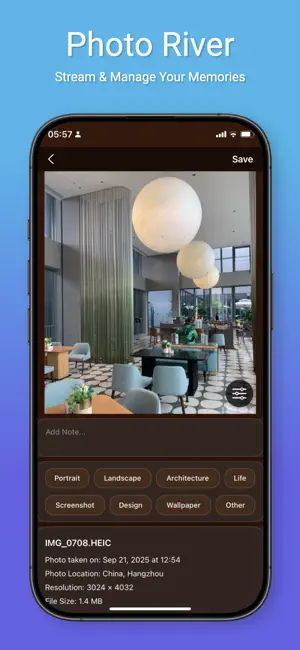
This app uses Apple's Standard End User License Agreement (EULA): https://www.apple.com/legal/internet-services/itunes/dev/stdeula/ PhotoRiver makes organizing your photo library as easy as browsing it. Swipe through your photos and videos full screen, and favorite, tag, or delete each one as you go. IMMERSIVE BROWSING • Swipe up and down, one photo per screen, with videos playing automatically • Favorite, tag, categorize, add notes, or add to albums and diaries right on the photo • Recommended, Memories, and To Organize filters • Switch between four views: River, Grid, Immersive, and Cards CLEANUP HUB • Duplicates and similar photos: compare in groups and keep the best one • Blurry photos: find the shots that didn't come out • Bursts and Live Photos: keep the best frame, clear the rest • Screenshot archiving: clear out screenshots you no longer need, in batches • Large files and video compression: see what's using your storage and compress videos in the app • Monthly review: a few minutes a month keeps your library tidy CAPTURE AND CREATE • Photo diary: combine photos with text, mood, and weather • Photo walls: templates and backgrounds for shareable collages • Albums: manage system and custom albums together • iCloud sync: favorites, tags, and diaries sync across your devices PRIVACY AND SAFETY • All photo analysis happens on your device and is never uploaded to our servers • Every deletion is confirmed first, and deleted photos stay in Recently Deleted for 30 days
What’s new
Version 6.0 · Updated October 15, 2026
What’s new in 6.0 • Photo editing, rebuilt: adjust exposure, contrast, highlights, shadows, warmth and saturation; crop with aspect ratios, rotate and straighten; place, resize and rotate stickers freely • 20 filters, including new clear Japanese-style looks. Save your own presets, copy and paste edits, and export as JPEG or HEIC • Cleanup: exact duplicates are now verified by file contents, and similar photos and bursts can be compared side by side with synced zoom • New: photo events, screenshot categories and a cleanup report • One deletion basket: review everything your cleanup tools picked in one place. Favorites and photos used in your diary stay protected • Photo walls: free layout, per-photo cropping, undo and redo, My Works, and multi-page PDF photo books • Better diary editing and reading • Fixed: compressed photos are now saved as new copies
App privacy
The developer, Naihe Hu, reported these privacy practices to Apple.
Data Not Collected
The developer does not collect any data from this app.
Alternatives to PhotoRiver
Looking for apps like PhotoRiver? Here are 6 similar apps on the App Store. The highest rated is PocketBox: Video Compressor (4.9/5), and all 6 are free to download.
-
 Moment - On This Day History
4.8
Moment - On This Day History
4.8
-
 ShareGuard: Blur & Redact
4.0
ShareGuard: Blur & Redact
4.0
-
 PhotoSlate
-
 PocketBox: Video Compressor
4.9
PocketBox: Video Compressor
4.9
-
 Evios: Light Meter for Film
-
 Fake Flex
3.4
Fake Flex
3.4
| App | Rating | Price | Last updated | Compare |
|---|---|---|---|---|
| PhotoRiver | 5.0 / 5 (3 ratings) | Free | October 15, 2026 | |
| Moment - On This Day History | 4.8 / 5 (18) | Free | Oct 12, 2026 | Compare |
| ShareGuard: Blur & Redact | 4.0 / 5 (1) | Free | Apr 13, 2026 | Compare |
| PhotoSlate | – | Free | Apr 25, 2026 | Compare |
| PocketBox: Video Compressor | 4.9 / 5 (7) | Free | Sep 22, 2026 | Compare |
| Evios: Light Meter for Film | – | Free | Jan 12, 2026 | Compare |
| Fake Flex | 3.4 / 5 (7) | Free | Oct 11, 2026 | Compare |
Compare PhotoRiver with the top alternatives: ratings, updates, ASO score and keyword gaps →