
Fragmemo: Note,Reminder,Widget
Jia Jiang Productivity iPhoneiPadiPod touch
Fragmemo: Note,Reminder,Widget is a free Productivity app for iPhone and iPad by Jia Jiang. Rated 5.0/5 from 6 ratings. Requires iOS 18.6.
- Rating
- 5.0
- 6 ratings
- Price
- Free
- on the App Store
- Size
- 118 MB
- Age 4+
- Updated
- Sep 14
- 2026 · v1.3.4
Screenshots
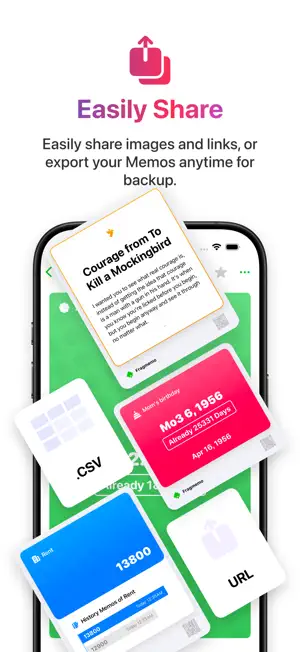
About Fragmemo: Note,Reminder,Widget
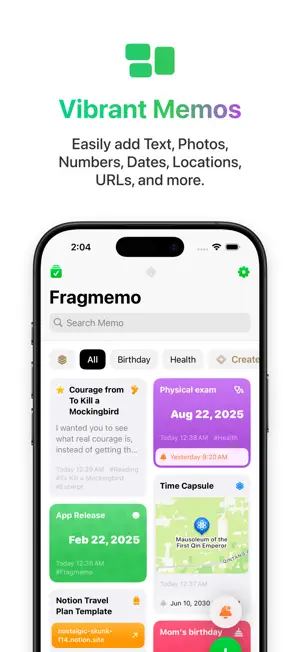
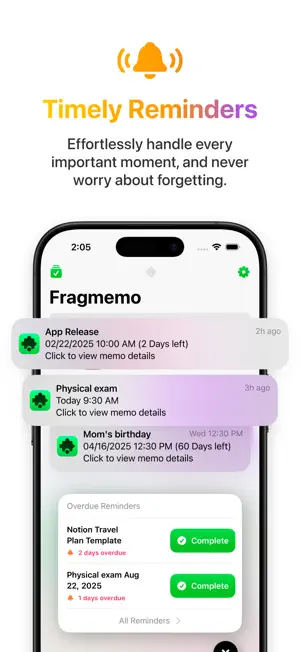
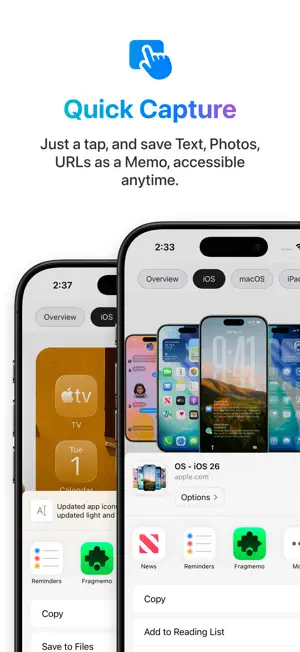
Fragmemo is a versatile memo and reminder app that helps you capture what matters, organize it your way, and act on it at the right time. Core Features: - Diverse Memos: Notes, Photos, Checklists, Numbers, Dates, Locations, Links, and Check-ins for different kinds of information. - Check-ins & Trends: Review check-in history with a heatmap, track checklist progress, and log multiple number values with trend charts. - Flexible Views & Styles: Switch between Grid, List, Compact, and Masonry layouts, with Vibrant, Muted, or Clean memo styles optimized for large screens. - Smarter Reminders: Configure flexible recurring rules and end conditions, choose whether to send notifications, and complete or skip reminders based on memo type. - Reminder Center: View and manage all reminders in one place from the sidebar, with prominent due notifications when they matter. - Powerful Organization: Manage nested groups and access Smart Group, Ungrouped, Tags, Archived, and Recently Deleted from an efficient sidebar. - Customizable Groups: Set emoji or symbol icons and group colors, choose how group labels appear, control visibility, set independent sorting, and filter Smart Groups by Memo Type, Tag, Reminder, Create Date, or Starred. See which Smart Group conditions each memo meets. - Memory Spark: Rediscover past memos from the Home toolbar, widgets, and daily notifications. - Widgets & Shortcuts: Add reminders, memo cards, and quick-add widgets to the Home Screen, overdue reminders to the Lock Screen, plus shortcuts and keyboard actions for faster capture. Filter the memo widget by type and group, with checklist states synced to the app in real time. - Capture & Editing: Create, view, and edit memos in one interface, with cross-app sharing, clipboard capture, and automatic image import from the clipboard. Clipboard link imports automatically fetch page titles and preview images. - Secure Sync: Keep your memos available across devices with iCloud sync and a clear sync status. - Extensive Settings: Customize memo colors and icons (emoji or symbols), choose a local calendar, and adjust app language, launch behavior, and more.
Ratings & reviews
5.0
6 ratings
What’s new
Version 1.3.4 · Updated September 14, 2026
- Memo & Group Icons: Choose emoji or symbol icons for memos and groups, and customize group colors. - Clipboard Link Import: Automatically fetch page titles and preview images when importing links from the clipboard. - Other Improvements & Fixes: Updated app icons, refined interface and interactions, and fixed several known issues.
App privacy
The developer, Jia Jiang, reported these privacy practices to Apple.
Data Not Collected
The developer does not collect any data from this app.
Alternatives to Fragmemo: Note,Reminder,Widget
Looking for apps like Fragmemo: Note,Reminder,Widget? Here are 6 similar apps on the App Store. The highest rated is note-Dash (5.0/5), and all 6 are free to download.
-
 Autolog: AI Reminders & Tasks
4.0
Autolog: AI Reminders & Tasks
4.0
-
 note-Dash
5.0
note-Dash
5.0
-
 Bloomnote - Notes & Journal
4.3
Bloomnote - Notes & Journal
4.3
-
 HelloTimer — All-in-One Timer
5.0
HelloTimer — All-in-One Timer
5.0
-
 LIMSTAR
5.0
LIMSTAR
5.0
-
 Countdown 321-Widget
4.6
Countdown 321-Widget
4.6
| App | Rating | Price | Last updated | Compare |
|---|---|---|---|---|
| Fragmemo: Note,Reminder,Widget | 5.0 / 5 (6 ratings) | Free | September 14, 2026 | |
| Autolog: AI Reminders & Tasks | 4.0 / 5 (4) | Free | Aug 15, 2026 | Compare |
| note-Dash | 5.0 / 5 (2) | Free | Apr 28, 2025 | Compare |
| Bloomnote - Notes & Journal | 4.3 / 5 (22) | Free | Apr 22, 2026 | Compare |
| HelloTimer — All-in-One Timer | 5.0 / 5 (2) | Free | Dec 3, 2025 | Compare |
| LIMSTAR | 5.0 / 5 (2) | Free | Nov 28, 2025 | Compare |
| Countdown 321-Widget | 4.6 / 5 (8) | Free | Sep 29, 2026 | Compare |