

Lumo Cam: Film Presets Editor
婕 宋 Photo & Video iPhoneiPadiPod touch
Lumo Cam: Film Presets Editor is a free Photo & Video app for iPhone and iPad by 婕 宋. Rated 4.8/5 from 20 ratings. Requires iOS 16.0.
- Rating
- 4.8
- 20 ratings
- Price
- Free
- on the App Store
- Size
- 127 MB
- Age 4+
- Updated
- Oct 31
- 2025 · v1.1.4
Screenshots


About Lumo Cam: Film Presets Editor
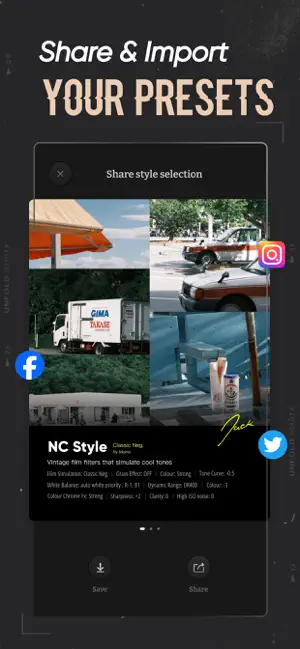
Lumo Cam is a photo and Live Photo editing app focused on simulating the colors of classic film stocks, bringing warmth and depth to every photo. In the world of digital photography, we still crave the unique texture of film — the natural color nuances, the grain, and the subtle play of light and shadow. Lumo Cam allows you to relive the warmth and individuality of iconic films like Fuji NC, NN, Kodak 200, and Leica. Every film simulation filter perfectly captures the classic tones and irreplaceable grain. You can freely create your own color recipes and express your interpretation and emotions of the world in every photo. Share your recipes with creators from all over the world to inspire and be inspired. You can also import recipes created by others to explore new styles and expand your creative horizons. And now, with the brand-new Screenshot Import feature, discovering and applying styles has never been easier. When you spot iPhone camera settings you love on TikTok or other social platforms, simply take a screenshot — Lumo Cam instantly recognizes the parameters and turns them into a filter you can use right away. Inspiration captured, in just one tap. Key Features: Simulate Classic Film Textures Carefully crafted filters for Fuji NC, NN, Kodak 200, and other iconic films, each photo bursting with a blend of retro and modern. From soft tones to delicate grain, these filters transport you back to the film era, capturing those unique lighting effects that can’t be replicated. Vintage Effects to Set the Mood Light leaks, grain, soft focus, motion blur, vignettes, and more. Add a nostalgic artistic touch to every shot, as if telling a story from the past. Custom Recipes, Share Your Creativity Create your own color recipes and share them with others, spreading your unique style. Import others’ recipes to bring more of the film nostalgia into your work and discover new ways to capture beauty. Screenshot Import, One-Tap Apply Found iPhone camera settings you love online? Just screenshot, and Lumo Cam will instantly recognize and apply them. Skip the manual adjustments and bring styles to life in seconds. Advanced Image Editing Tools With color adjustments, white balance, exposure compensation, and other editing tools, freely create and express yourself. Every photo can reveal the beauty you see inside. Endless Inspiration, Explore the World of Film Import recipes via files and discover a world of creative possibilities. Each recipe is a spark of inspiration, a place for you to collaborate with others and push the limits of your creativity. This app offers subscriptions for PRO. They're available (in United States pricing) for $4.99 a week or $19.99 a year. Subscriptions will automatically renew unless auto-renew is turned off at least 24 hours before the end of the current period (and charged to your iTunes account). You can turn off auto-renew/manage subscriptions in your iTunes Account Settings after purchase. Contact Us: We’d love to hear from you. Please send us your feedback at: [email protected] Legal Disclaimer: This app is not affiliated with Fuji Film. Privacy Policy: https://docs.google.com/document/d/14D4l0jvtK77Zg4O6FNAUftbkeqTABBAgL56lI4aPdyg/edit?usp=sharing Terms of Use: https://docs.google.com/document/d/1Q4TmKoBzMv07pfNhGw02Tfsm6P5pjyrxht6CPSeEBV8/edit?usp=sharing
Ratings & reviews
4.8
20 ratings
What’s new
Version 1.1.4 · Updated October 31, 2025
Supports scanning Fujifilm camera parameters Minor optimizations
App privacy
The developer, 婕 宋, reported these privacy practices to Apple.
Data Not Collected
The developer does not collect any data from this app.
Alternatives to Lumo Cam: Film Presets Editor
Looking for apps like Lumo Cam: Film Presets Editor? Here are 6 similar apps on the App Store. The highest rated is Slica (5.0/5), and all 6 are free to download.
-
 Slica
5.0
Slica
5.0
-
 momo cam
-
 KUMO CAM - AI for pop Style
4.8
KUMO CAM - AI for pop Style
4.8
-
 Roll Camera: Retro Film Camera
4.8
Roll Camera: Retro Film Camera
4.8
-
 nomini camera
3.9
nomini camera
3.9
-
 topho CAM - Camera & Editor
5.0
topho CAM - Camera & Editor
5.0
| App | Rating | Price | Last updated | Compare |
|---|---|---|---|---|
| Lumo Cam: Film Presets Editor | 4.8 / 5 (20 ratings) | Free | October 31, 2025 | |
| Slica | 5.0 / 5 (7) | Free | Oct 3, 2025 | Compare |
| momo cam | – | Free | Mar 13, 2025 | Compare |
| KUMO CAM - AI for pop Style | 4.8 / 5 (84) | Free | Sep 24, 2025 | Compare |
| Roll Camera: Retro Film Camera | 4.8 / 5 (4) | Free | Aug 27, 2026 | Compare |
| nomini camera | 3.9 / 5 (10) | Free | Aug 11, 2026 | Compare |
| topho CAM - Camera & Editor | 5.0 / 5 (2) | Free | Mar 14, 2024 | Compare |