

Home Nav. ~ Never get Lost ~
Koichiro Ueki Navigation iPhoneiPadiPod touchApple Watch
Home Nav. ~ Never get Lost ~ is a free Navigation app for iPhone and iPad by Koichiro Ueki. Requires iOS 26.0. Updated September 16, 2026.
- Price
- Free
- on the App Store
- Size
- 38 MB
- Age 17+
- Updated
- Sep 16
- 2026 · v1.21.0
Screenshots

About Home Nav. ~ Never get Lost ~
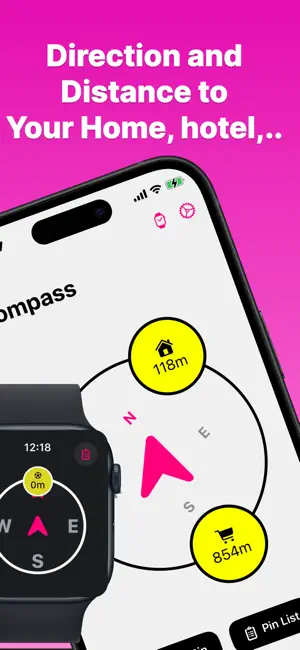
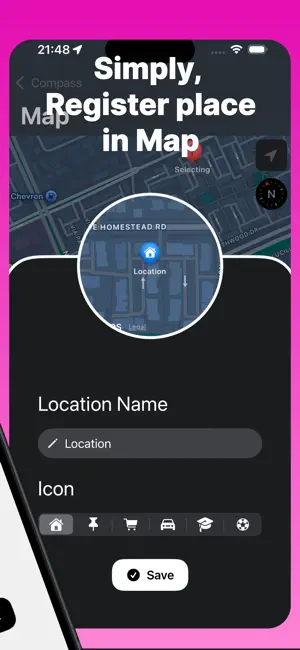
Navigate without staring at a map. You know where you want to go. You just need to know which direction. HomeNavi. shows you a compass pointing toward your destination and the distance remaining — nothing more. No confusing streets, no constant map-checking, no "recalculating." Just an arrow and a number. Perfect for those of us who are directionally challenged but too stubborn to follow turn-by-turn directions. ◉ HOW IT WORKS 1. Save your destinations (home, work, favorite café) 2. Open the app and see the compass 3. Walk in the direction of the arrow 4. Watch the distance count down That's it. No route. No ETA. Just direction and distance. ◉ KEY FEATURES • Compass Navigation — Real-time arrow pointing toward your destination with smooth animation • Multiple Destinations — Save home, work, and other frequent places with custom icons • Distance Display — See exactly how far you are in meters or miles • Apple Watch Support — Check direction right from your wrist without pulling out your phone • Home Screen Widget — Glance at your destination direction without opening the app • Battery Friendly — Adjustable GPS accuracy from high-precision to power-saving mode ◉ DESTINATION MANAGEMENT • Add unlimited locations via map search • Choose from 7 icons: Home, Work, Store, Car, School, Sports, Pin • Show/hide destinations as needed • Edit or delete anytime ◉ APPLE WATCH Your destination, always on your wrist: • Syncs automatically with iPhone • Compact compass display • View distance and direction at a glance • Works with GPS-enabled Apple Watch ◉ SETTINGS • GPS Accuracy: Best / 10m / 100m / Power Saving • Distance Units: Meters & Kilometers or Feet & Miles • Watch Auto-Sync: On/Off ◉ PERFECT FOR • People with a poor sense of direction • Explorers who want to wander without getting lost • Walkers who hate staring at their phone • Anyone who wants to find their way home ◉ PRIVACY HomeNavi only uses your location to calculate direction and distance. Your location data stays on your device. --- Download HomeNavi and never feel lost again. Just follow the arrow. Questions or feedback? Contact us anytime.
What’s new
Version 1.21.0 · Updated September 16, 2026
Minor updates
App privacy
The developer, Koichiro Ueki, reported these privacy practices to Apple.
Data Not Linked to You
The following data, which may be collected but is not linked to your identity, may be used for the following purposes:
- Diagnostics: Crash Data, Performance Data, Other Diagnostic Data
Used for: Analytics
Alternatives to Home Nav. ~ Never get Lost ~
Looking for apps like Home Nav. ~ Never get Lost ~? Here are 6 similar apps on the App Store. The highest rated is NOMAP Walk (5.0/5), and 5 of the 6 are free to download.
-
 WhichWay: Point to your target
-
 Great Arrow Navi
2.0
-
 NOMAP Walk
5.0
-
 ArrowToWaypoint
4.0
-
 Spot Compass
-
 GeoReturn
4.9
| App | Rating | Price | Last updated | Compare |
|---|---|---|---|---|
| Home Nav. ~ Never get Lost ~ | – | Free | September 16, 2026 | |
| WhichWay: Point to your target | – | Free | Oct 9, 2026 | Compare |
| Great Arrow Navi | 2.0 / 5 (2) | 1.99 USD | Sep 30, 2026 | Compare |
| NOMAP Walk | 5.0 / 5 (1) | Free | Mar 30, 2026 | Compare |
| ArrowToWaypoint | 4.0 / 5 (1) | Free | Nov 26, 2025 | Compare |
| Spot Compass | – | Free | Apr 2, 2026 | Compare |
| GeoReturn | 4.9 / 5 (7) | Free | Aug 1, 2026 | Compare |