

Locus GTD: AI Task Planner
嘉豪 栾 Productivity iPhoneiPadiPod touch
Locus GTD: AI Task Planner is a free Productivity app for iPhone and iPad by 嘉豪 栾. Rated 3.8/5 from 10 ratings. Requires iOS 18.0. Updated October 23, 2026.
- Rating
- 3.8
- 10 ratings
- Price
- Free
- on the App Store
- Size
- 57 MB
- Age 4+
- Updated
- Oct 23
- 2026 · v2.4.3
Screenshots



About Locus GTD: AI Task Planner
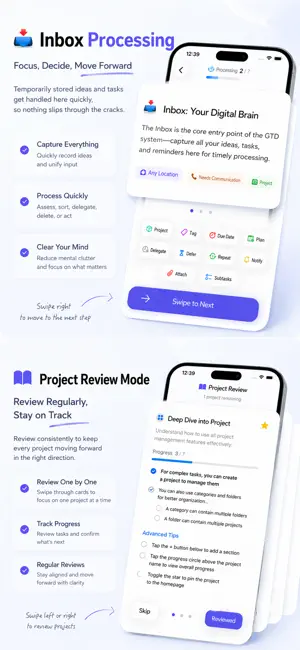
Turn everything on your mind into a clear next action. Locus GTD combines a complete GTD workflow with an AI agent that helps you plan, organize, and act. Capture ideas quickly, manage projects at any depth, and focus on the work that is truly available now. PLAN WITH LOCUS AI • Break complex outcomes into actionable tasks and subtasks • Ask the agent to create, find, update, and organize tasks through conversation • Review your inbox, projects, and schedule with useful context • Use the built-in AI with Locus Pro, or connect a supported custom provider PRACTICE GTD, END TO END • Capture tasks quickly into a trusted inbox • Organize work with projects, groups, tags, and action lists • Use sequential or parallel projects to reveal the right next action • Process your inbox and keep projects current with guided review workflows • Build custom Perspectives for the work and contexts that matter to you PLAN WITHOUT LOSING FOCUS • Schedule work separately from deadlines • See tasks and selected Apple Calendar events together • Use reminders, recurring tasks, flags, and location-based tags • Find anything with global search • Import from Apple Reminders or Things 3, and create portable backups MADE FOR APPLE DEVICES • iCloud keeps supported data in sync where Locus is available • Widgets and the Share extension make capture and review faster • The native Mac app provides Quick Capture, keyboard shortcuts, multi-select, and undo Locus is free to download. Eligible subscription plans may include a free trial. Optional Locus Pro subscriptions and lifetime access are available in the app; the App Store shows the current price for your region. Terms of Use: https://www.apple.com/legal/internet-services/itunes/dev/stdeula/
Ratings & reviews
3.8
10 ratings
What’s new
Version 2.4.3 · Updated October 23, 2026
• A new Liquid Glass app icon. • Calendar: completed tasks and ended events now display consistently, with a Remaining / All switch in the list. • Fixed several crashes and other stability issues.
App privacy
The developer, 嘉豪 栾, reported these privacy practices to Apple.
Data Not Linked to You
The following data, which may be collected but is not linked to your identity, may be used for the following purposes:
- Diagnostics: Crash Data, Performance Data
Used for: App Functionality