

Sol.App - ToDo, Task Manager
Rostislav Maslov Productivity iPhoneiPadiPod touchMac
Sol.App - ToDo, Task Manager is a free Productivity app for iPhone and iPad by Rostislav Maslov. Rated 5.0/5 from 1 ratings. Requires iOS 15.6.
- Rating
- 5.0
- 1 ratings
- Price
- Free
- on the App Store
- Size
- 45 MB
- Age 4+
- Updated
- Sep 14
- 2026 · vv.1.20.0
Screenshots


About Sol.App - ToDo, Task Manager
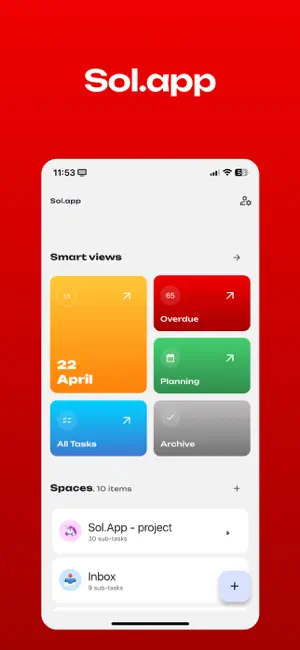
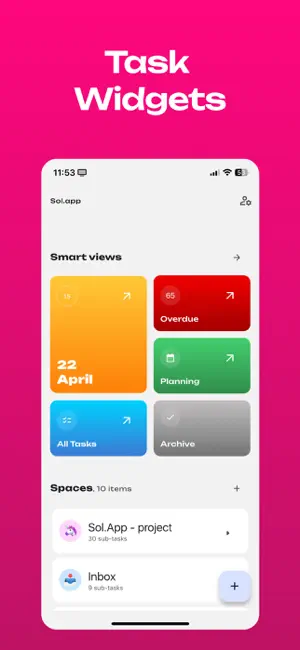
Hey, I’m building Sol.App to be the kind of task manager I’ve always wanted — simple, clean, and actually enjoyable to use. In this update, I completely redesigned the app. It’s now more intuitive, better looking, and easier to navigate. Whether you're planning your day or managing something bigger, Sol.App gives you space to focus — without distractions. Here’s what’s inside: • A brand new design — minimal, thoughtful, and easy on the eyes • Smarter task and project management • Real-time sync to keep everything up to date • Light and dark mode, depending on your mood I use Sol.App every day to keep my own work on track. Hope it helps you do the same.
What’s new
Version v.1.20.0 · Updated September 14, 2026
I focused this release on the everyday actions that shape how Sol.App feels. Mobile screens now have a new floating bottom bar. Dark, high-contrast actions bring task and event creation together with navigation that matches the current context. Moving into task creation is smoother too: the action gives way to the form immediately, without an awkward pause between states. Task creation buttons and a selected future deadline now follow the same darker visual style. Choosing a deadline, date, or time also has a very subtle haptic response—enough to confirm the interaction without asking for extra attention. The lower edge of the calendar is cleaner, with no grey strip or double spacing beneath the floating controls. You can still scroll through the final hours of the day, while a short fade makes the transition into the bottom bar feel softer. The connection between tasks and events is clearer as well. When a task has upcoming events, its card shows the nearest one and the number of additional events. Opening an event refreshes its linked tasks when a connection is available, while an individual error or offline mode does not block the event itself. All of these changes move in the same direction: less visual noise, clearer context, and a calmer way to work with your plans each day.
App privacy
The developer, Rostislav Maslov, reported these privacy practices to Apple.
Data Linked to You
The following data, which may be collected and linked to your identity, may be used for the following purposes:
- Contact Info: Email Address, Name
- User Content: Photos or Videos, Audio Data
- Identifiers: User ID
Used for: App Functionality
Data Not Linked to You
The following data, which may be collected but is not linked to your identity, may be used for the following purposes:
- Diagnostics: Crash Data, Performance Data, Other Diagnostic Data
Used for: App Functionality
Alternatives to Sol.App - ToDo, Task Manager
Looking for apps like Sol.App - ToDo, Task Manager? Here are 6 similar apps on the App Store. The highest rated is Word Text Pro-Text with Fonts (1.0/5), and 4 of the 6 are free to download.
-
 Word Text Pro-Text with Fonts
1.0
Word Text Pro-Text with Fonts
1.0
-
 FlowPilot - Smart Tasks
-
 Mosf - Tasks App
-
 Tally – Simple Task Manager
-
 Zetrr Planner
-
 Scientific Timer
| App | Rating | Price | Last updated | Compare |
|---|---|---|---|---|
| Sol.App - ToDo, Task Manager | 5.0 / 5 (1 rating) | Free | September 14, 2026 | |
| Word Text Pro-Text with Fonts | 1.0 / 5 (1) | 4.99 USD | Jan 9, 2025 | Compare |
| FlowPilot - Smart Tasks | – | Free | Apr 21, 2026 | Compare |
| Mosf - Tasks App | – | Free | Jan 6, 2026 | Compare |
| Tally – Simple Task Manager | – | Free | Nov 1, 2024 | Compare |
| Zetrr Planner | – | Free | Oct 9, 2026 | Compare |
| Scientific Timer | – | 0.99 USD | Sep 23, 2026 | Compare |