

Clip-A-Doodle-Draw: Film&Recap
Takehiko Murai Sports iPhoneiPadiPod touch
Clip-A-Doodle-Draw: Film&Recap is a free Sports app for iPhone and iPad by Takehiko Murai. Requires iOS 18.0. Updated October 13, 2026.
- Price
- Free
- on the App Store
- Size
- 23 MB
- Age 4+
- Updated
- Oct 13
- 2026 · v1.18.0
Screenshots

About Clip-A-Doodle-Draw: Film&Recap
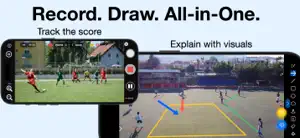
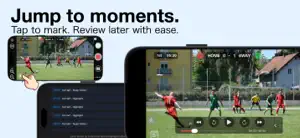
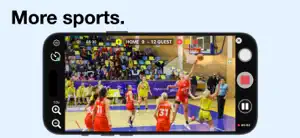
Record the match. Draw on the action. Review the play. Create highlight videos. Clip-A-Doodle-Draw helps you record, review, and analyze sports footage, including soccer matches. From recording matches to drawing on videos, creating highlight reels, and sharing them with your team, Clip-A-Doodle-Draw makes it easier to review games and communicate your ideas. 1. Record & Track Record and save match footage with the game clock and scoreboard displayed on the video. - Record scores and game time: Keep track of the match situation right in your video. - Customize goal celebrations: Add celebratory effects to goal-scoring moments (soccer mode only). - Mark highlights: Tag important moments and plays as they happen. - Jump to key moments: Select a saved highlight to quickly replay the scene you want to review. Marking moments during recording makes reviewing the match afterward easier. 2. Review & Draw on Videos Play your recorded videos or previously uploaded YouTube videos, and draw lines, shapes, and text directly over the footage to analyze key moments. - Visualize plays: Illustrate player movements, positioning, passing lanes, and more. - Review tactics: Draw on the video to express your observations and ideas. - Keep the original video intact: Your drawings don't alter the original footage, so you can experiment freely. - Screen recording: On iOS 27 and later, record video playback along with on-screen actions, including drawing. Use video to explain plays to players, review tactics, and support team discussions. 3. Create Highlights & Share Videos Turn your marked moments into videos that make reviewing and sharing matches easier. - Create highlight reels: With a single tap, combine your saved highlights into a digest video and save it to your Photos library. - Share videos: Share recorded videos directly from the app to review matches with teammates and friends. - YouTube chapters made easy: When sharing, your highlight list is automatically copied to the clipboard. Simply paste it into your YouTube video description to create chapters. Spend less time searching for key moments and make important plays easier to share. Who Is Clip-A-Doodle-Draw For? - Players and coaches who want to record matches and review them efficiently. - Anyone who wants to explain plays and tactics by drawing on video. - Teams and players who want to create and share match highlights. - Anyone looking for an easier way to analyze sports footage. From recording to review and sharing, Clip-A-Doodle-Draw supports your match analysis workflow. All features are available for free, with ads required to unlock certain features. Terms of Use: https://vucavucalife.com/clip-a-doodle-draw-terms-of-use-en/ Manual: https://vucavucalife.com/clip-a-doodle-draw-how-to-use-en/
What’s new
Version 1.18.0 · Updated October 13, 2026
・Dynamic Scoreboard Animations Added a smooth, springy popup animation when the score changes. ・Goal Celebration for Soccer Added celebratory effects to highlight goal-scoring moments. Customize the effect style and colors separately for the HOME and AWAY teams. ・Other minor improvements and bug fixes.
App privacy
The developer, Takehiko Murai, reported these privacy practices to Apple.
Data Used to Track You
The following data may be used to track you across apps and websites owned by other companies:
- Location: Coarse Location
- Identifiers: Device ID
- Usage Data: Product Interaction, Advertising Data
- Diagnostics: Crash Data, Performance Data
Data Linked to You
The following data, which may be collected and linked to your identity, may be used for the following purposes:
- Location: Coarse Location
- Identifiers: Device ID
- Usage Data: Product Interaction, Advertising Data
- Diagnostics: Crash Data, Performance Data
Used for: Third-Party Advertising
Alternatives to Clip-A-Doodle-Draw: Film&Recap
Looking for apps like Clip-A-Doodle-Draw: Film&Recap? Here are 6 similar apps on the App Store. The highest rated is Draw On Sports Video (4.9/5), and all 6 are free to download.
-
 Draw On Sports Video
4.9
Draw On Sports Video
4.9
-
 TacticalSnap: Football Film
-
 CoachLens: Video Coaching App
4.2
CoachLens: Video Coaching App
4.2
-
 VisualEyes: Video Coaching App
4.8
VisualEyes: Video Coaching App
4.8
-
 ScoreBreak: Game Film Review
4.3
ScoreBreak: Game Film Review
4.3
-
 CoachView Slowmo Video Player
4.6
CoachView Slowmo Video Player
4.6
| App | Rating | Price | Last updated | Compare |
|---|---|---|---|---|
| Clip-A-Doodle-Draw: Film&Recap | – | Free | October 13, 2026 | |
| Draw On Sports Video | 4.9 / 5 (15) | Free | Apr 2, 2026 | Compare |
| TacticalSnap: Football Film | – | Free | Oct 12, 2026 | Compare |
| CoachLens: Video Coaching App | 4.2 / 5 (68) | Free | Jul 31, 2026 | Compare |
| VisualEyes: Video Coaching App | 4.8 / 5 (406) | Free | Oct 15, 2026 | Compare |
| ScoreBreak: Game Film Review | 4.3 / 5 (55) | Free | Oct 2, 2026 | Compare |
| CoachView Slowmo Video Player | 4.6 / 5 (611) | Free | Oct 13, 2026 | Compare |