

MeBackup
金铃 梁 Lifestyle iPhoneiPadiPod touch
MeBackup is a free Lifestyle app for iPhone and iPad by 金铃 梁. Requires iOS 15.0. Updated October 27, 2026.
- Price
- Free
- on the App Store
- Size
- 71 MB
- Age 4+
- Updated
- Oct 27
- 2026 · v2.0.2
Screenshots



About MeBackup
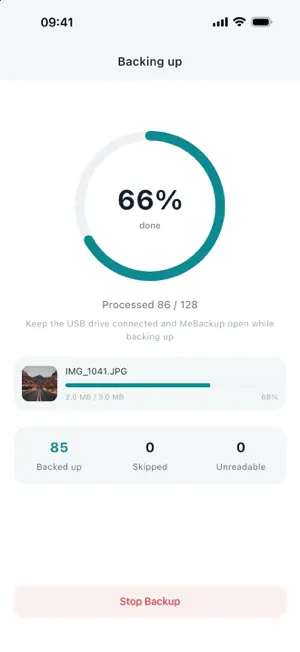
Back up your iPhone memories to a drive you can keep with you. MeBackup helps you back up, browse and restore photos, videos, contacts and files using a compatible MeBackup USB drive. The Backup Center brings drive space, pending items and your main backup controls together in one place. PHOTO AND VIDEO BACKUP Back up photos and videos together, choose photos or videos only, or manually select the items you want to keep. Live Photos are backed up with their video component. Items already recorded as backed up are skipped on later backups. BROWSE AND RESTORE Browse photos and videos on your drive by month, view photos and play supported video formats. Select items from the drive album to save them back to your iPhone photo library. PHOTO AND VIDEO CAPTURE Take photos and record videos inside MeBackup, then save them directly to your compatible drive. Camera preview is available without a drive; saving requires a compatible connected accessory. FILE MANAGEMENT Organize files stored in MeBackup and on your compatible drive. Create folders, copy, move, rename, delete and share files. Receive photos, videos and files shared from other apps and choose where to save them. CONTACTS BACKUP Save contact backups to your drive, preview saved backups and restore contacts to your iPhone. Two-way sync helps fill in missing contacts between your iPhone and the latest backup. Review the on-screen details before restoring or syncing. PRIVACY LOCK Control access to MeBackup with a six-digit passcode and optional Face ID or Touch ID on supported devices. Privacy Lock controls access to the app; it does not encrypt the contents of your drive. YOUR BACKUPS, ON YOUR DEVICES Backup content is stored on your own devices. MeBackup does not provide cloud hosting for your photos, videos, contacts or files. See the privacy policy for information about accessory verification, crash reports and diagnostic logs. BEFORE YOU START - Drive features require a compatible MeBackup external storage accessory. Compatibility depends on the accessory model, connector and iOS version; not all USB drives are supported. - Allow access to Photos or Contacts when prompted to use the corresponding features. - Keep the drive connected and MeBackup in the foreground during backups and transfers. - Check your saved files before removing the originals. Available in Simplified Chinese, English, Traditional Chinese, Japanese, Korean, German, French, Italian, Spanish, Portuguese, Russian and Arabic.
What’s new
Version 2.0.2 · Updated October 27, 2026
Maintenance update.
App privacy
The developer, 金铃 梁, reported these privacy practices to Apple.
Data Not Collected
The developer does not collect any data from this app.
Alternatives to MeBackup
Looking for apps like MeBackup? Here are 6 similar apps on the App Store. The highest rated is Luck is coming (5.0/5), and all 6 are free to download.


| App | Rating | Price | Last updated | Compare |
|---|---|---|---|---|
| MeBackup | – | Free | October 27, 2026 | |
| Luck is coming | 5.0 / 5 (1) | Free | Oct 21, 2026 | Compare |
| My Devotional App | – | Free | Aug 13, 2026 | Compare |
| Peak Residence | – | Free | Dec 28, 2024 | Compare |
| Unify-Your Storage Helper | – | Free | Oct 11, 2026 | Compare |
| 卡路里救援 | – | Free | Oct 27, 2026 | Compare |
| CYBERNETIC | 5.0 / 5 (2) | Free | Jan 23, 2024 | Compare |
Compare MeBackup with the top alternatives: ratings, updates, ASO score and keyword gaps →