

Vision Fox
Cho Yan Yam Productivity iPhoneiPadiPod touch
Vision Fox is a free Productivity app for iPhone and iPad by Cho Yan Yam. Rated 5.0/5 from 1 ratings. Requires iOS 18.0. Updated August 9, 2026.
- Rating
- 5.0
- 1 ratings
- Price
- Free
- on the App Store
- Size
- 6 MB
- Age 4+
- Updated
- Aug 9
- 2026 · v3.8
Screenshots

About Vision Fox
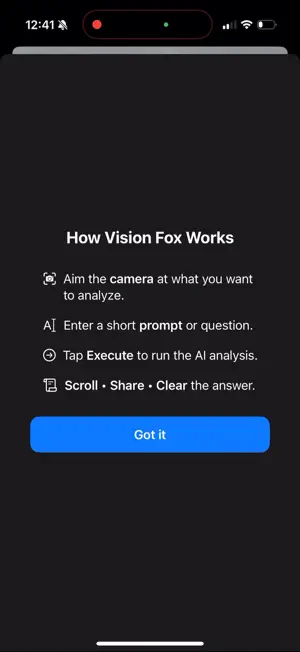
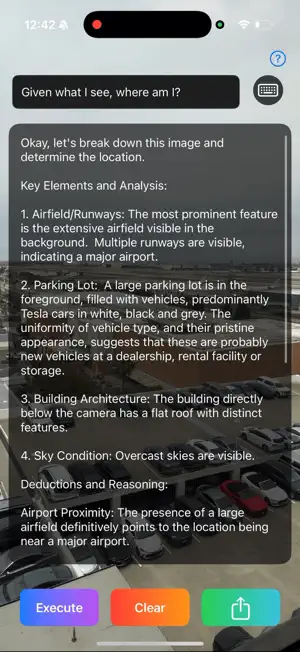
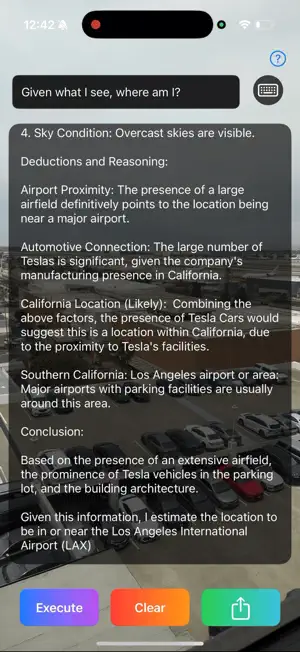
See it. Understand it. Act. Vision Fox turns a camera capture, photo, or screenshot into a clear visual analysis and practical next steps. Choose a focused mode or type your own request, then review the image before sending it for AI analysis. HOW IT WORKS 1. Point the camera at what you want to understand, or choose an image from Photos. 2. Select a mode: • Auto — general image analysis • Custom — type exactly what you want Vision Fox to do • Explain — understand what something is • Troubleshoot — identify a visible problem and possible next steps • Extract — read and organize visible text • Inspect — check for unusual, missing, damaged, or risky details 3. Review the captured image and tap Analyze. 4. Read the result in clear sections covering observations, possible meaning, uncertainty, and recommended next actions. BUILT FOR PRACTICAL VISUAL QUESTIONS Use Vision Fox to understand objects, documents, screenshots, labels, equipment, products, signs, charts, visible problems, and other everyday images. Custom mode lets you give specific instructions, and your request remains visible through review and results. CLEAR, ACTIONABLE RESULTS Results are organized into easy-to-read cards: • Summary • What Vision Fox Observed • What It May Mean • Risks or Uncertainty • What To Do Next • Extracted Text, when available • Suggested Follow-Ups KEEP THE CONVERSATION GOING Ask a follow-up question about the same image or tap one of the suggested questions to go deeper without starting over. SAVE AND SHARE Save useful scans to local History, reopen them later, pin important items, rename them, or share a formatted report. Vision Fox creates a saved History item only when you tap Save. RELIABLE AND RESPONSIBLE Vision Fox separates visible observations from interpretation, states uncertainty, supports cancel and retry, and shows estimated progress while analysis is running. Text-focused requests can also use on-device Apple Vision OCR as supporting evidence. This release includes Firebase App Check integration to help protect AI requests from unauthorized clients. Vision Fox — see it, understand it, act.
What’s new
Version 3.8 · Updated August 9, 2026
A major Vision Fox upgrade: • New Auto, Custom, Explain, Troubleshoot, Extract, and Inspect modes • Clearer results with observations, uncertainty, next steps, and follow-up questions • Added saved History, improved OCR, and Firebase App Check protection Also includes camera, layout, and reliability improvements.
App privacy
The developer, Cho Yan Yam, reported these privacy practices to Apple.
Data Not Linked to You
The following data, which may be collected but is not linked to your identity, may be used for the following purposes:
- Diagnostics: Other Diagnostic Data
- User Content: Photos or Videos, Other User Content
- Identifiers: Device ID
Used for: Analytics, App Functionality
Alternatives to Vision Fox
Looking for apps like Vision Fox? Here are 6 similar apps on the App Store. The highest rated is PeggyAI (5.0/5), and all 6 are free to download.


| App | Rating | Price | Last updated | Compare |
|---|---|---|---|---|
| Vision Fox | 5.0 / 5 (1 rating) | Free | August 9, 2026 | |
| BigOit | – | Free | Sep 21, 2026 | Compare |
| LPMI | – | Free | Jun 30, 2026 | Compare |
| PeggyAI | 5.0 / 5 (2) | Free | Nov 11, 2025 | Compare |
| RuthVision | – | Free | Oct 9, 2026 | Compare |
| Todo List Task Planner Manager | – | Free | Jul 17, 2026 | Compare |
| Chatbot: AI Genie Bot | – | Free | Aug 13, 2024 | Compare |
Compare Vision Fox with the top alternatives: ratings, updates, ASO score and keyword gaps →