

PDF to Word & PDF Converter
Abdul Rehman Productivity iPhoneiPadiPod touch
PDF to Word & PDF Converter is a free Productivity app for iPhone and iPad by Abdul Rehman. Rated 3.0/5 from 2 ratings. Requires iOS 15.6.
- Rating
- 3.0
- 2 ratings
- Price
- Free
- on the App Store
- Size
- 98 MB
- Age 4+
- Updated
- Sep 10
- 2026 · v1.0.6
Screenshots


About PDF to Word & PDF Converter
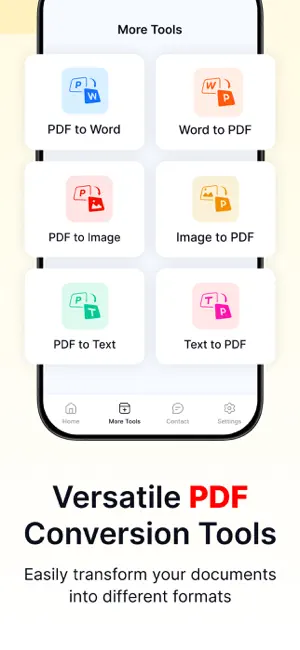
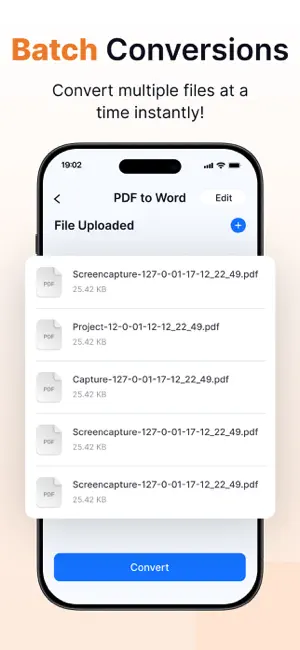
PDF to Word Converter Free lets you convert multiple PDF files into Word (Docx) format and vice versa with ease. The PDF Converter Free app is designed to provide a seamless and accurate PDF to Word converter while simplifying the file conversion process for all users. More Tools Added in PDF to Word App Word to PDF Convert multiple Word or Docx files into high-quality PDF documents instantly using our powerful Word to PDF Converter. Image to PDF or JPG to PDF Image to PDF Converter can easily convert images or photos into PDF format. Text to PDF Quickly convert text files into PDF documents with our Text to PDF Converter. PDF to Image or PDF to JPG Convert PDF files into image formats easily using our PDF to Image Converter tool. PDF to Text Extract text from PDF files and save it as editable text files using our PDF to Text Converter. Merge PDF or PDF Merger Easily merge pdf files for free into one document using a fast and reliable PDF Merger. Web to PDF Paste a link or search the web—instantly convert any webpage to PDF with our Web to PDF Converter. PDF Reader Our advanced pdf reader helps you read pdf files with smooth scrolling and clear formatting. Whether you need to read pdf documents for work or study, this reliable reader ensures fast loading and an optimized viewing experience. Word Reader The powerful Word reader allows you to open and view docx files without losing formatting. This dedicated docx reader makes it easy to read text, review documents, and navigate pages effortlessly. Text Reader Our fast and lightweight text reader is built to open txt files instantly. PDF Scanner The PDF Scanner helps you create clear, professional-quality PDF files from physical documents instantly. Scan multiple pages, organize them into a single PDF, and easily store, print, or share your files for work, school, or personal use. Doc Scanner The Doc Scanner is designed to scan documents with precision and convert them into sharp digital copies. Card Scanner The Card Scanner makes it easy to scan business cards, ID cards, membership cards, and other important cards with crisp detail. Keep your cards organized digitally, access them anytime, and reduce the need to carry physical copies. How to Use the PDF to Word - PDF Converter Free App Follow these simple steps: - Upload one or multiple PDF files from your device storage. - Tap the Convert button. - The app will convert your PDFs into Word (Docx) files. - Download files individually or use the Download ZIP option to save them all at once. The same steps can be used for other conversions as well. Features of the PDF to Word Converter 1. Simple Interface The app features a clean and user-friendly interface. No technical skills are required. 2. Multiple File Conversion Convert multiple PDF or Word files at the same time. 3. Fast Conversion Advanced technology ensures quick and efficient file conversion. 4. High-Quality Results Maintains the original layout and quality of your files. 5. Multiple Language Support Supports multiple languages, making it accessible worldwide. Download the PDF to Word Converter - Docx app today and start converting your files effortlessly! Note: We value your privacy. None of your data will be shared with third parties. If you have any further questions or encounter any problems while using this app, please feel free to contact us so that we can resolve the issue as soon as possible. Payment will be charged to your iTunes Account at confirmation of purchase. Your subscription will automatically renew unless auto-renew is turned off at least 24 hours before the end of the current subscription period. Your account renewal will be charged within 24 hours before the end of the current subscription period. Automatic renewals cost the same price you were originally charged for the subscription. Terms of Use: https://www.pdfaword.net/terminos-y-condiciones Privacy Policy: https://www.pdfaword.net/politica-de-privacidad
What’s new
Version 1.0.6 · Updated September 10, 2026
- Upgrade to Premium to unlock an ad-free experience and unlimited PDF conversions.
App privacy
The developer, Abdul Rehman, reported these privacy practices to Apple.
Data Used to Track You
The following data may be used to track you across apps and websites owned by other companies:
- Usage Data: Advertising Data
Data Linked to You
The following data, which may be collected and linked to your identity, may be used for the following purposes:
- Usage Data: Advertising Data
Used for: Developer’s Advertising or Marketing, Analytics
Alternatives to PDF to Word & PDF Converter
Looking for apps like PDF to Word & PDF Converter? Here are 6 similar apps on the App Store. The highest rated is PDF to Word: OCR, DOC, DOCX (4.4/5), and all 6 are free to download.
-
 PDF to Word: OCR, DOC, DOCX
4.4
-
 PDF to Word: Converter & OCR
-
 Word To PDF App
-
 PDF to Word App
3.0
-
 Word to PDF Converter ©
4.2
-
 PDF to Docx Converter App
4.4
| App | Rating | Price | Last updated | Compare |
|---|---|---|---|---|
| PDF to Word & PDF Converter | 3.0 / 5 (2 ratings) | Free | September 10, 2026 | |
| PDF to Word: OCR, DOC, DOCX | 4.4 / 5 (5) | Free | Aug 31, 2025 | Compare |
| PDF to Word: Converter & OCR | – | Free | Aug 18, 2026 | Compare |
| Word To PDF App | – | Free | Jul 23, 2026 | Compare |
| PDF to Word App | 3.0 / 5 (2) | Free | Jul 19, 2026 | Compare |
| Word to PDF Converter © | 4.2 / 5 (11) | Free | Aug 20, 2025 | Compare |
| PDF to Docx Converter App | 4.4 / 5 (30) | Free | Sep 23, 2026 | Compare |