

Sequincer: MIDI Sequencer
Alexis Doualle Music iPhoneiPadiPod touch
Sequincer: MIDI Sequencer is a free Music app for iPhone and iPad by Alexis Doualle. Rated 4.6/5 from 17 ratings. Requires iOS 18.0.
- Rating
- 4.6
- 17 ratings
- Price
- Free
- on the App Store
- Size
- 39 MB
- Age 4+
- Updated
- Oct 27
- 2026 · v2.1.0
Screenshots
Save to Pinterest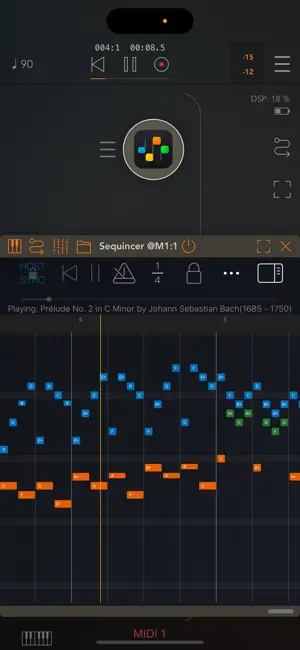

About Sequincer: MIDI Sequencer
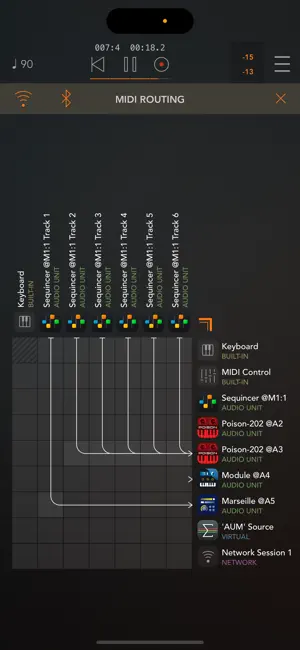
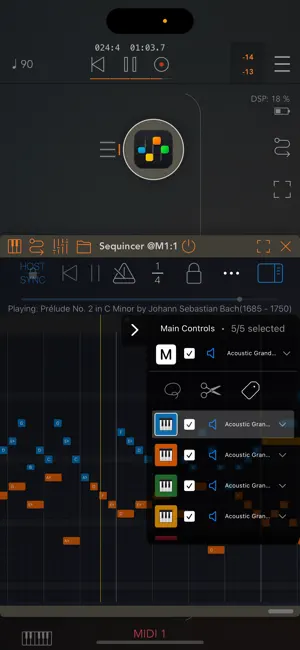
Sequincer is a multi-track, grid-based MIDI sequencer for iPhone and iPad which makes it easy to compose music on the go. Just tap the grid to add notes and hit the play button to hear your creation. Notes added by a tap will have the duration of whichever beat division is selected. You can select a wide range of beat divisions by tapping the "1/4" button, or by pinching horizontally to double and halve the current value. You can change a note's duration by tapping on it to shorten it, or by holding and panning to the right to increase it. There are four tiers: a free preview tier, then Loops, Producer, and Composer. The free tier lets you preview the app. The second tier, Loops, gives you 4 tracks and 64 beats to compose (16 standard bars). The third tier, Producer, brings this to 16 tracks and 1000 beats, enough for a full-length song. The fourth tier, Composer, allows you to use up to 64 tracks and an even greater number of beats, enough for a complete symphony. The 7-note input system, inspired by sheet music, uses the diatonic scale, and you can add accidentals for any new note by dragging up or down as soon as you create it. The 12-tone chromatic mode lets you input notes like on most piano rolls. Velocity, tempo changes and other properties can be edited for each bar in "Structure" mode, by tapping the bar's header or using the edit button. You can write up to 64 simultaneous tracks each with its own instrument, all overlaid on the same piano roll so you can see your full composition at a glance. Each track can be selected, muted, or soloed. • Works as standalone or as a plugin Sequincer is also an AUv3 MIDI processor, so you can use it inside host apps like AUM. Each track can send MIDI to a different synth, making it ideal for layering sounds or building complex arrangements. • Flexible timing and rhythm Create as many bars as you need, and set a custom beat count for each one. Pinch horizontally to zoom in or out on the beat divisions: add quarters, eighths, sixteenths, or even dotted rhythms for compound time. Pinch vertically to zoom in and out of the piano roll. Add tempo change events to speed up or slow down specific parts. • MIDI and MusicXML compatibility Import MIDI files or MusicXML (sheet music). Sequincer currently supports many standard features like tempo changes, dynamics, and jumps. Route tracks to external MIDI devices • Write with real notes Each bar can be set to a musical key, so you’re always writing in scale. A C sharp and a D flat might sound the same in equal temperament, but they’re not the same note. If you’re writing a B flat minor chord for example, you need a D flat for the minor third–a C sharp would be an augmented second. This harmonic awareness makes it possible to experiment with other tuning systems such as Pythagorean, Meantone, and Microtonality. To add accidentals, drag the note up or down as you place it. • Compatible with Apple Pencil on iPad Hover to hear notes before placing them. Double-tap to quickly switch instruments. Use a squeeze gesture (on Pencil Pro) to open the track palette. It’s a fast and intuitive way to compose, if you’ve got a compatible device. • Available on all your devices Your creations are automatically synced with iCloud so you can start on your iPhone and finish it on your iPad. Happy composing! This app is subject to Apple’s standard EULA: https://www.apple.com/legal/internet-services/itunes/dev/stdeula/
Ratings & reviews
4.6
17 ratings
What’s new
Version 2.1.0 · Updated October 27, 2026
New in 2.1: • Track settings: hold a track to set its volume, mute or solo it, rename, duplicate or reorder it, or move its notes to another track. • Instrument icons: every instrument and drum sound has its own. • Version History: each song keeps its earlier versions. Restore any of them as a new song; the song itself never changes. • Duplicate songs. Tap ••• on a song in the song list for Duplicate, Version History, Song Settings, Move and Delete. • You can now delete the song that's open: your most recently edited song opens instead. • Safer saving: your latest edits are saved at once when you leave the app, dynamics changes are always saved, and with iCloud, Undo no longer brings back a bar changed on another device. • A bigger free plan: 2 tracks (one can be drums), and songs play up to 256 beats. • iPhone Duo: a Mix deck in laptop pose, with a fader per track. • Fixes: quick pinches no longer send the piano roll to another part of the song, and the plan screen shows the plan you just bought. The contact form works again. If you sent a message recently and got no reply, please send it again. In case you missed it, Sequincer 2: editing, rebuilt. • New gestures: tap a note to open its settings, double tap to delete it. Hold a note's end to resize it, its middle to move it. • Note settings: velocity, tuning in cents (Composer), start, length, sharps and flats, and track, for one note or a whole selection. • Edit and Select tools replace the old modes. Tap the bar numbers to select bars. • One action bar for selected notes, selected bars and Transpose. Transposing can now be undone. • A new track panel: tools, tracks, instruments, mute and routing in one place. New to Sequincer, or coming back? An interactive tutorial walks you through it in a few minutes, in the app and in the AUv3 plugin. Made for iPhone Duo: half fold it like a laptop, with the piano roll on top and your tracks or a trackpad below. The outer screen works too. Also: the grid uses the full screen height, a clearer bar header, and fixes for the grid jumping after zooming during playback on iOS 27, Copy to next bar pasting twice, and tiny invisible notes that blocked editing.
App privacy
The developer, Alexis Doualle, reported these privacy practices to Apple.
Data Not Collected
The developer does not collect any data from this app.
Alternatives to Sequincer: MIDI Sequencer
Looking for apps like Sequincer: MIDI Sequencer? Here are 6 similar apps on the App Store. The highest rated is ChordBaker (5.0/5), and all 6 are free to download.
-
 SAND: Audio MIDI Sequencer
4.6
-
 ChordBaker
5.0
-
 Dialekt for iPad
4.7
-
 MIDITrail
3.2
-
 Dialekt
4.9
-
 LateTape
5.0
| App | Rating | Price | Last updated | Compare |
|---|---|---|---|---|
| Sequincer: MIDI Sequencer | 4.6 / 5 (17 ratings) | Free | October 27, 2026 | |
| SAND: Audio MIDI Sequencer | 4.6 / 5 (90) | Free | Nov 17, 2026 | Compare |
| ChordBaker | 5.0 / 5 (3) | Free | Nov 20, 2026 | Compare |
| Dialekt for iPad | 4.7 / 5 (40) | Free | Oct 27, 2026 | Compare |
| MIDITrail | 3.2 / 5 (82) | Free | Sep 2, 2026 | Compare |
| Dialekt | 4.9 / 5 (22) | Free | Oct 27, 2026 | Compare |
| LateTape | 5.0 / 5 (21) | Free | Oct 23, 2026 | Compare |