

What to Eat: Menu Translator
DNNR Tech Food & Drink iPhoneiPadiPod touch
What to Eat: Menu Translator is a free Food & Drink app for iPhone and iPad by DNNR Tech. Rated 4.3/5 from 4 ratings. Requires iOS 15.0.
- Rating
- 4.3
- 4 ratings
- Price
- Free
- on the App Store
- Size
- 97 MB
- Age 4+
- Updated
- Sep 22
- 2026 · v2.0.1
Screenshots


About What to Eat: Menu Translator
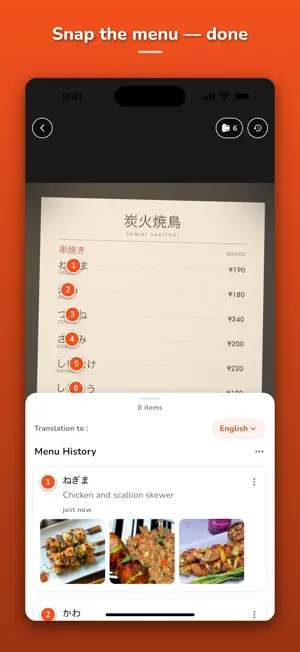
Point your camera at a menu you cannot read and find out what every dish actually is - translated into your language, with real photos. What to Eat turns one photo of a foreign restaurant menu into something you can order from. The app finds the dish names on the menu and marks them right on your photo. Tap a marker and you get the name in your language plus real photos of that dish, so you know what is coming before it reaches your table. HOW IT WORKS 1. Photograph the menu Hold your phone over the menu and press Scan Menu. No typing, no login, no account. 2. Dishes are marked on your photo Each dish name is pinned to the spot where it appears, so you never lose track of the line you are reading. 3. Tap a dish Read the translation and look at real photos of the dish. An unfamiliar name becomes an actual meal. TRANSLATE MENUS INTO 14 LANGUAGES English, Korean, Japanese, Chinese (Simplified), Chinese (Traditional), Vietnamese, Thai, Indonesian, Spanish, French, German, Russian, Italian and Portuguese. Choose your language once and the app remembers it. MADE FOR REAL TRAVEL MOMENTS - The handwritten board outside a tiny place in Tokyo - A laminated menu in Bangkok with no English and no pictures - A tapas list in Seville where every name sounds great and means nothing - A ramen ticket machine, a Vietnamese street stall, a German Gasthaus - And at home too: the neighbourhood restaurant whose menu is only in Chinese NEW IN VERSION 2.0 - If a scan fails, tap Try again - your photo is kept, so you do not have to walk back to the menu and shoot it a second time - Camera access turned off? The app explains why and opens Settings for you - A back button on the scanner screen - Popular dishes come back faster from a shared results cache - Your translation language is remembered between trips - A new Settings screen for language and app info - Results keep this scan separate from your earlier scans - Live progress for each dish while it is looked up - Changing language no longer interrupts scanning WHY TRAVELERS KEEP IT ON THE HOME SCREEN - Order what you actually want instead of pointing at a random line - Steer around ingredients you would rather not eat - Try the dish you would never have picked, because now you can read its name - Every menu you scan stays in your history, so you can find that dish again after the trip Useful for tourists, food lovers, exchange students, business travelers and anyone who eats where the menu is in another language - from street food stalls and night markets to cafes and fine dining. No sign-up. No account. Open the app, photograph the menu, order with confidence. An internet connection is required to scan and translate menus. ——— Terms of Use (EULA): https://www.apple.com/legal/internet-services/itunes/dev/stdeula/ Privacy Policy: https://dnnr.us/privacy-policy
What’s new
Version 2.0.1 · Updated September 22, 2026
Fixes for purchases and rewarded ads. - Scan packs and Unlimited now start reliably - Rewarded credits arrive even if the reward lands after you close the ad - Subscribers are no longer asked to pay, or shown ads, when settings load slowly - Report a wrong dish photo right from the card menu - The scan button now explains a failure instead of doing nothing
App privacy
The developer, DNNR Tech, reported these privacy practices to Apple.
Data Used to Track You
The following data may be used to track you across apps and websites owned by other companies:
- Usage Data: Product Interaction, Advertising Data, Other Usage Data
- Diagnostics: Crash Data
Data Not Linked to You
The following data, which may be collected but is not linked to your identity, may be used for the following purposes:
- Usage Data: Product Interaction, Advertising Data, Other Usage Data
- Diagnostics: Crash Data, Other Diagnostic Data
Used for: Developer’s Advertising or Marketing, Analytics, App Functionality
Alternatives to What to Eat: Menu Translator
Looking for apps like What to Eat: Menu Translator? Here are 6 similar apps on the App Store. The highest rated is SeeFood: AI Menu Reader (5.0/5), and all 6 are free to download.
-
 SeeFood: AI Menu Reader
5.0
-
 FoodPickAI: Allergy Menu
4.0
-
 menu2image - menu translator
-
 crunchy tomatoes menu scanner
5.0
-
 Menuu - Instant Picture Menu
3.7
-
 DishPic: Menu Scanner & Macros
| App | Rating | Price | Last updated | Compare |
|---|---|---|---|---|
| What to Eat: Menu Translator | 4.3 / 5 (4 ratings) | Free | September 22, 2026 | |
| SeeFood: AI Menu Reader | 5.0 / 5 (5) | Free | Dec 13, 2024 | Compare |
| FoodPickAI: Allergy Menu | 4.0 / 5 (3) | Free | Oct 22, 2025 | Compare |
| menu2image - menu translator | – | Free | Dec 7, 2024 | Compare |
| crunchy tomatoes menu scanner | 5.0 / 5 (2) | Free | Jul 10, 2024 | Compare |
| Menuu - Instant Picture Menu | 3.7 / 5 (3) | Free | Mar 31, 2025 | Compare |
| DishPic: Menu Scanner & Macros | – | Free | Oct 1, 2025 | Compare |