

DocSnapper: PDF Scanner & OCR
Rafsan Nazmul Productivity iPhoneiPadiPod touch
DocSnapper: PDF Scanner & OCR is a free Productivity app for iPhone and iPad by Rafsan Nazmul. Requires iOS 18.0. Updated October 4, 2026.
- Price
- Free
- on the App Store
- Size
- 39 MB
- Age 4+
- Updated
- Oct 4
- 2026 · v1.0
Screenshots


About DocSnapper: PDF Scanner & OCR
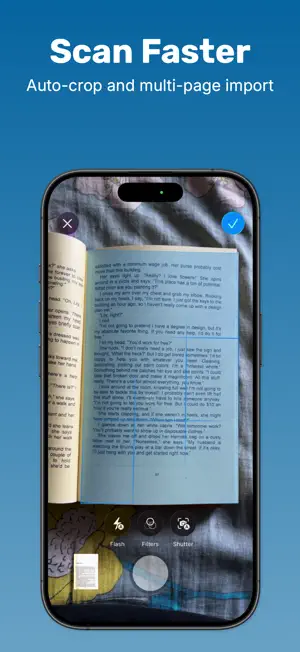
DocSnapper turns your iPhone into a full document scanner. Point the camera at a page and DocSnapper finds the edges, flattens the perspective and cleans up the image — then lets you sign it, redact it, run text recognition on it and export a sharp PDF. Built entirely on Apple's own Vision and VisionKit frameworks. Your documents are scanned, processed and stored on your device. Available in 10+ languages. SCAN AND IMPORT • Multi-page camera capture with automatic edge detection • Auto-crop and perspective correction on every page • Import photos from your library or existing PDFs and images from Files • Review every page before it is saved 18 CLEANUP FILTERS Magic Color, Deep B&W, De-shadow, Whiteboard, Auto, Denoise, Sharpen, Warm Fix, Vibrant and more — tuned for paper, receipts, whiteboards and handwriting. A REAL EDITOR, NOT JUST A CAMERA • Crop — drag the detected page corners by hand • Rotate — 90° steps, orientation safe • Signature — draw it or type it in a handwriting font, save it, then drag, resize and rotate it onto any page • Mark Up — freehand annotation in any color • Hide — paint over sensitive information and flatten it permanently into the page • Forms — 10 placeable marks including check, cross, circle, arrow, highlight, free text, auto-date and auto-time • Stamp — APPROVED, CONFIDENTIAL, DRAFT and more, or build your own with 5 frame styles, custom fonts and colors • Page Size — A3 to A6, US Letter, US Legal, Tabloid, Photo 4x6, Business Card • Watermark — tile custom repeating text across a page • Distortion — fix curved book pages, tilted shots and lens warp TEXT RECOGNITION (OCR) Pull the text out of any scan, read it full screen, copy it or share it. Export a whole folder as a plain text file. REPLACE TEXT INSIDE A SCAN DocSnapper recognizes individual words and lets you swap them in place. The patch samples the paper color and the ink color, so the correction blends into the page instead of sitting on top of it. ORGANIZE • Folders with search, sort and drag to reorder • Rename, duplicate, move and multi-select delete • Thumbnail grid with an at-a-glance sync status badge • Every edit is non-destructive — the original scan is always kept EXPORT AND SHARE • PDF, PNG, JPG and TXT • Compression controls with a live file-size estimate before you send • Share a whole folder or just the pages you pick • Send to Dropbox, Files, Mail, Messages or any app ICLOUD SYNC Turn it on and your folders follow you to every device signed into the same Apple Account. Sync runs through your own private iCloud Drive container. DOCSNAPPER PRO Free users can send 10 pages per day, capture one page per batch and export 500 characters of recognized text at a time. Pro removes all of it: • Unlimited multi-page scanning and importing • Unlimited sharing and export • Full-length OCR text export • No ads DocSnapper Pro Monthly costs $4.99 per month after a 3-day free trial. DocSnapper Pro Yearly costs $29.99 per year after a 1-week free trial. Payment is charged to your Apple Account at confirmation of purchase. The subscription renews automatically at the price above unless auto-renew is turned off at least 24 hours before the end of the current period. Your account is charged for renewal within 24 hours before the period ends. Manage or cancel in Settings > Apple Account > Subscriptions. Any unused portion of a free trial is forfeited when you purchase a subscription. Terms of Use: https://thunderapps.xyz/terms Privacy Policy: https://thunderapps.xyz/privacy
App privacy
The developer, Rafsan Nazmul, reported these privacy practices to Apple.
Data Not Linked to You
The following data, which may be collected but is not linked to your identity, may be used for the following purposes:
- Diagnostics: Crash Data, Performance Data, Other Diagnostic Data
Used for: Analytics, App Functionality
Alternatives to DocSnapper: PDF Scanner & OCR
Looking for apps like DocSnapper: PDF Scanner & OCR? Here are 6 similar apps on the App Store. The highest rated is SellOut: AI powered listing (4.7/5), and all 6 are free to download.
-
 Stamp STL Maker
3.0
Stamp STL Maker
3.0
-
 Craft Inventory: CraftCue
-
 Sibelius KeyPad
4.6
Sibelius KeyPad
4.6
-
 AI Story Generator: AI Base
4.3
AI Story Generator: AI Base
4.3
-
 OpenL Translate
2.8
OpenL Translate
2.8
-
 SellOut: AI powered listing
4.7
SellOut: AI powered listing
4.7
| App | Rating | Price | Last updated | Compare |
|---|---|---|---|---|
| DocSnapper: PDF Scanner & OCR | – | Free | October 4, 2026 | |
| Stamp STL Maker | 3.0 / 5 (1) | Free | Aug 18, 2026 | Compare |
| Craft Inventory: CraftCue | – | Free | Oct 8, 2026 | Compare |
| Sibelius KeyPad | 4.6 / 5 (142) | Free | Oct 16, 2026 | Compare |
| AI Story Generator: AI Base | 4.3 / 5 (84) | Free | Oct 12, 2026 | Compare |
| OpenL Translate | 2.8 / 5 (6) | Free | Mar 21, 2025 | Compare |
| SellOut: AI powered listing | 4.7 / 5 (155) | Free | Apr 18, 2026 | Compare |