

Mouse Jiggler Undetectable
Mathieu Meesters Productivity iPhoneiPadiPod touch
Mouse Jiggler Undetectable is a free Productivity app for iPhone and iPad by Mathieu Meesters. Rated 4.7/5 from 265 ratings. Requires iOS 15.6.
- Rating
- 4.7
- 265 ratings
- Price
- Free
- on the App Store
- Size
- 68 MB
- Age 4+
- Updated
- May 28
- 2026 · v1.0.93
Screenshots

About Mouse Jiggler Undetectable
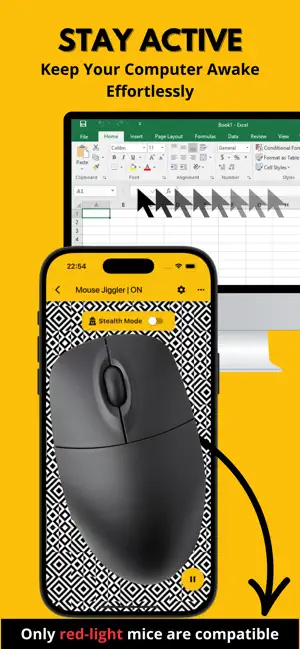
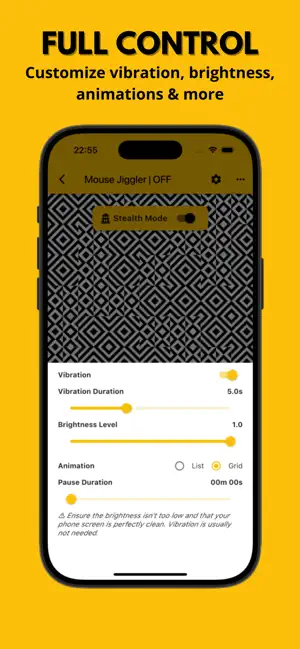
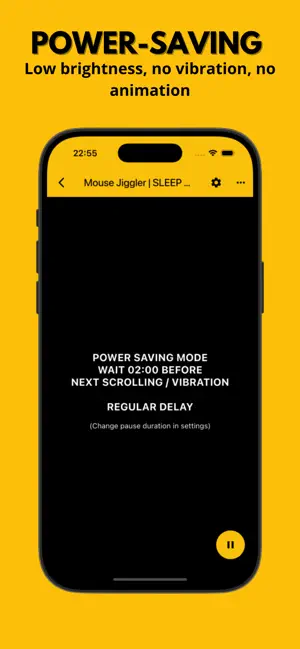
Prevent your computer screen from locking with Mouse Jiggler. Compatible with Windows and macOS computers, this application prevents your computer screen from locking by periodically moving your mouse cursor a few millimeters. MAIN FEATURES : - Scrolling Mode : Scrolls an image and increases screen brightness at regular intervals to move your mouse cursor. - Vibration Mode : Vibrates your phone at regular intervals to move your mouse cursor. (Vibration mode is not available on iPad) - Power-saving Mode : Activates intermittently to consume less energy. - Undetectable Mode : Use a random time interval between two animations to be practically undetectable by most monitoring systems. - Completely Free App ADVANCED SETTINGS : - Vibration : Enable or disable vibration mode. - Vibration Duration : Customize how long each vibration lasts. - Pause Duration : Set the time between two scrolls or vibrations. - Brightness Level : Adjust the brightness level when the app activates. (Reducing it too much may impact effectiveness.) COMPATIBILITY : Mouse Jiggler is officially compatible only with mice that use a visible red light (optical sensor). Mice that use invisible light, such as infrared or laser sensors, are not supported — even if they might occasionally work. This is not a bug, but a limitation related to the sensitivity of the mouse sensor, as well as your phone’s maximum screen brightness and vibration power. If you experience issues, we recommend using a mouse with a visible red optical sensor. WHY CHOOSE MOUSE JIGGLER ? - No Extra Hardware: Unlike USB dongles or jiggling pads, the app only needs your phone and your mouse. - More Private: Unlike desktop software, this mobile app leaves no digital trace on your computer. - Free & Convenient: A simple, cost-effective solution — similar hardware tools can cost up to $30. DISCLAIMER : Do not use this app if it conflicts with your employer's policies. Terms of Use: https://mousejiggler.lol/terms.html Privacy Policy: https://mousejiggler.lol/privacy.html
Ratings & reviews
4.7
265 ratings
What’s new
Version 1.0.93 · Updated May 28, 2026
- Bug fixes and performance improvements.
App privacy
The developer, Mathieu Meesters, reported these privacy practices to Apple.
Data Used to Track You
The following data may be used to track you across apps and websites owned by other companies:
- Location: Coarse Location
- Usage Data: Product Interaction, Advertising Data
- Diagnostics: Crash Data, Performance Data
Data Not Linked to You
The following data, which may be collected but is not linked to your identity, may be used for the following purposes:
- Location: Coarse Location
- Usage Data: Product Interaction, Advertising Data
- Diagnostics: Crash Data, Performance Data
Used for: Third-Party Advertising, Analytics
Alternatives to Mouse Jiggler Undetectable
Looking for apps like Mouse Jiggler Undetectable? Here are 6 similar apps on the App Store. The highest rated is Mouse · Keyboard (4.7/5), and all 6 are free to download.
-
 Mouse Ripple: Auto Mouse Mover
-
 VMouse - VNC Remote Mouse
4.2
VMouse - VNC Remote Mouse
4.2
-
 Remote Mouse & Keyboard
4.6
Remote Mouse & Keyboard
4.6
-
 Mouse · Keyboard
4.7
Mouse · Keyboard
4.7
-
 Remote Keyboard & Mouse
4.4
Remote Keyboard & Mouse
4.4
-
 Magic Mousepad
| App | Rating | Price | Last updated | Compare |
|---|---|---|---|---|
| Mouse Jiggler Undetectable | 4.7 / 5 (265 ratings) | Free | May 28, 2026 | |
| Mouse Ripple: Auto Mouse Mover | – | Free | Jun 4, 2026 | Compare |
| VMouse - VNC Remote Mouse | 4.2 / 5 (39) | Free | Nov 20, 2025 | Compare |
| Remote Mouse & Keyboard | 4.6 / 5 (73) | Free | Sep 3, 2025 | Compare |
| Mouse · Keyboard | 4.7 / 5 (2,471) | Free | Oct 5, 2026 | Compare |
| Remote Keyboard & Mouse | 4.4 / 5 (42) | Free | Oct 3, 2026 | Compare |
| Magic Mousepad | – | Free | Nov 19, 2024 | Compare |