

inPaper
静 宋 Utilities iPhoneiPadiPod touch
inPaper is a free Utilities app for iPhone and iPad by 静 宋. Requires iOS 15.6. Updated September 5, 2026.
- Price
- Free
- on the App Store
- Size
- 107 MB
- Age 4+
- Updated
- Sep 5
- 2026 · v1.1.5
Screenshots


About inPaper
inPaper — Your A4 Practice Paper & Template Printing Assistant Still hunting online for lined paper or grid PDFs? inPaper puts find a template → preview → print and build your own practice sheet in one app: a huge library of built-in A4 templates, plus draw a box, fill it with elements, save, and reprint anytime. Why inPaper? • Rich templates: Lined paper, grids, 田字格, 米字格, staff paper, composition paper, pinyin sheets, English four-line paper, weekly planners, calendars, timelines, Ebbinghaus review charts, homework logs, and more • Quick Create: 12 element types — lines, dashed lines, grids, text, photos, timelines, and more — mix and match your own practice sheets • Print right away: Connect via AirPrint, or share and archive templates • PDF printing: Already have a PDF? Import and print directly — adjust scale to leave room for notes • Favorites & Recents: Favorite templates for one-tap access; quickly find recent prints • 8 themes: Switch UI colors anytime — print output stays the same • Friendly companion: A cute home-screen helper to guide your way Who It’s For • Parents: Print homework paper, character practice sheets, pinyin grids, and planners for kids • Students: Lined notes, grid math, staff paper for ear training • Journal / planner fans: To Do lists, weekly plans, and calendar templates — print and go • Teachers: Quick printing for classroom worksheets and registration forms What Quick Create Can Do Draw a box → pick an element → adjust spacing and color → save as My Template → reprint anytime. Add photos and stickers for personalized practice sheets or journal pages. How to Print • AirPrint wireless printing (works with most home printers) • PDF preview before you print • Standard A4 — crisp, clear output More Features • Template search and category filters • Import / share template packages • Recent print history • Customizable theme colors, wheel haptics, and more Download inPaper — spend less time finding paper, more time learning. Questions or feedback? Contact us in the app. Thank you for your support!
What’s new
Version 1.1.5 · Updated September 5, 2026
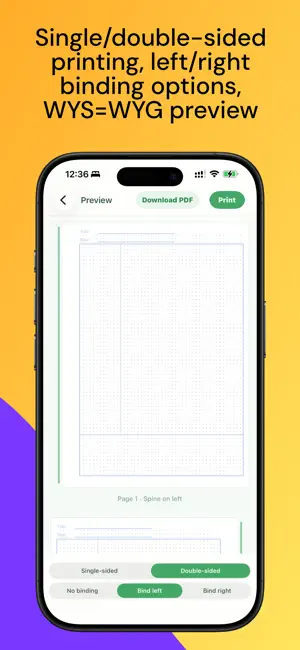
New templates: Cornell Notes Dot Grid, Daily Planner, Weekly Plan Check-in, Mistake Notebook, and more VIP subscription: Export watermark-free PDFs, remove ads, and instantly unlock check-in reward templates Double-sided printing: Choose single- or double-sided in the print preview Left/right binding: No binding, bind left, or bind right—with automatic spine handling for double-sided prints
App privacy
The developer, 静 宋, reported these privacy practices to Apple.
Data Not Linked to You
The following data, which may be collected but is not linked to your identity, may be used for the following purposes:
- Usage Data: Product Interaction, Advertising Data, Other Usage Data
Used for: Third-Party Advertising
Alternatives to inPaper
Looking for apps like inPaper? Here are 6 similar apps on the App Store. The highest rated is A4 Print Templates (5.0/5), and 5 of the 6 are free to download.
-
 Paper®
1.0
-
 A4 Print Templates
5.0
-
 Pebbl — Notepad Calculator
-
 JustPush.io
-
 Portable Organizer
5.0
-
 Password Tool Help
5.0
| App | Rating | Price | Last updated | Compare |
|---|---|---|---|---|
| inPaper | – | Free | September 5, 2026 | |
| Paper® | 1.0 / 5 (1) | 9.99 USD | Nov 8, 2023 | Compare |
| A4 Print Templates | 5.0 / 5 (1) | Free | Sep 7, 2026 | Compare |
| Pebbl — Notepad Calculator | – | Free | Aug 30, 2026 | Compare |
| JustPush.io | – | Free | May 12, 2025 | Compare |
| Portable Organizer | 5.0 / 5 (1) | Free | Sep 24, 2025 | Compare |
| Password Tool Help | 5.0 / 5 (1) | Free | Jun 11, 2025 | Compare |
Compare inPaper with the top alternatives: ratings, updates, ASO score and keyword gaps →