

Cookbook Manage & save recipes
Paul Stelzer Food & Drink iPhoneiPadiPod touch
Cookbook Manage & save recipes is a free Food & Drink app for iPhone and iPad by Paul Stelzer. Requires iOS 16.4. Updated October 30, 2026.
- Price
- Free
- on the App Store
- Size
- 45 MB
- Age 4+
- Updated
- Oct 30
- 2026 · v26.11.0
Screenshots


About Cookbook Manage & save recipes
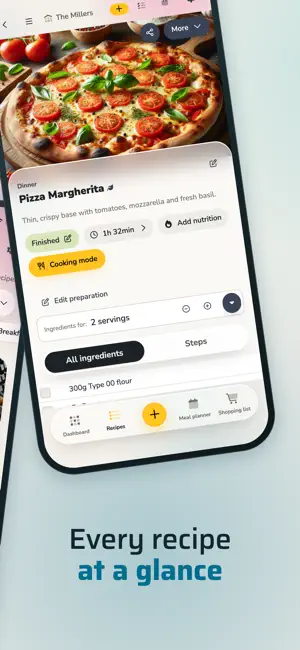
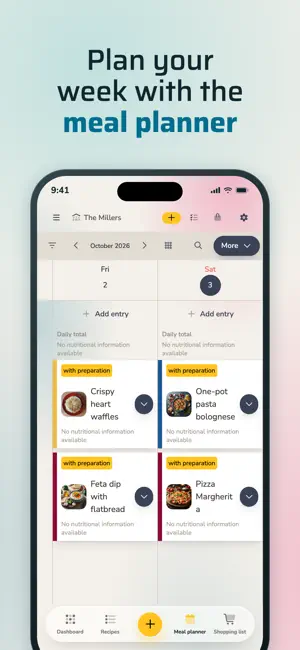
Save your recipes in one place: import them from any recipe website with a link, photograph a printed or handwritten recipe, or type them in yourself. Then share your cookbook with family and friends, plan your meals for the week and tick off one shared grocery list in real time. Store and manage unlimited recipes for free. Your recipes are safely stored in the cloud and available on every device – phone, tablet and PC – even offline. With the cookbook app you can import, edit, organize and share recipes, see calories and nutrition facts, plan meals and keep a grocery list. Thousands of home cooks already use it every day. WHAT TO EXPECT - Website import: save your favorite recipes from any recipe website with a link - Photo import: photograph an existing recipe (even handwritten) and let the app do the rest - Cooking mode: check off ingredients and steps while you cook - Share with your family: cook and rate the best recipes together - Meal planner: put saved recipes on the planner, move them around and print the weekly plan - Grocery list: add ingredients from recipes and cross off what you have bought – everyone sees it in real time - Nutrition and calories: nutrition facts per serving or per 100 g, calculated from the ingredients or entered by you, with daily limits in the meal planner - Recipe ideas: follow recipe channels with a link, get a notification for every new recipe and copy it into your cookbook with one tap - Everywhere: smartphone, tablet or PC, always in sync EASY RECIPE MANAGEMENT Managing recipes has never been easier. Whether you take a photo of a recipe, import it from a website or create it yourself – with the cookbook app you always have your recipes with you. The app is available on smartphone, tablet and PC, and your recipe collection stays the same everywhere. OFFLINE AVAILABILITY Your recipes are stored on your device as well, so you can start cooking at your family's or friends' place even without an internet connection. SHARE WITH FAMILY AND FRIENDS Create a cookbook together with your family and friends. Cook and rate the best recipes together and build a shared recipe collection that everyone can use and expand. MEAL PLANNER Put your recipes on the meal planner, move dishes around with a tap and print the weekly plan. You always know what you want to cook and what you need to buy. GROCERY LIST Add the ingredients from your recipes to the grocery list and cross off what you have already bought – in real time. When you shop with the family, everyone sees what the others have already picked up. NUTRITION AND CALORIES Every recipe can show its nutrition facts: calories and more per serving or per 100 g. Let the app calculate them from the ingredients or enter them yourself. In the meal planner you see the values for each day and set your own daily limits, so planning the week also means keeping an eye on your calories. The calculation is based on general ingredient data and is a guide. RECIPE IDEAS FROM RECIPE CHANNELS Recipe channels are cookbooks you follow with a link: you see every published recipe, get a notification when a new one arrives and copy any recipe into your own cookbook with one tap. With Pro you publish your own channel for your family, your club or your followers. IN-APP PURCHASES AND SUBSCRIPTIONS The app offers in-app purchases and optional Starter or Pro subscriptions: - Starter and Pro subscriptions offer unlimited storage space and the option to create or join additional groups. - Subscriptions can be purchased for 1 month or 12 months and renew automatically unless cancelled 24 hours before the end of the current period. You will be charged via your Apple account; subscriptions can be managed via the App Store. - Cancellation takes effect at the end of the current subscription period. For more information, please see our Terms of Use (https://cookbook-app.com/terms-of-use/) and our Privacy Policy (https://cookbook-app.com/privacy-policy-app/).
What’s new
Version 26.11.0 · Updated October 30, 2026
- Bring over recipes from other apps. - Shopping list: items can now have a priority (low, medium, high). New filters show only certain priorities or just the ingredients of selected recipes. - The shopping list has a new bar at the top, laid out like the recipe view.
App privacy
The developer, Paul Stelzer, reported these privacy practices to Apple.
Data Used to Track You
The following data may be used to track you across apps and websites owned by other companies:
- Usage Data: Advertising Data
Data Linked to You
The following data, which may be collected and linked to your identity, may be used for the following purposes:
- Contact Info: Email Address
Used for: App Functionality
Data Not Linked to You
The following data, which may be collected but is not linked to your identity, may be used for the following purposes:
- Identifiers: Device ID
- Usage Data: Advertising Data
- Diagnostics: Other Diagnostic Data, Crash Data
Used for: Third-Party Advertising, Analytics, App Functionality
Alternatives to Cookbook Manage & save recipes
Looking for apps like Cookbook Manage & save recipes? Here are 6 similar apps on the App Store. The highest rated is Recipe Manager: Kale (4.9/5), and all 6 are free to download.
-
 Recipe Manager: Kale
4.9
-
 RecipeChef: Recipe Manager
4.9
-
 Recipe Keeper - Taste
4.7
-
 My Cookbook | All your recipes
-
 My Cookery Book
4.4
-
 Recipe Book
4.2
| App | Rating | Price | Last updated | Compare |
|---|---|---|---|---|
| Cookbook Manage & save recipes | – | Free | October 30, 2026 | |
| Recipe Manager: Kale | 4.9 / 5 (13) | Free | Jan 11, 2026 | Compare |
| RecipeChef: Recipe Manager | 4.9 / 5 (48) | Free | Oct 24, 2026 | Compare |
| Recipe Keeper - Taste | 4.7 / 5 (156) | Free | Sep 26, 2026 | Compare |
| My Cookbook | All your recipes | – | Free | Sep 10, 2026 | Compare |
| My Cookery Book | 4.4 / 5 (9) | Free | Mar 8, 2025 | Compare |
| Recipe Book | 4.2 / 5 (9) | Free | Sep 23, 2026 | Compare |