

ArtLoop: How to Draw Together
Anhelina Denezhko Games iPhoneiPadiPod touch
ArtLoop: How to Draw Together is a free Games app for iPhone and iPad by Anhelina Denezhko. Rated 4.7/5 from 16,495 ratings. Requires iOS 15.6.
- Rating
- 4.7
- 16.4K ratings
- Price
- Free
- on the App Store
- Size
- 257 MB
- Age 9+
- Updated
- Oct 20
- 2026 · v1.9.86
Screenshots

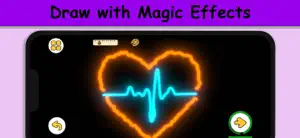
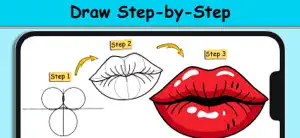
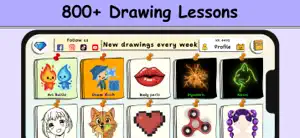
About ArtLoop: How to Draw Together
Unlock Your Artistic Potential with Our Drawing App! Discover ArtLoop – a playful drawing game where learning to draw happens through fun, challenges and experiments, not boring lessons. From calm step-by-step tutorials to fast multiplayer battles, ArtLoop turns your screen into a creative playground for any skill level. Draw in Different Styles: Follow clear, step-by-step tutorials to draw characters, objects, food, animals and more. Explore a wide variety of styles: from simple doodles and cute cartoons to more detailed illustrations. Practice at your own pace – repeat drawings, try new colors and build your own gallery of finished artworks. Pixel Art & Neon Glow: Pixel Art Mode – create retro-style pictures pixel by pixel, like a tiny digital mosaic. Neon & Glow Drawings – draw with bright glowing lines on a dark canvas. Experiment with different looks and turn simple sketches into bold, stylized art. Dynamic Drawing Modes: Use dynamic brushes with animated strokes that wobble, pulse and move, making your lines feel alive. Combine classic drawing with playful effects so every sketch feels fresh and satisfying. Draw Rush – Speed & Precision: In Draw Rush, you copy simple shapes and lines as quickly and accurately as you can. Race against the timer, focus on precision and try to beat your own score in short, intense rounds. Great for quick drawing challenges when you only have a few minutes. Art Battle: Join Art Battle and compete in drawing challenges with friends! It’s all about fun, creativity and friendly competition – not about being “perfect”. Fun Challenges, Not Stressful Lessons: No strict rules, no pressure – just a safe space to experiment and enjoy drawing. No prior art skills needed: simple guidance helps you start, and varied modes keep you motivated. User-Friendly Interface: Enjoy a clean, intuitive interface that keeps the focus on your drawing, not on menus. The drawing pad is comfortable for both finger and stylus, so you can relax and focus on your lines, colors and ideas. Paint Offline Keep drawing even when you’re offline. Most tutorials and practice modes work without an internet connection, so you can sketch on a trip, in a café or anywhere else. For Anyone Who Loves to Draw (or Wants to Start) Whether you’re: a beginner taking your first steps in digital drawing, a casual doodler who wants fun challenges, or a more experienced artist looking for new styles and modes to play with, ArtLoop gives you a playful way to practice, experiment and grow your skills over time. Jump into ArtLoop today and turn everyday doodles into a fun drawing habit! Privacy Policy: https://artloop.netlify.app/privacy-policy Terms of Use (EULA): https://artloop.netlify.app/terms-of-use
Ratings & reviews
4.7
16.4K ratings
What’s new
Version 1.9.86 · Updated October 20, 2026
– New Profile Inventory: View your brushes, animated effects, and emojis in one place! – Draw Rush Update: Refreshed battle UI, player avatars, improved tracing accuracy, and victory fireworks. Earn exclusive stickers for your first victory and 10 wins! – New Multiplayer Art Battle: Draw "Koi Dance" and "Waffles" (2 players), plus "Spooky Tanghulu" (3 players) with friends! – New Halloween Content: Draw spooky favorites including "Candy Corn", "Monster Donut", "Cauldron", "Ghost", "Vampire", "Zombie", and "Spiderweb"!
Play today's Sudoku puzzle
A quick 6×6 Sudoku every day; levels grow to the classic 9×9. A free daily puzzle from Fiplay, same board for everyone. It plays right here, no download.
App privacy
The developer, Anhelina Denezhko, reported these privacy practices to Apple.
Data Used to Track You
The following data may be used to track you across apps and websites owned by other companies:
- Purchases: Purchase History
- Location: Coarse Location
- Identifiers: Device ID
- Usage Data: Product Interaction, Advertising Data
Data Linked to You
The following data, which may be collected and linked to your identity, may be used for the following purposes:
- Location: Coarse Location
- Identifiers: Device ID, User ID
- Usage Data: Product Interaction, Advertising Data
- Purchases: Purchase History
Used for: Third-Party Advertising, Analytics, App Functionality
Data Not Linked to You
The following data, which may be collected but is not linked to your identity, may be used for the following purposes:
- Purchases: Purchase History
- User Content: Gameplay Content
- Diagnostics: Crash Data, Performance Data, Other Diagnostic Data
Used for: Third-Party Advertising, Analytics, App Functionality
Alternatives to ArtLoop: How to Draw Together
Looking for apps like ArtLoop: How to Draw Together? Here are 6 similar apps on the App Store. The highest rated is My Cute Friends: Coloring Book (4.8/5), and all 6 are free to download.
-
 Coloring book paint drawing
4.4
Coloring book paint drawing
4.4
-
 YoYa Time: Build, Share & Play
4.6
YoYa Time: Build, Share & Play
4.6
-
 Toca Life Aesthetic Mod Boca
2.6
Toca Life Aesthetic Mod Boca
2.6
-
 My Cute Friends: Coloring Book
4.8
My Cute Friends: Coloring Book
4.8
-
 Cozy Home: Comfy Coloring Book
4.8
Cozy Home: Comfy Coloring Book
4.8
-
 Sushi Land: ASMR
3.9
Sushi Land: ASMR
3.9
| App | Rating | Price | Last updated | Compare |
|---|---|---|---|---|
| ArtLoop: How to Draw Together | 4.7 / 5 (16,495 ratings) | Free | October 20, 2026 | |
| Coloring book paint drawing | 4.4 / 5 (25,527) | Free | Feb 19, 2025 | Compare |
| YoYa Time: Build, Share & Play | 4.6 / 5 (12,913) | Free | Oct 22, 2026 | Compare |
| Toca Life Aesthetic Mod Boca | 2.6 / 5 (5,683) | Free | Feb 28, 2024 | Compare |
| My Cute Friends: Coloring Book | 4.8 / 5 (2,046) | Free | Oct 19, 2026 | Compare |
| Cozy Home: Comfy Coloring Book | 4.8 / 5 (17,376) | Free | Oct 15, 2026 | Compare |
| Sushi Land: ASMR | 3.9 / 5 (130) | Free | Nov 27, 2025 | Compare |