

Transcribe Voice to Text Noker
Happy Bees Limited Productivity iPhoneiPadiPod touchMac
Transcribe Voice to Text Noker is a free Productivity app for iPhone and iPad by Happy Bees Limited. Rated 3.9/5 from 24 ratings. Requires iOS 15.5.
- Rating
- 3.9
- 24 ratings
- Price
- Free
- on the App Store
- Size
- 170 MB
- Age 4+
- Updated
- Oct 12
- 2026 · v1.0.72
Screenshots



About Transcribe Voice to Text Noker
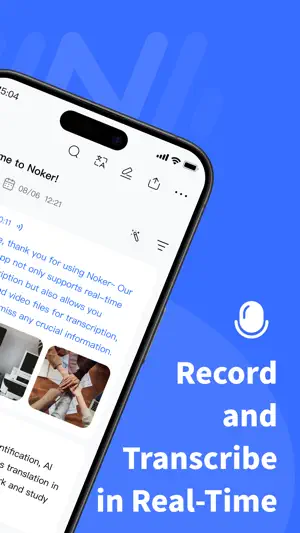
AI Transcription & Smart Notes Turn Conversations Into Intelligent Notes Record, transcribe, summarize, and organize information with AI. Transform meetings, interviews, lectures, and conversations into clear, searchable notes in seconds. Whether you’re capturing business meetings, studying, recording ideas, or reviewing important discussions, this AI transcription app helps you save time and focus on what matters. # Powerful AI Transcription # Real-Time Speech to Text Convert your voice into accurate text instantly. Capture every important detail with fast and reliable live transcription. # Transcribe Audio & Video Files Import recordings, videos, voice memos, interviews, podcasts, or lectures and turn them into searchable transcripts. # AI Summaries & Smart Notes Let AI analyze your transcripts and create concise summaries, key points, and meeting notes. Quickly understand long conversations without replaying hours of audio. # Speaker Recognition Automatically identify different speakers in conversations. Edit speaker names, organize discussions, and create clearer transcripts for meetings and interviews. # Translate Conversations Worldwide Break language barriers with AI-powered translation. Translate transcripts into 60+ languages for learning, international communication, customer conversations, and global collaboration. Create translated notes and export them whenever you need. # A Complete Workspace for Your Transcripts More than a transcription tool, this app helps you manage and organize your knowledge. Edit transcripts like documents: • Add images to notes • Create tags for better organization • Search within transcripts instantly • Highlight important moments • Add tasks and reminders • Rename speakers and edit content manually Keep your recordings, transcripts, and notes organized in one place. # Work Across Your Apple Devices Designed for the Apple ecosystem. Use seamlessly on: • iPhone • iPad • Mac Transfer files between devices quickly through Wi-Fi without cables or complicated setup. Capture ideas anywhere and continue working on the device you prefer. # Professional Recording & Playback Capture high-quality audio with a clean and reliable voice recorder. Enjoy useful tools for reviewing recordings: • Adjustable playback speed • Skip silent sections to save time • Search and organize recordings • Manage files easily # Flexible Export Options Share your work in the format you need. Export: • Text transcripts • Audio recordings • Transcripts with timestamps • Translated transcripts • Speaker-labeled transcripts • Audio and text together #Your AI Assistant for Work & Learning From professionals creating meeting notes to students reviewing lectures, this AI transcription app helps you capture information, understand conversations, and turn audio into valuable knowledge. Record less. Remember more. Work smarter with AI. Need help or have a suggestion? Contact us at [email protected]. ------------------------------------------------------ Auto-Renewable Subscription Terms 1. Subscription duration: Monthly, Yearly 2. Your account will be charged for renewal within 24-hours prior to the end of the current period and identify the cost of the renewal. 3. You can cancel the automatic renewal in your iPhone account settings at least 24 hours before the end of the current period. 4. Terms of Use: https://ios-static-2.hkxmf.com/voice2text_ios/privacy/detail.html?lang=en&q=user-terms 5. Privacy Policy: https://ios-static-2.hkxmf.com/voice2text_ios/privacy/index.html?lang=en 6. Auto-Renewal Agreement: https://ios-static-2.hkxmf.com/voice2text_ios/privacy/detail.html?lang=en&q=auto-renewal-agreement
Ratings & reviews
3.9
24 ratings
What’s new
Version 1.0.72 · Updated October 12, 2026
Fixed some bugs.
App privacy
The developer, Happy Bees Limited, reported these privacy practices to Apple.
Data Used to Track You
The following data may be used to track you across apps and websites owned by other companies:
- Identifiers: Device ID
Data Not Linked to You
The following data, which may be collected but is not linked to your identity, may be used for the following purposes:
- Identifiers: Device ID
- Usage Data: Product Interaction
- Diagnostics: Crash Data, Performance Data
Used for: Third-Party Advertising, Analytics, App Functionality
Alternatives to Transcribe Voice to Text Noker
Looking for apps like Transcribe Voice to Text Noker? Here are 6 similar apps on the App Store. The highest rated is Transkriptor - Speech to Text (4.7/5), and all 6 are free to download.
-
 AI Transcribe Audio to Text !
4.5
AI Transcribe Audio to Text !
4.5
-
 Voice to Text AI Transcriber
4.3
Voice to Text AI Transcriber
4.3
-
 Transcribe AI Voice Note Taker
4.6
Transcribe AI Voice Note Taker
4.6
-
 Transcribe Video to Text: Vid2
4.5
Transcribe Video to Text: Vid2
4.5
-
 Speech to Text & AI Note Taker
4.2
Speech to Text & AI Note Taker
4.2
-
 Transkriptor - Speech to Text
4.7
Transkriptor - Speech to Text
4.7
| App | Rating | Price | Last updated | Compare |
|---|---|---|---|---|
| Transcribe Voice to Text Noker | 3.9 / 5 (24 ratings) | Free | October 12, 2026 | |
| AI Transcribe Audio to Text ! | 4.5 / 5 (13) | Free | Oct 30, 2026 | Compare |
| Voice to Text AI Transcriber | 4.3 / 5 (259) | Free | Oct 1, 2026 | Compare |
| Transcribe AI Voice Note Taker | 4.6 / 5 (62) | Free | Sep 24, 2026 | Compare |
| Transcribe Video to Text: Vid2 | 4.5 / 5 (189) | Free | Oct 27, 2026 | Compare |
| Speech to Text & AI Note Taker | 4.2 / 5 (38) | Free | Oct 26, 2026 | Compare |
| Transkriptor - Speech to Text | 4.7 / 5 (1,104) | Free | Oct 16, 2026 | Compare |