

Ref-Vision
SAMUEL LANE MADDOCK Sports iPhoneiPadiPod touchApple Watch
Ref-Vision is a free Sports app for iPhone and iPad by SAMUEL LANE MADDOCK. Requires iOS 26.4. Updated October 23, 2026.
- Price
- Free
- on the App Store
- Size
- 8 MB
- Age 4+
- Updated
- Oct 23
- 2026 · v2.4
Screenshots


About Ref-Vision
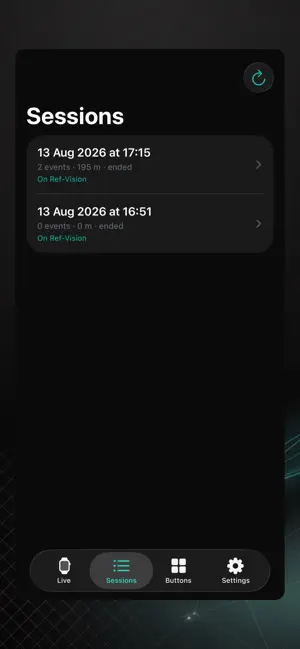
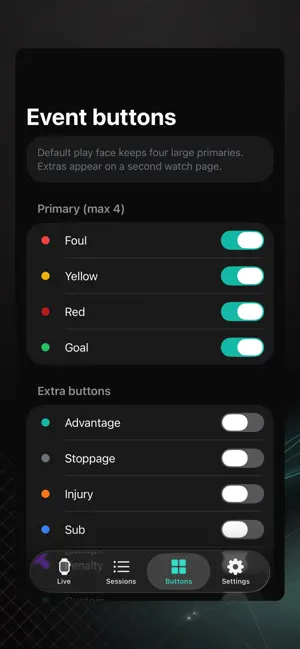
Ref-Vision captures a referee’s match on Apple Watch and iPhone: GPS, heart rate, speed, distance, match clock, event taps, and sideline video, all heading to one game on your Ref-Vision account. Start the watch at kick-off. Put the iPhone on a tripod if you want film. The watch is built to be glanced at, not stared at. Large buttons, haptics, and an always-on clock. APPLE WATCH • Start at kick-off: one workout records GPS and heart rate for the whole appointment, including half-time • Match clock with half-time, second half, and full-time • Live heart rate, speed, distance, and GPS lock • Four large event buttons by default: Foul, Yellow, Red, Goal • Extra buttons (Advantage, Stoppage, Injury, Sub, Penalty, and more) from a second page if you enable them on iPhone • Undo the last event with a swipe • Sessions are saved on the watch first, then sent to iPhone automatically. No network required during the match IPHONE • Live glance of clock, heart rate, distance, and last event while the watch is recording • Finished sessions arrive from the watch automatically • Review distance, heart rate, and events after the match; edit or delete a mis-tap • Attach the session to a game, or create one, then upload to your Ref-Vision account • Sign in once with the same email code you use on ref.vision • Customise which event buttons appear on the watch and push the layout across RECORD • New Record tab for sideline match film from a tripod-mounted iPhone • Checks before you start: phone on its side (landscape), on the tripod, and on a power bank • Ultra-wide (0.5x) so the pitch fills the frame; 1080p by default, 4K if you want it • Built for a full match — keep the app open and don’t lock the phone • Recordings stay on this iPhone first, even with no signal • Attach or create a game, then upload. We’ll start processing the film onto that game soon • Watch capture and phone film can run together: movement and events on the watch, video on the phone AFTER UPLOAD Watch sessions land on your game with GPS, heart rate, and event tags. Phone film is uploaded from the app; after we process it, it appears on the same game at ref.vision. Attach footage and set one sync offset so movement, heart rate, and watch events line up with the film together. Capture works without an account. Upload to Ref-Vision requires sign-in. Ref-Vision records referee performance (location, heart rate, and optional sideline video). It is not a medical device and does not provide medical advice. Requires a compatible Apple Watch for GPS, heart rate, and event capture. Video recording uses iPhone. Designed for referees at every level.
What’s new
Version 2.4 · Updated October 23, 2026
You can now send a watch GPS session to another game. If it is already on one game, attach a different one and upload it again. The first game keeps its copy, and the new game gets its own.
App privacy
The developer, SAMUEL LANE MADDOCK, reported these privacy practices to Apple.
Data Not Collected
The developer does not collect any data from this app.
Alternatives to Ref-Vision
Looking for apps like Ref-Vision? Here are 6 similar apps on the App Store.
-
 Universal Score Tracker
-
 REF!
-
 Forma Football
-
 UmpireClickerTimer
-
 FiveO – Rugby Match Management
-
 RefereeWise - Referee Tests
| App | Rating | Price | Last updated | Compare |
|---|---|---|---|---|
| Ref-Vision | – | Free | October 23, 2026 | |
| Universal Score Tracker | – | Free | Oct 6, 2026 | Compare |
| REF! | – | Free | Oct 12, 2026 | Compare |
| Forma Football | – | Free | Sep 30, 2026 | Compare |
| UmpireClickerTimer | – | Free | Sep 22, 2026 | Compare |
| FiveO – Rugby Match Management | – | Free | Mar 12, 2026 | Compare |
| RefereeWise - Referee Tests | – | Free | Jul 1, 2026 | Compare |
Compare Ref-Vision with the top alternatives: ratings, updates, ASO score and keyword gaps →