

SketchBook Draw Art & Paint
Dhaval Kanani Graphics & Design iPhoneiPadiPod touch
SketchBook Draw Art & Paint is a free Graphics & Design app for iPhone and iPad by Dhaval Kanani. Rated 3.3/5 from 31 ratings. Requires iOS 17.0.
- Rating
- 3.3
- 31 ratings
- Price
- Free
- on the App Store
- Size
- 15 MB
- Age 4+
- Updated
- Oct 23
- 2026 · v2.5
Screenshots



About SketchBook Draw Art & Paint
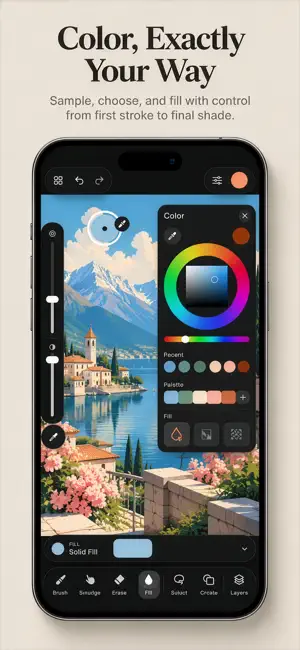
Sketchbook Drawing: The Ultimate Drawing App for Creative Minds Unleash your creativity with Sketchbook Drawing, the go-to app for sketching, painting, and drawing. Designed for beginners and professionals alike, this user-friendly app gives you all the tools you need to bring your imagination to life. Whether you're doodling, illustrating, or painting, Sketchbook Drawing is packed with powerful features to make your art effortless and fun. Why Choose Sketchbook Drawing? Smooth Drawing Experience: Enjoy fluid strokes with realistic brushes. Powerful Tools: Use 60+ brushes, shape rulers, custom color wheels, and advanced layer options to perfect your creations. Import & Edit: Enhance your drawings by importing photos or using reference images. Easy Sharing: Share your artwork instantly with friends and on social media. Key Features: > Shape Draw Assist: Draw accurate shapes effortlessly. > Super Realistic Brushes: From basic to artist-grade brushes, including pens, pastels, splatter, and smudge tools. > 16 Shape Rulers: Add precision with advanced rulers. > Custom Color Palette: Get the perfect shade with a custom color wheel. > Multiple Layers: Create intricate drawings with unlimited layers and advanced layer settings. > Undo/Redo: Fix mistakes quickly with unlimited undo and redo options. > Photo Import: Use photos as references or enhance them with your art. Create Anywhere, Anytime Sketch, draw, and paint like a pro, whether you're at home, traveling, or in the park. Sketchbook Drawing is perfect for artists, designers, and anyone who loves to create. SUBSCRIPTION PRICING AND TERMS Unlock premium Brushes and features with our subscription plans: Monthly: $8.99/month (3-day free trial) Yearly: $29.99/year (best value!) -Prices are for US customers. Pricing in other countries may vary. -Payment will be charged to iTunes Account at confirmation of purchase. -Subscription renews automatically unless auto-renew is turned off at least 24-hours before the end of the current period. -Manage subscriptions and turn off auto-renewal in Account Settings. -Unused portion of a free trial will be forfeited upon purchasing a subscription. * Link to Privacy Policy: https://docs.google.com/document/d/e/2PACX-1vQRVxpR9iGVZ3kFVhPZRI5VdOKJRJxcTBPzoB0FAq_zaaoQ_cstTAG-1v0u_aScMyXmI1cWWodD88jP/pub * Link to Terms of use: https://docs.google.com/document/d/e/2PACX-1vSzpzHYvOcHefsPP31EdDFzrS-UNIsQ7pcDG_d0TtU1TcekbbjFY5brWzl8XXALcoEs4UdPctv37ts8/pub Cancel or manage your subscription anytime through your iTunes account settings. Get Started Today Download Sketchbook Drawing now and unlock your full creative potential with powerful tools, realistic brushes, and an intuitive interface. Turn your ideas into stunning works of art with ease!
Ratings & reviews
3.3
31 ratings
What’s new
Version 2.5 · Updated October 23, 2026
Critical Bug fixed, Powerful Tools: Use 60+ brushes, shape rulers, custom color wheels, and advanced layer options to perfect your creations.
App privacy
The developer, Dhaval Kanani, reported these privacy practices to Apple.
Data Used to Track You
The following data may be used to track you across apps and websites owned by other companies:
- Identifiers: Device ID
- Usage Data: Product Interaction, Advertising Data
- Diagnostics: Crash Data, Performance Data
Data Linked to You
The following data, which may be collected and linked to your identity, may be used for the following purposes:
- Identifiers: Device ID
Used for: Third-Party Advertising, Developer’s Advertising or Marketing, Analytics, Product Personalization, App Functionality
Data Not Linked to You
The following data, which may be collected but is not linked to your identity, may be used for the following purposes:
- Usage Data: Product Interaction, Advertising Data
- Diagnostics: Crash Data, Performance Data
Used for: Third-Party Advertising, Analytics, Product Personalization, App Functionality
Alternatives to SketchBook Draw Art & Paint
Looking for apps like SketchBook Draw Art & Paint? Here are 6 similar apps on the App Store. The highest rated is Photo2Art - Aesthetic Drawing (4.7/5), and all 6 are free to download.
-
 AI Home Design: InterioFlux
4.1
AI Home Design: InterioFlux
4.1
-
 Photo2Art - Aesthetic Drawing
4.7
Photo2Art - Aesthetic Drawing
4.7
-
 Image resizer, converter iSize
4.6
Image resizer, converter iSize
4.6
-
 Poster Generator: Flyer Maker
4.7
Poster Generator: Flyer Maker
4.7
-
 AI Tattoo Generator, Designs
4.5
AI Tattoo Generator, Designs
4.5
-
 Logo Maker Pro
3.3
Logo Maker Pro
3.3
| App | Rating | Price | Last updated | Compare |
|---|---|---|---|---|
| SketchBook Draw Art & Paint | 3.3 / 5 (31 ratings) | Free | October 23, 2026 | |
| AI Home Design: InterioFlux | 4.1 / 5 (8) | Free | Aug 13, 2026 | Compare |
| Photo2Art - Aesthetic Drawing | 4.7 / 5 (76) | Free | Jan 21, 2025 | Compare |
| Image resizer, converter iSize | 4.6 / 5 (133) | Free | Dec 12, 2024 | Compare |
| Poster Generator: Flyer Maker | 4.7 / 5 (172) | Free | May 22, 2026 | Compare |
| AI Tattoo Generator, Designs | 4.5 / 5 (118) | Free | Aug 14, 2026 | Compare |
| Logo Maker Pro | 3.3 / 5 (91) | Free | Sep 24, 2026 | Compare |