

Sheets - Excel Editor
Neon Infotech FZ-LLC Productivity iPhoneiPadiPod touch
Sheets - Excel Editor is a free Productivity app for iPhone and iPad by Neon Infotech FZ-LLC. Requires iOS 14.0. Updated July 29, 2026.
- Price
- Free
- on the App Store
- Size
- 50 MB
- Age 12+
- Updated
- Jul 29
- 2026 · v1.2
Screenshots



About Sheets - Excel Editor
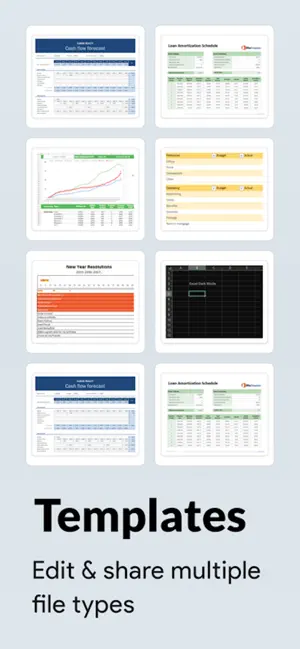
Sheets - Excel Editor is a powerful and intuitive Excel editing tool for iOS, designed to help you manage, create, and edit spreadsheets with ease. Whether you’re working on a project, financial plan, or inventory list, this app is packed with features that streamline your spreadsheet experience. Features: 1. Excel File Management: • Create New Excel Files – Start fresh by creating new Excel workbooks from scratch with ease. • Import Existing Excel Files – Quickly import .xlsx files from your device. • Add to Favorites – Mark important files as favorites for quick and easy retrieval. • Predefined Templates – Choose from templates designed for financial, project planning, inventory tracking, and more. 2. AI-Powered Assistance: • AI Chat Integration – Get smart suggestions for formulas, troubleshoot issues, and receive helpful tips for data analysis. 3. Spreadsheet Creation & Editing • Cell Formatting: • Apply bold, italic, and strike-through styles to text • Merge cells for improved data organisation • Adjust text alignment horizontally (left, center, right) and vertically (top, middle, bottom) • Change text and cell fill colors to enhance readability • Apply or remove cell borders like inner, horizontal, vertical, outer, left, top, right, and bottom • Undo/Redo functionality for seamless editing • Search Text for finding data within large spreadsheets • Set Fonts & Sizes: • Choose from a variety of fonts and sizes to customize the appearance of your text. • Insert & Delete Rows/Columns: • Effortlessly insert and delete rows or columns to organise data as you need. Subscription Details: Payment will be charged to iTunes Account at confirmation of purchase Subscription automatically renews unless auto-renew is turned off at least 24-hours before the end of the current period Account will be charged for renewal within 24-hours prior to the end of the current period, and identify the cost of the renewal No cancellation of the current subscription is allowed during active subscription period Any unused portion of a free trial period, if offered, will be forfeited when the user purchases a subscription to that publication, where applicable Note:- For Further Information: Privacy Policy: https://privacypolicycenter.com/new/view/id6737402064 Terms of Use: https://privacypolicycenter.com/new/terms/id6737402064 EULA: https://privacypolicycenter.com/new/eula/id6737402064
What’s new
Version 1.2 · Updated July 29, 2026
- Performance Improvement. - Bugs Fixing.
App privacy
The developer, Neon Infotech FZ-LLC, reported these privacy practices to Apple.
Data Used to Track You
The following data may be used to track you across apps and websites owned by other companies:
- Usage Data: Advertising Data
Data Not Linked to You
The following data, which may be collected but is not linked to your identity, may be used for the following purposes:
- Usage Data: Advertising Data
- Identifiers: User ID, Device ID
- Diagnostics: Crash Data, Performance Data, Other Diagnostic Data
Used for: Third-Party Advertising, Analytics
Alternatives to Sheets - Excel Editor
Looking for apps like Sheets - Excel Editor? Here are 6 similar apps on the App Store. The highest rated is Forms AI+ for Google Forms (5.0/5), and all 6 are free to download.
-
 Make Spreadsheet: Excel Reader
-
 Forms AI+ for Google Forms
5.0
Forms AI+ for Google Forms
5.0
-
 Word to Excel Converter
4.7
Word to Excel Converter
4.7
-
 Spreadsheets Editor-XLS Reader
5.0
Spreadsheets Editor-XLS Reader
5.0
-
 Excel to PDF Converter - XLSX
5.0
Excel to PDF Converter - XLSX
5.0
-
 Bundle for MS Office Templates
4.5
Bundle for MS Office Templates
4.5
| App | Rating | Price | Last updated | Compare |
|---|---|---|---|---|
| Sheets - Excel Editor | – | Free | July 29, 2026 | |
| Make Spreadsheet: Excel Reader | – | Free | Jan 2, 2025 | Compare |
| Forms AI+ for Google Forms | 5.0 / 5 (2) | Free | May 30, 2026 | Compare |
| Word to Excel Converter | 4.7 / 5 (9) | Free | Aug 5, 2026 | Compare |
| Spreadsheets Editor-XLS Reader | 5.0 / 5 (10) | Free | Aug 25, 2026 | Compare |
| Excel to PDF Converter - XLSX | 5.0 / 5 (13) | Free | Sep 8, 2026 | Compare |
| Bundle for MS Office Templates | 4.5 / 5 (22) | Free | Sep 28, 2026 | Compare |