

Useful Video Mosaic
katapu.net Photo & Video iPhoneiPadiPod touch
Useful Video Mosaic is a free Photo & Video app for iPhone and iPad by katapu.net. Requires iOS 15.6. Updated October 5, 2026.
- Price
- Free
- on the App Store
- Size
- 169 MB
- Age 4+
- Updated
- Oct 5
- 2026 · v1.2.0
Screenshots
About Useful Video Mosaic
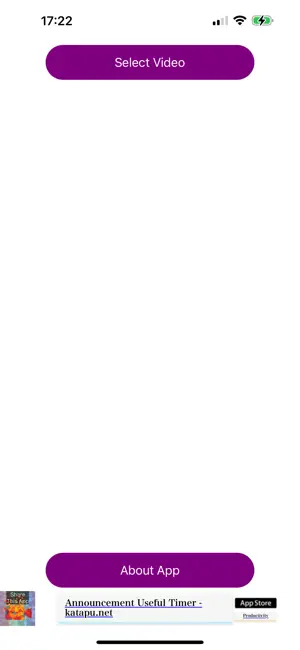
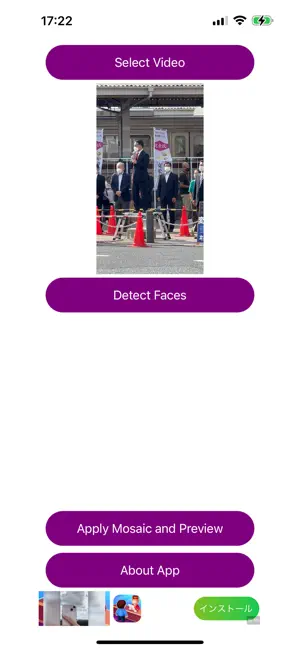
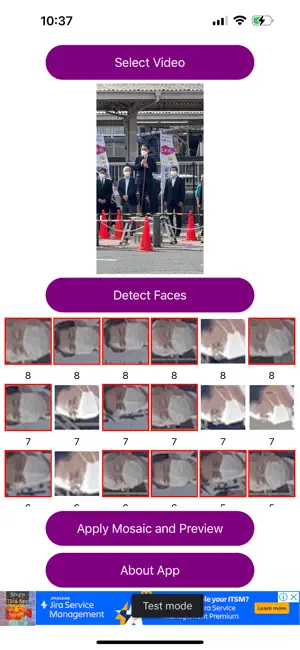
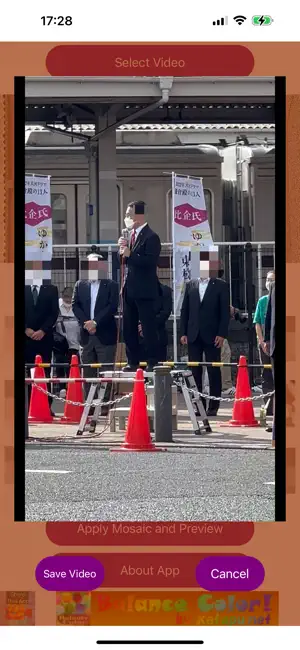
A great app for detecting faces in videos and applying mosaic blur with a single tap is here! When you upload videos to social media, do the faces of people in the footage ever get in the way? This app detects people's faces in a video, applies mosaic blur with one tap, lets you preview the result, and then saves it to help protect privacy. After loading a video, tap “Mosaic and Preview” to detect every person's face in the video, apply mosaic blur, and create a preview video. If the preview looks good, save it. After loading a video, tap “Detect Faces” to detect and identify face images in the video. By default, mosaic is turned on for every face. The identified faces appear as tiles at the bottom of the screen. Tap each face tile to choose individually whether that face should be mosaicked. (Faces with mosaic on appear with a red border and a darkened face image. Faces with mosaic off appear with a white border and the face image displayed normally.) After choosing mosaic on or off for all faces, tap “Mosaic and Preview” to create a preview video using those on/off settings. If the preview looks good, save it. If you want to upload a video to social media but people you do not want to show are visible, this app is worth trying. The basic flow is simple: process with one tap, create a preview, and save it. If there are specific people you do not want to mosaic, tap “Detect Faces”, choose mosaic on or off for each identified face, then create the preview and save it. Please be careful not to upload the original video by mistake instead of the saved mosaic video. The app is free, so feel free to use it. A paid ad-free PRO version is also available. How to use 1-1. Tap “Select Video” and choose a video. 2-1. Tap “Mosaic and Preview” to apply mosaic blur and create a preview. 3-1. If the preview looks good, tap “Save Video” to save it. 1-2. Tap “Select Video” and choose a video. 2-2. Tap “Detect Faces” to detect face images in the video. 3-2. Tap the identified face tiles to set mosaic on or off. 4-2. Tap “Mosaic and Preview” to apply mosaic blur using your selected on/off settings and create a preview. 5-2. If the preview looks good, tap “Save Video” to save it. If not, cancel, adjust the mosaic on/off settings again, and repeat step 4-2. Videos are saved to your camera roll.
What’s new
Version 1.2.0 · Updated October 5, 2026
- Added support for iOS 27 and iPadOS 27. - Improved the layout when rotating the screen or resizing the app window on iPad. - Improved the app’s behavior when returning from the background. - Fixed an issue that could cause the app to close unexpectedly under certain conditions. - Improved stability when displaying ads. - Fixed other minor issues.
App privacy
The developer, katapu.net, reported these privacy practices to Apple.
Data Used to Track You
The following data may be used to track you across apps and websites owned by other companies:
- Location: Coarse Location
- Identifiers: Device ID
- Usage Data: Product Interaction, Advertising Data
- Diagnostics: Crash Data, Performance Data
Data Linked to You
The following data, which may be collected and linked to your identity, may be used for the following purposes:
- Location: Coarse Location
- Identifiers: Device ID
- Usage Data: Product Interaction, Advertising Data
- Diagnostics: Performance Data
Used for: Third-Party Advertising
Data Not Linked to You
The following data, which may be collected but is not linked to your identity, may be used for the following purposes:
- Diagnostics: Crash Data
Used for: Third-Party Advertising, App Functionality
Alternatives to Useful Video Mosaic
Looking for apps like Useful Video Mosaic? Here are 6 similar apps on the App Store. The highest rated is Video Blur Maker: Censor Face (5.0/5), and all 6 are free to download.
-
 Video Blur Maker: Censor Face
5.0
Video Blur Maker: Censor Face
5.0
-
 Face Pixelation & Blur
4.5
Face Pixelation & Blur
4.5
-
 Auto Video Blur - Filtering
4.3
Auto Video Blur - Filtering
4.3
-
 Video Mosaic - Blemish Remover
4.0
Video Mosaic - Blemish Remover
4.0
-
 Blur - Photo & Video Editor
2.3
Blur - Photo & Video Editor
2.3
-
 Blur Video & Mosaic
4.5
Blur Video & Mosaic
4.5
| App | Rating | Price | Last updated | Compare |
|---|---|---|---|---|
| Useful Video Mosaic | – | Free | October 5, 2026 | |
| Video Blur Maker: Censor Face | 5.0 / 5 (4) | Free | Oct 17, 2026 | Compare |
| Face Pixelation & Blur | 4.5 / 5 (16) | Free | Sep 29, 2026 | Compare |
| Auto Video Blur - Filtering | 4.3 / 5 (31) | Free | Oct 24, 2026 | Compare |
| Video Mosaic - Blemish Remover | 4.0 / 5 (121) | Free | Jan 2, 2024 | Compare |
| Blur - Photo & Video Editor | 2.3 / 5 (6) | Free | Sep 4, 2026 | Compare |
| Blur Video & Mosaic | 4.5 / 5 (4,406) | Free | Sep 30, 2026 | Compare |