

Screen Time Control: PureFocus
Dmitry Vanyushkin Productivity iPhoneiPadiPod touch
Screen Time Control: PureFocus is a free Productivity app for iPhone and iPad by Dmitry Vanyushkin. Rated 4.8/5 from 46 ratings. Requires iOS 17.0.
- Rating
- 4.8
- 46 ratings
- Price
- Free
- on the App Store
- Size
- 73 MB
- Age 4+
- Updated
- Dec 24
- 2025 · v1.0.8
Screenshots
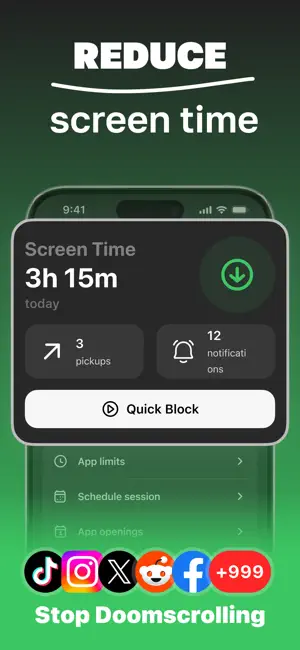


About Screen Time Control: PureFocus
Pure Focus – Stay Focused, Live Fully In a world full of digital distractions, staying focused has never been more challenging. Constant notifications, social media feeds, and endless doomscrolling often derail productivity. Pure Focus is designed to help you regain control over your time and attention by blocking distracting apps, allowing you to concentrate on what truly matters. Whether you’re studying, working, or simply want to reduce unnecessary screen time, the app provides a simple and effective solution to live a more intentional and fulfilling life. Main features: ► Flexible App Blocking Options • Quick Session: Start focusing instantly with just one tap. Perfect for spontaneous work bursts. • Daily Session Limits: Set a specific number of focus sessions per day to build consistent productivity habits. • App Usage Limit: Define daily usage limits for selected apps. Once reached, the apps are blocked, ensuring you stay on track. • Scheduled Blocking: Plan your focus time by scheduling app blocks during essential tasks, meetings, or study periods. ► Gamification and Achievements Stay motivated with our built-in achievement system. Earn rewards for hitting focus milestones, maintaining streaks, and cutting down screen time. Turning focus into a game keeps you engaged and committed. ► Detailed Progress Tracking and Statistics Monitor your habits and progress with comprehensive statistics. View session counts, streaks, and time saved on the home screen. Detailed reports provide insights into your focus patterns over time, helping you improve daily. ►Customization and User-Friendly Interface Tailor Pure Focus to your needs with extensive customization options. Choose which apps to block, adjust time limits, and personalize session durations—all through a clean, intuitive interface that’s easy to navigate. This isn’t just an app blocker; it’s a complete solution for reclaiming your time and boosting productivity. With flexible blocking modes, motivating achievements, and insightful progress tracking, staying focused becomes simple and rewarding. Download Pure Focus today and take the first step toward a more focused, distraction-free life. Contact Us: [email protected] Terms of Use: https://telegra.ph/Terms-of-Use-02-25-3 Privacy Policy: https://telegra.ph/Privacy-Policy-02-25-64
Ratings & reviews
4.8
46 ratings
What’s new
Version 1.0.8 · Updated December 24, 2025
What's New in This Update: - Bug fixes Thank you for using Pure Focus! We're continuously working to make your journey to greater productivity even smoother and more efficient.
App privacy
The developer, Dmitry Vanyushkin, reported these privacy practices to Apple.
Data Not Linked to You
The following data, which may be collected but is not linked to your identity, may be used for the following purposes:
- Purchases: Purchase History
- User Content: Other User Content
- Identifiers: Device ID
Used for: Analytics, App Functionality
Alternatives to Screen Time Control: PureFocus
Looking for apps like Screen Time Control: PureFocus? Here are 6 similar apps on the App Store. The highest rated is Image Compressor ™ (4.9/5), and all 6 are free to download.
-
 FriendLock: Screentime Friends
4.8
-
 Elevate: Daily Planner&Habit
3.9
-
 Habit Tracker - HabitBot
4.8
-
 Image Compressor ™
4.9
-
 Goal Tracker: Challenges
4.6
-
 Pomodoro Focus Timer: Krono
4.6
| App | Rating | Price | Last updated | Compare |
|---|---|---|---|---|
| Screen Time Control: PureFocus | 4.8 / 5 (46 ratings) | Free | December 24, 2025 | |
| FriendLock: Screentime Friends | 4.8 / 5 (27) | Free | Jan 6, 2026 | Compare |
| Elevate: Daily Planner&Habit | 3.9 / 5 (12) | Free | Jun 25, 2025 | Compare |
| Habit Tracker - HabitBot | 4.8 / 5 (56) | Free | Jun 16, 2025 | Compare |
| Image Compressor ™ | 4.9 / 5 (55) | Free | Feb 11, 2026 | Compare |
| Goal Tracker: Challenges | 4.6 / 5 (56) | Free | Oct 12, 2026 | Compare |
| Pomodoro Focus Timer: Krono | 4.6 / 5 (19) | Free | Aug 25, 2025 | Compare |