

PDF Converter-File Creator App
Savelii Stepura Productivity iPhoneiPadiPod touch
PDF Converter-File Creator App is a free Productivity app for iPhone and iPad by Savelii Stepura. Requires iOS 15.1. Updated September 28, 2025.
- Price
- Free
- on the App Store
- Size
- 40 MB
- Age 4+
- Updated
- Sep 28
- 2025 · v1.0.3
Screenshots


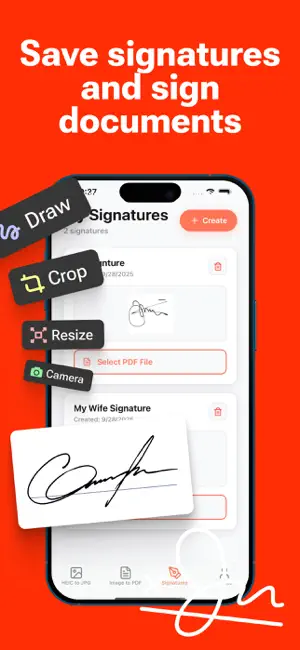
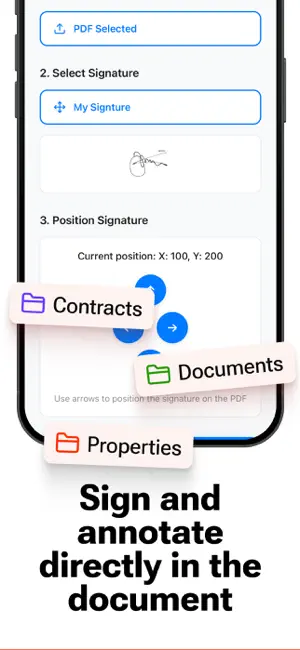
About PDF Converter-File Creator App
Convert Your Photos to PDF and Almost Any Image Format, Quickly and Easily! Select Your Input File Choose an Output Format (e.g.,PDF, SVG, JPG, PNG, GIF, etc.) Convert in Seconds! Save Your File or Open It in Your Favorite App Supported Output Formats: Choose from a wide range, including PDF, JPG, PNG, GIF, PSD, BMP, EPS, SVG, EXR, ICO, TIFF, TGA, WBMP, WEBP, ODD, PSD, PS, and PDF. Supported Input Formats: Convert from popular formats like JPG, PNG, HEIC, PDF, SVG, EPS, WEBP, GIF, TIF, DOCX, AI, PAGES, and many others. Save, Share, or View Instantly After conversion, easily share your images with any app or use the in-app file browser to access previously converted files. You can also AirDrop photos directly to your Mac or other devices right away. Fast Conversion in Under 15 Seconds Conversions are performed on a secure cloud server, ensuring a quick, battery-efficient process. An internet connection is required, and files are automatically deleted from the server after conversion. By using this app, you agree that files will be transferred over the internet for conversion. Local Conversion Support For many formats, conversions can also be done locally, without needing a server, for even faster results. We are continually expanding support for local conversions in each update. Optional Premium Pass Subscription Upgrade with a Premium Pass to access additional features. The subscription begins with a free trial, followed by an auto-renewing monthly fee. Payment is charged to your Apple account, and subscriptions renew automatically unless canceled at least 24 hours before the end of the current period. Manage subscriptions and auto-renew settings in your Apple Account Settings. Unused trial time will be forfeited upon purchasing a subscription. Terms of Use: https://www.apple.com/legal/internet-services/itunes/dev/stdeula/ Privacy Policy: https://sites.google.com/view/heic-pdf-converter
What’s new
Version 1.0.3 · Updated September 28, 2025
- Bug fixes
App privacy
The developer, Savelii Stepura, reported these privacy practices to Apple.
Data Not Linked to You
The following data, which may be collected but is not linked to your identity, may be used for the following purposes:
- User Content: Photos or Videos
Used for: App Functionality
Alternatives to PDF Converter-File Creator App
Looking for apps like PDF Converter-File Creator App? Here are 6 similar apps on the App Store. The highest rated is Alice: AI assistant (4.8/5), and all 6 are free to download.
-
 Image Converter to JPG-PDF-PNG
4.7
Image Converter to JPG-PDF-PNG
4.7
-
 Image Converter: JPEG PDF HEIC
4.7
Image Converter: JPEG PDF HEIC
4.7
-
 PDF Converter: File & Photo
4.6
PDF Converter: File & Photo
4.6
-
 Yandex Disk secure storage
4.7
Yandex Disk secure storage
4.7
-
 The Image Converter □
4.6
The Image Converter □
4.6
-
 Alice: AI assistant
4.8
Alice: AI assistant
4.8
| App | Rating | Price | Last updated | Compare |
|---|---|---|---|---|
| PDF Converter-File Creator App | – | Free | September 28, 2025 | |
| Image Converter to JPG-PDF-PNG | 4.7 / 5 (369) | Free | Aug 14, 2026 | Compare |
| Image Converter: JPEG PDF HEIC | 4.7 / 5 (9,025) | Free | Nov 4, 2025 | Compare |
| PDF Converter: File & Photo | 4.6 / 5 (9) | Free | Sep 16, 2026 | Compare |
| Yandex Disk secure storage | 4.7 / 5 (5,827) | Free | Oct 5, 2026 | Compare |
| The Image Converter □ | 4.6 / 5 (16,689) | Free | Apr 6, 2026 | Compare |
| Alice: AI assistant | 4.8 / 5 (2,907) | Free | Oct 7, 2026 | Compare |