

Trendly - AI Social Planner
IDIVARTS SOLUTIONS PRIVATE LIMITED Productivity iPhoneiPadiPod touch
Trendly - AI Social Planner is a free Productivity app for iPhone and iPad by IDIVARTS SOLUTIONS PRIVATE LIMITED. Requires iOS 15.1.
- Price
- Free
- on the App Store
- Size
- 67 MB
- Age 17+
- Updated
- Oct 27
- 2026 · v5.1.0
Screenshots


About Trendly - AI Social Planner
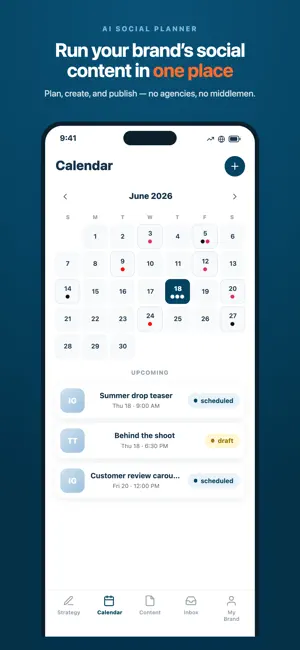
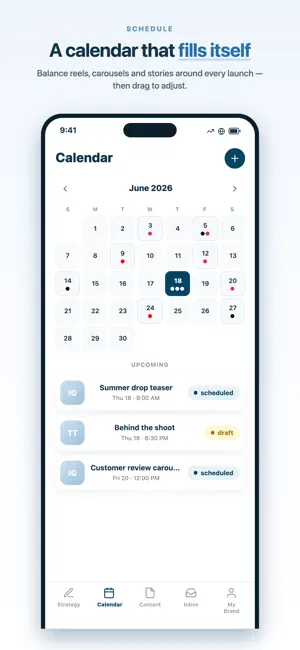
Trendly is the AI social planner that helps creators, founders, and small teams plan, create, and schedule their content — all from one calendar. Stop juggling spreadsheets, notes, and a dozen browser tabs. Trendly brings your entire content workflow into a single, organized space, with the best AI models helping at every step. PLAN YOUR CONTENT • A visual content calendar that shows your whole month at a glance • Drag and drop to reschedule in seconds • Build a repeatable content strategy instead of posting at random • Keep every idea, draft, and asset together in one place CREATE WITH AI • Generate post ideas, hooks, and full captions in your brand voice • Turn a single idea into a week of posts • Get help with hashtags, headlines, and calls to action • Powered by leading AI models so you always get strong results SCHEDULE & PUBLISH • Schedule posts ahead of time and stay consistent • Organize content by channel, campaign, and status • Plan your feed and see how everything fits together before it goes live BUILT FOR • Solo founders and small teams running their own social media • Creators who want to post consistently without the overwhelm • Anyone tired of last-minute, unplanned posting Bring structure, creativity, and AI together — and turn social media from a daily scramble into a simple, repeatable routine. Download Trendly and plan your next month of content today. Terms of Use (EULA): https://www.apple.com/legal/internet-services/itunes/dev/stdeula/
What’s new
Version 5.1.0 · Updated October 27, 2026
Design Studio, rebuilt around AI • The Studio now has three honest states: an empty canvas with one prompt box, a live generating state showing the brief you just typed, and your finished design. No more two composers asking you the same question. • The AI now looks at what it makes. It renders a preview of each design, checks the layout, spacing and motion, and fixes what's off before handing it to you. • Scene transitions play in the preview, so what you watch is what gets exported — cross-fades instead of a hard cut at every scene boundary. • Choose your AI model right next to the prompt, and the picker now lists the models that will actually run. A clearer content editor • The content page is split into Overview and Content. Overview holds the brief, script, performance and production handoff; Content holds the post itself — media, caption, hashtags and per-platform options. • The brief is edited in place on Overview instead of hidden behind a dialog you had to find. • Scripts start with AI: describe the idea, the mood and who it's for, and let it write — then refine it in the same place. Example prompts are there if you're stuck. • Tabs now live in the URL, so you can link to one, reload into it, and use the back button. • Content that failed or only partly published now appears under "Needs attention" instead of vanishing from the board. • Status and platform changes save on their own — and the app no longer warns about unsaved changes that were already saved. Fixes and polish • Show the password you're typing, on login, sign-up and checkout. • The app opens straight to the start screen — the intro animation is gone. • Rebuilt the start screen on phones: the prompt is docked in the thumb zone and the keyboard no longer pushes it off-screen. • Fixed screens sliding under the status bar on Design Studio, Messages, onboarding, the landing pages and more. • Terms & conditions are readable in dark mode. • AI chat tells you when something went wrong instead of the typing indicator just stopping. • Sign-in errors say what's actually wrong — a wrong password now says so. • Fixed a crash during push-notification registration. • Fixed shared links not opening the app on Android.
App privacy
The developer, IDIVARTS SOLUTIONS PRIVATE LIMITED, reported these privacy practices to Apple.
Data Used to Track You
The following data may be used to track you across apps and websites owned by other companies:
- Contact Info: Email Address
- Identifiers: User ID, Device ID
Data Linked to You
The following data, which may be collected and linked to your identity, may be used for the following purposes:
- Location: Precise Location, Coarse Location
- Contact Info: Physical Address, Email Address, Name, Phone Number
- User Content: Emails or Text Messages, Photos or Videos, Audio Data, Customer Support
- Identifiers: User ID
Used for: Product Personalization, App Functionality
Data Not Linked to You
The following data, which may be collected but is not linked to your identity, may be used for the following purposes:
- Search History: Search History
- Browsing History: Browsing History
- Identifiers: Device ID
- Usage Data: Product Interaction, Advertising Data
- Diagnostics: Crash Data, Performance Data, Other Diagnostic Data
- Contact Info: Other User Contact Info
Used for: Analytics, App Functionality
Alternatives to Trendly - AI Social Planner
Looking for apps like Trendly - AI Social Planner? Here are 6 similar apps on the App Store. The highest rated is BlockMyApps: App Blocker (5.0/5), and all 6 are free to download.
-
 Teleprompter: AI Notes Voice
-
 BlockMyApps: App Blocker
5.0
-
 1 Minute Journal: Daily Videos
4.3
-
 Long Ago: Habit & Life Tracker
4.6
-
 Custom Order Tracker
5.0
-
 Photo PDF by Vectorsoft
| App | Rating | Price | Last updated | Compare |
|---|---|---|---|---|
| Trendly - AI Social Planner | – | Free | October 27, 2026 | |
| Teleprompter: AI Notes Voice | – | Free | Jun 28, 2026 | Compare |
| BlockMyApps: App Blocker | 5.0 / 5 (1) | Free | Oct 19, 2026 | Compare |
| 1 Minute Journal: Daily Videos | 4.3 / 5 (3) | Free | Mar 31, 2024 | Compare |
| Long Ago: Habit & Life Tracker | 4.6 / 5 (18) | Free | Oct 13, 2026 | Compare |
| Custom Order Tracker | 5.0 / 5 (4) | Free | Oct 28, 2026 | Compare |
| Photo PDF by Vectorsoft | – | Free | Sep 12, 2024 | Compare |