

Road Trip Planner - Fernweh
David Moeller Travel iPhoneiPadiPod touch
Road Trip Planner - Fernweh is a free Travel app for iPhone and iPad by David Moeller. Requires iOS 26.0. Updated October 14, 2026.
- Price
- Free
- on the App Store
- Size
- 221 MB
- Age 4+
- Updated
- Oct 14
- 2026 · v1.25.0
Screenshots
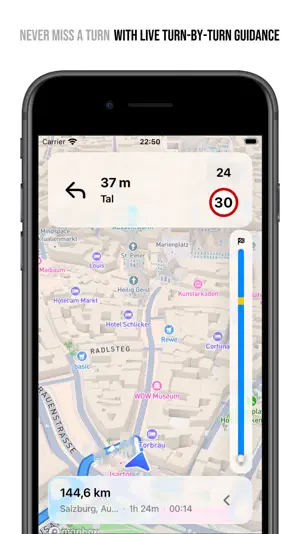


About Road Trip Planner - Fernweh
PLAN MULTI-STOP ROAD TRIPS WITH EASE Create road trip itineraries with local AI assistance and enhanced sharing. Fernweh transforms scattered travel inspiration into organized adventures. Perfect for cross-country trips, European tours, or any multi-stop journey. KEY FEATURES: • NEW: Turn-by-turn navigation (subscription) - live guidance with CarPlay support, EV charging stops along your route, and dimension-aware routing that avoids low bridges and weight limits for oversized vehicles • AI Trip Assistant - describe your journey and get a first set of stops to build on (runs on your device; needs Apple Intelligence) • Share a place from your maps app straight into Fernweh • Search EV charging stations from any leg's directions, with connector count and maximum power • Filter POI searches by category (restaurants, gas stations, hotels, more) • Smart search tokens for quick trip filtering on home screen • Calculate trip costs based on your vehicle's fuel efficiency and your average fuel cost • Configure multiple vehicles with different fuel consumption profiles • Plan trips forward or backward in time • Automatic date calculations for each destination • Interactive route mapping with enhanced trip overview • Customizable stay duration at each location • Real-time travel time estimates • Invite friends and family to plan trips together • Export trips in various formats (PDF, GPX, KML, CSV, JSON, Markdown) PERFECT FOR: • Road trip enthusiasts • Multi-city travelers • Weekend getaways • Cross-country adventures • European tours • Family vacations • Digital nomads POWERFUL LOCATION MANAGEMENT • Search places worldwide • Tap-to-add locations on the map • Import places from other maps apps • Rich location details (address, phone, website) • Drag & drop route optimization • Visual journey overview with smart markers SEAMLESS APPLE ECOSYSTEM INTEGRATION • iCloud sync across iPhone and iPad • Turn-by-turn navigation built into CarPlay (subscription) - no hand-off to another app • Siri & Apple Shortcuts integration • Share extension for quick location adding WHY TRAVELERS CHOOSE FERNWEH: • Liquid Glass design with fluid, translucent interfaces • Intuitive interface designed for complex trips • Privacy-focused - your data stays yours, AI runs locally • No 3rd-party tracking Download Fernweh now and start planning your next road trip. #RoadTrip #TravelPlanning #Adventure Terms of Use: https://www.apple.com/legal/internet-services/itunes/dev/stdeula/ Privacy Policy: https://davidmoeller.me/apps/fernweh/privacy
What’s new
Version 1.25.0 · Updated October 14, 2026
What's New in Version 1.25.0: NEW: • One Search Everywhere — Trip detail, the Day view and Saved Places now share one search bar. Before you type, it tells you what it searches; tap a result to open the place, or save it for later straight from the list. • Search Where You're Looking — Search starts where you're looking on the map, finds places along your route instead of just around the screen centre, and keeps the places it found even when part of the lookup fails on a weak connection. • Campsite Facilities — Campsites show their facilities, and search understands Apple's newest place categories. • Find Your Vehicles — Home search now lists your vehicles alongside trips, stops and saved places. IMPROVED: • Searching from the Day view adds the place after the day's last stop, or right before a stop you choose. Inside a trip, search lists only that trip's stops. • Stop, directions and place details open as sheets at the planner's current size, close with an X, and the trash button has moved away from it. • CarPlay's start-today offer names the drive: where it starts, where it ends and the stops in between. • Blue stop icons stay easy to tell apart in dark mode. • Ferry crossings still show on your route map. The separate crossing editor is gone, and former ferry terminals open as ordinary stops. FIXED: • Navigate from a leg or a stop starts guidance again. • Adding a stop after another stop works again, and the position you choose holds. • Places shared from another app sync to your other devices, even while Fernweh is closed. • One outdated place no longer hides every stop marker and day label on the trip map. • A cancelled charger search no longer counts against your allowance. • Closing a place you opened by long-pressing the map returns you to the Day view you came from.
App privacy
The developer, David Moeller, reported these privacy practices to Apple.
Data Not Linked to You
The following data, which may be collected but is not linked to your identity, may be used for the following purposes:
- Usage Data: Other Usage Data
- Location: Precise Location, Coarse Location
Used for: Analytics, App Functionality
Alternatives to Road Trip Planner - Fernweh
Looking for apps like Road Trip Planner - Fernweh? Here are 6 similar apps on the App Store. The highest rated is ezyPowerPlug (5.0/5), and 4 of the 6 are free to download.
-
 Nomadlog: Travel Calendar Days
3.7
Nomadlog: Travel Calendar Days
3.7
-
 PlanetFinder Pro
4.5
PlanetFinder Pro
4.5
-
 ezyPowerPlug
5.0
ezyPowerPlug
5.0
-
 Offline Maps: GPS Tracker GPX
4.7
Offline Maps: GPS Tracker GPX
4.7
-
 Packing List Checklist: Packy
4.5
Packing List Checklist: Packy
4.5
-
 Car Dashboard : Music & Maps
4.5
Car Dashboard : Music & Maps
4.5
| App | Rating | Price | Last updated | Compare |
|---|---|---|---|---|
| Road Trip Planner - Fernweh | – | Free | October 14, 2026 | |
| Nomadlog: Travel Calendar Days | 3.7 / 5 (3) | Free | Jun 10, 2026 | Compare |
| PlanetFinder Pro | 4.5 / 5 (16) | 1.99 USD | Apr 17, 2026 | Compare |
| ezyPowerPlug | 5.0 / 5 (1) | Free | Apr 13, 2025 | Compare |
| Offline Maps: GPS Tracker GPX | 4.7 / 5 (49) | 5.99 USD | Oct 16, 2026 | Compare |
| Packing List Checklist: Packy | 4.5 / 5 (52) | Free | Sep 8, 2026 | Compare |
| Car Dashboard : Music & Maps | 4.5 / 5 (393) | Free | Nov 22, 2024 | Compare |