

Azule Timecard
Linarc Inc. Business iPhoneiPadiPod touch
Azule Timecard is a free Business app for iPhone and iPad by Linarc Inc. Requires iOS 26.0. Updated October 3, 2026.
- Price
- Free
- on the App Store
- Size
- 68 MB
- Age 4+
- Updated
- Oct 3
- 2026 · v2.2.0
Screenshots
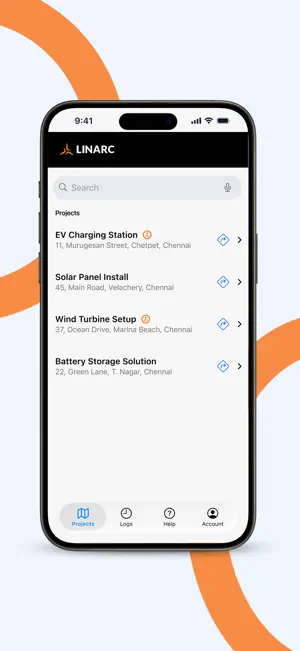
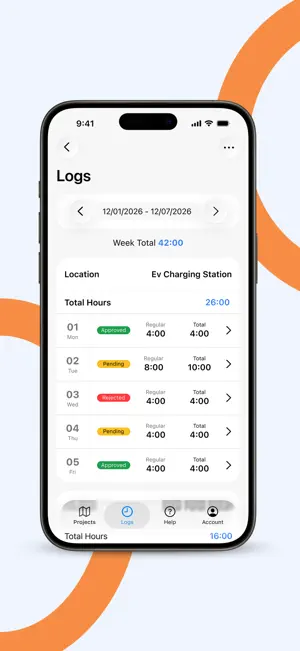


About Azule Timecard
Linarc Timecard is the time tracking and workforce management app built for construction crews and site workers. Purpose-built for the job site, it works where you work — including areas with poor or no network coverage. Built for the Job Site • Clock In/Out with Geofencing — Clock in and out at your assigned project site. GPS polygon geofencing verifies you're on-site before you start. The app automatically clocks you out when your shift ends or when you leave the boundary. • Task-Based Time Tracking — Log time against specific tasks — system tasks, field tasks, punchlists, task codes, and T&M items. Switch between tasks throughout the day with a single tap. • Offline-First, Always — Every clock-in, task punch, note, photo, and clock-out is written locally the moment you tap. A background sync queue with automatic retry pushes it all to the server once signal returns. The app shows you exactly how many records are pending sync so nothing ever goes missing. • Session Resilience — Force-close the app, kill it mid-shift, or lose your phone screen lock — your active session is fully restored when you reopen. A 60-second minimum session gate prevents accidental ghost entries. • Multi-Site Support — Assigned to more than one project? Switch between sites without logging out. When you're clocked into one project, other sites stay isolated so time never bleeds across jobs. • Task Photos — Attach up to 5 photos per field task to document work progress. Photos are compressed and queued for upload offline, then synced automatically. View attachments full-screen with swipe navigation. • Task Notes — Add append-only notes to field tasks with a running history. Notes are available offline and visible to supervisors in real time once synced. • Logs Review & Editing — Review up to 14 days of logged time. Edit entries, correct task assignments, and add missing time before submitting your time card. • Time Card Sign-Off — Submit your time card with a digital signature. Biometric step-up (Face ID or fingerprint) keeps the process fast and tamper-proof. • Injury Confirmation on Clock-Out — When closing out, confirm whether any injury occurred during the shift. If yes, the app routes you directly into an incident report before submission. • Incident Reporting — Report safety incidents on the spot. Log severity (Minor, Significant, or Critical), date, cause, injury details, notes, and supporting documents. • Crew Notes — Add notes directly to tasks so your team and supervisors stay in the loop. • Site Rules & Shift Alerts — View site-specific rules before you start. Get notified about shift changes, crew assignments, and geofence events in real time. • Time Off Requests — Submit PTO and sick leave requests and track their status without calling the office. • License Management — Upload and manage your Driving and Operator Licenses directly in the app. • Secure Access — Biometric login, OTP-based password reset, and role-based permissions. Linarc Timecard keeps construction crews accurate, accountable, and audit-ready — on site or off signal.
What’s new
Version 2.2.0 · Updated October 3, 2026
- Attach videos to field tasks and incidents. - Tap a notification to jump directly to that screen. - Push notifications for shifts, crew, and site alerts. - Add untracked time if you missed logging hours. - App Attest verification on launch.
App privacy
The developer, Linarc Inc., reported these privacy practices to Apple.
Data Linked to You
The following data, which may be collected and linked to your identity, may be used for the following purposes:
- Contact Info: Phone Number, Name, Other User Contact Info
- User Content: Photos or Videos
Used for: Analytics, Product Personalization, App Functionality
Data Not Linked to You
The following data, which may be collected but is not linked to your identity, may be used for the following purposes:
- Diagnostics: Crash Data
- Location: Precise Location
Used for: Analytics, Product Personalization, App Functionality
Alternatives to Azule Timecard
Looking for apps like Azule Timecard? Here are 6 similar apps on the App Store. The highest rated is Employee TimeCard (4.5/5), and all 6 are free to download.
-
 Time.Cards
-
 AB TimeClock 400
3.7
AB TimeClock 400
3.7
-
 Symbo Sales Dialer
-
 SwiftReporter
3.0
SwiftReporter
3.0
-
 Employee TimeCard
4.5
Employee TimeCard
4.5
-
 SubBase Mobile
4.0
SubBase Mobile
4.0
| App | Rating | Price | Last updated | Compare |
|---|---|---|---|---|
| Azule Timecard | – | Free | October 3, 2026 | |
| Time.Cards | – | Free | Jul 5, 2024 | Compare |
| AB TimeClock 400 | 3.7 / 5 (3) | Free | Mar 17, 2026 | Compare |
| Symbo Sales Dialer | – | Free | Aug 21, 2026 | Compare |
| SwiftReporter | 3.0 / 5 (2) | Free | Oct 11, 2026 | Compare |
| Employee TimeCard | 4.5 / 5 (2) | Free | Jan 11, 2024 | Compare |
| SubBase Mobile | 4.0 / 5 (4) | Free | Oct 30, 2026 | Compare |
Compare Azule Timecard with the top alternatives: ratings, updates, ASO score and keyword gaps →