

Fill and Sign - PDF Documents
Janko Bilyk Utilities iPhoneiPadiPod touch
Fill and Sign - PDF Documents is a free Utilities app for iPhone and iPad by Janko Bilyk. Rated 4.6/5 from 15 ratings. Requires iOS 17.0.
- Rating
- 4.6
- 15 ratings
- Price
- Free
- on the App Store
- Size
- 7 MB
- Age 4+
- Updated
- Apr 22
- 2025 · v1.0.2
Screenshots

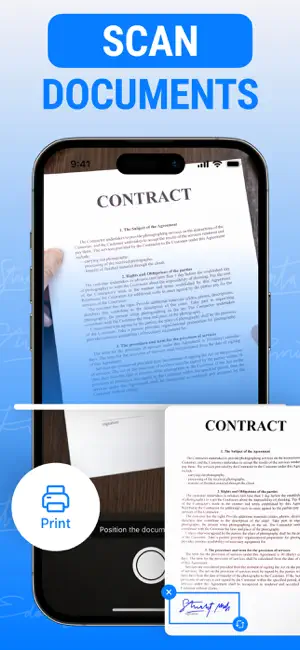

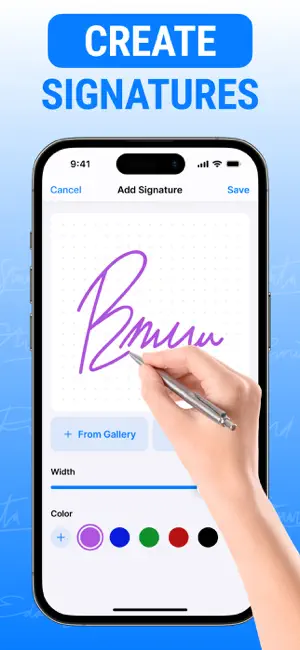
About Fill and Sign - PDF Documents
Our app is your ultimate solution for digital document signing, offering a fast, secure, and convenient way to sign documents anytime, anywhere. Designed for professionals, businesses, and individuals alike, our product streamlines the signing process, eliminating the need for printing, scanning, or faxing. Key Features: - Easy Document Upload: Import documents directly from your device, email, or cloud storage services like Google Drive and Dropbox. - Effortless Signing: Add your signature with just a tap! Use your finger or stylus to create a personalized signature, or select from pre-made options. - Multiple Signatures: Support for multiple signers on a single document, making it ideal for contracts, agreements, and collaborative projects. - Secure and Compliant: Ensure the integrity of your documents with advanced encryption and compliance with legal standards like eIDAS and UETA. - Customizable Templates: Create and save templates for frequently used documents, making future signing quick and easy. - Track Document Status: Stay updated on your documents' signing progress with real-time notifications and tracking. - Offline Signing: Sign documents without an internet connection, then sync your changes when you’re back online. With our you can enhance productivity, reduce turnaround times, and eliminate paper waste—all while maintaining the highest level of security. Whether you’re a freelancer, a small business owner, or part of a large enterprise, our product adapts to your needs, making document signing as simple as a click of a button. Download our app today and transform the way you handle document signing! After purchasing an auto-renewable subscription, you will gain access to all features, such as: - Unlimited Document Signing: Sign an unlimited number of documents without any restrictions. - Advanced Security: Benefit from enhanced encryption and secure cloud storage for all your signed documents. - Custom Branding: Add your company’s logo and branding to documents for a more professional touch. Subscription Information: - Payment will be charged to your iTunes Account upon confirmation of purchase. - Subscriptions automatically renew unless auto-renew is turned off at least 24 hours before the end of the current period. - Your account will be charged for renewal within 24 hours before the end of the current period. - You can manage subscriptions and turn off auto-renewal at any time in your Account Settings after purchase. - Privacy Policy & Terms of Use: http://10853923privacy-policy.tilda.ws
Ratings & reviews
4.6
15 ratings
What’s new
Version 1.0.2 · Updated April 22, 2025
Bug fixes and improvements
App privacy
The developer, Janko Bilyk, reported these privacy practices to Apple.
Data Not Collected
The developer does not collect any data from this app.
Alternatives to Fill and Sign - PDF Documents
Looking for apps like Fill and Sign - PDF Documents? Here are 6 similar apps on the App Store. The highest rated is Auth Authenticator: 2FA & MFA (4.9/5), and all 6 are free to download.
-
 Infrared Remote Glint Detector
4.7
-
 Smart Air Printer:Scan Printer
4.7
-
 Auth Authenticator: 2FA & MFA
4.9
-
 Coin Identifier Scanner Value.
4.3
-
 eSign Signature: Fill & Sign
4.3
-
 eSign: Fill and Sign Documents
4.3
| App | Rating | Price | Last updated | Compare |
|---|---|---|---|---|
| Fill and Sign - PDF Documents | 4.6 / 5 (15 ratings) | Free | April 22, 2025 | |
| Infrared Remote Glint Detector | 4.7 / 5 (40) | Free | Mar 4, 2025 | Compare |
| Smart Air Printer:Scan Printer | 4.7 / 5 (26) | Free | Apr 17, 2025 | Compare |
| Auth Authenticator: 2FA & MFA | 4.9 / 5 (28) | Free | Oct 16, 2026 | Compare |
| Coin Identifier Scanner Value. | 4.3 / 5 (65) | Free | Jan 6, 2026 | Compare |
| eSign Signature: Fill & Sign | 4.3 / 5 (11) | Free | Apr 16, 2025 | Compare |
| eSign: Fill and Sign Documents | 4.3 / 5 (18) | Free | Mar 27, 2025 | Compare |