

Subtext: AI Writing Assistant
ANTON LICHT Productivity iPhoneiPadiPod touch
Subtext: AI Writing Assistant is a free Productivity app for iPhone and iPad by ANTON LICHT. Rated 4.9/5 from 21 ratings. Requires iOS 15.6.
- Rating
- 4.9
- 21 ratings
- Price
- Free
- on the App Store
- Size
- 84 MB
- Age 4+
- Updated
- Oct 13
- 2026 · v1.3.71
Screenshots

About Subtext: AI Writing Assistant
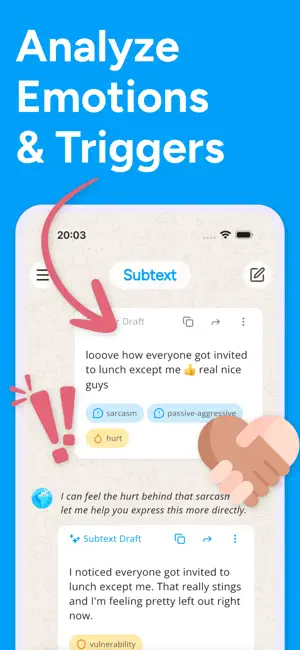
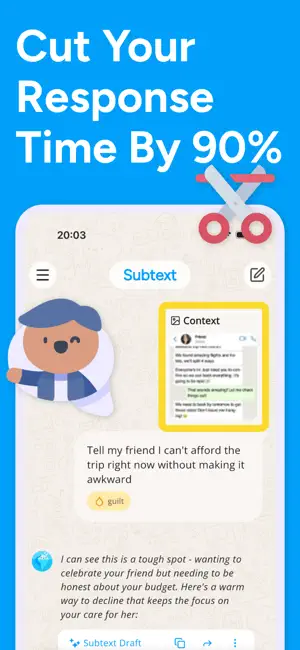
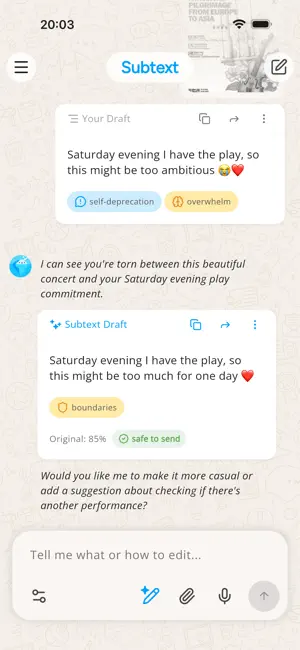
Subtext AI is your writing and communication assistant for everyday messages, replies, and difficult conversations. Write from scratch, paste a draft, or share a screenshot of a conversation. Subtext helps you see how your message may come across, improve your wording, and draft replies that feel clear, thoughtful, and natural. Use it for texts, emails, dating conversations, work replies, group chats, follow-ups, check-ins, and those moments when you know what you want to say but not exactly how to say it. WHO IT'S FOR - People who rewrite the same message five times before sending - Overthinkers, over-editors, and anyone wondering "does this sound okay?" - People navigating sensitive conversations, follow-ups, boundaries, or unexpected replies - Anyone who wants their writing to better match their intention WHAT SUBTEXT DOES - Message Analyzer: Review tone, clarity, and how your message may come across. Spot wording that could feel unclear, too harsh, too passive, or easy to misread. - Writing Coach and Proofreader: Understand why certain phrases need work and how to improve them. Fix grammar, spelling, and sentence structure automatically. - Smart Reply and Response Generator: Generate or improve replies based on conversation context. Paste a screenshot or type the conversation, and get response options that fit. - Tone Tuner: Make your message warmer, clearer, shorter, softer, firmer, or more professional. - Rewriter and Rephraser: Turn rough drafts, scattered notes, and half-finished thoughts into polished messages. - Context Summary: Paste a full conversation and get a breakdown of the key points, possible tone and intent, and reply options. USE IT FOR - Turning drafts and notes into clear messages - Proofreading before you hit send - Quick replies when you're not sure what to say - Navigating sensitive or emotionally loaded conversations - Setting boundaries without overexplaining - Following up on unanswered messages - Work emails and professional communication - Group chats, dating, friendships, and family messages - Exploring how a message might be interpreted before sending WHY PEOPLE USE IT - Write with less second-guessing - Say what you mean without overexplaining or underexplaining - Avoid wording that may come across the wrong way - Get practical, real-time feedback that helps you improve over time - Keep your own voice while making sure your message is clear Subtext uses AI to analyze tone, suggest improvements, and help you communicate with more confidence, one message at a time. Subtext is a writing and communication assistant. It does not provide therapy, diagnosis, or medical advice. AI suggestions may not always be accurate or appropriate. Review messages before sending.
Ratings & reviews
4.9
21 ratings
What’s new
Version 1.3.71 · Updated October 13, 2026
Subtext now remembers who you write to and how you write. Save the people you message most, like your manager or your partner, and Subtext keeps them in mind every time. Save writing styles too, like business emails or a gentler tone. Each one gets its own profile, where you can add as much detail as you want Subtext to know.
App privacy
The developer, ANTON LICHT, reported these privacy practices to Apple.
Data Used to Track You
The following data may be used to track you across apps and websites owned by other companies:
- Contact Info: Email Address
- Identifiers: User ID, Device ID
- Usage Data: Product Interaction
Data Linked to You
The following data, which may be collected and linked to your identity, may be used for the following purposes:
- Usage Data: Product Interaction
- Location: Coarse Location
- Identifiers: User ID
- Contact Info: Email Address
- User Content: Customer Support
Used for: Third-Party Advertising, Developer’s Advertising or Marketing, Analytics, App Functionality
Data Not Linked to You
The following data, which may be collected but is not linked to your identity, may be used for the following purposes:
- Identifiers: User ID, Device ID
- Contact Info: Email Address
- Diagnostics: Crash Data, Performance Data
Used for: Third-Party Advertising, Developer’s Advertising or Marketing, Analytics, App Functionality
Alternatives to Subtext: AI Writing Assistant
Looking for apps like Subtext: AI Writing Assistant? Here are 6 similar apps on the App Store. The highest rated is ConfiText–AI Texting Assistant (5.0/5), and all 6 are free to download.
-
 Meli: Personal AI
3.8
Meli: Personal AI
3.8
-
 minimee - AI Journaling & Mood
4.6
minimee - AI Journaling & Mood
4.6
-
 AI Chatbot & Keyboard - SageAI
2.8
AI Chatbot & Keyboard - SageAI
2.8
-
 DoThisNow: ADHD Productivity
4.2
DoThisNow: ADHD Productivity
4.2
-
 ConfiText–AI Texting Assistant
5.0
ConfiText–AI Texting Assistant
5.0
-
 Polly:AI Note Taker Recorder
4.7
Polly:AI Note Taker Recorder
4.7
| App | Rating | Price | Last updated | Compare |
|---|---|---|---|---|
| Subtext: AI Writing Assistant | 4.9 / 5 (21 ratings) | Free | October 13, 2026 | |
| Meli: Personal AI | 3.8 / 5 (30) | Free | Oct 15, 2026 | Compare |
| minimee - AI Journaling & Mood | 4.6 / 5 (150) | Free | Jul 29, 2026 | Compare |
| AI Chatbot & Keyboard - SageAI | 2.8 / 5 (6) | Free | May 29, 2026 | Compare |
| DoThisNow: ADHD Productivity | 4.2 / 5 (5) | Free | Aug 10, 2025 | Compare |
| ConfiText–AI Texting Assistant | 5.0 / 5 (14) | Free | Aug 3, 2026 | Compare |
| Polly:AI Note Taker Recorder | 4.7 / 5 (73) | Free | Sep 1, 2026 | Compare |