

Video Splitter - VSplitter
REAFO CO., LTD. Photo & Video iPhoneiPadiPod touch
Video Splitter - VSplitter is a free Photo & Video app for iPhone and iPad by REAFO CO., LTD. Rated 4.2/5 from 9 ratings. Requires iOS 16.4.
- Rating
- 4.2
- 9 ratings
- Price
- Free
- on the App Store
- Size
- 33 MB
- Age 4+
- Updated
- Oct 15
- 2026 · v2.5
Screenshots
About Video Splitter - VSplitter
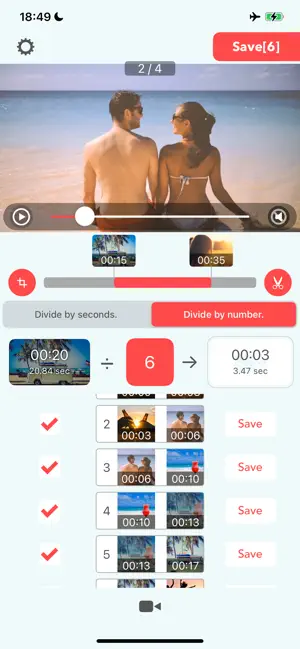
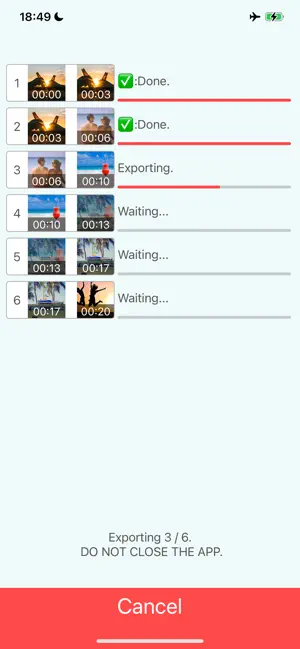
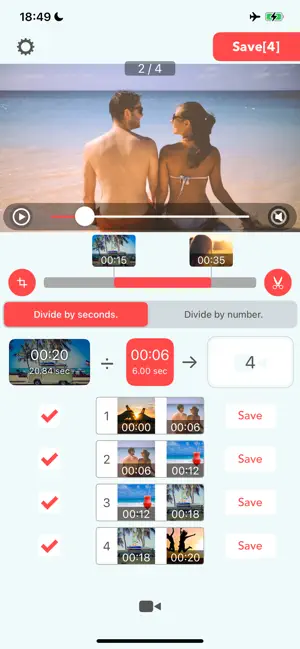
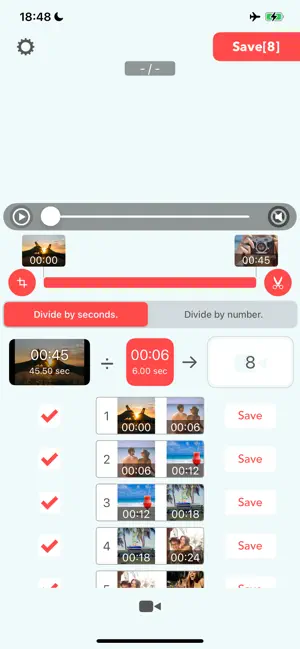
Have you ever encountered time restrictions when posting on social media, or needed to split videos into specific lengths for free plans on children’s video-sharing services? "VSplitter" is the perfect solution for you! VSplitter is a simple app that allows you to easily split your videos. 【How to Use】 It’s super easy to use: 1:Select your video 2:Choose the splitting method 3:Specify the number of splits or the duration (in seconds) 4:Tap the save button in the top right to save all the segments at once 【Additional Features】 ・Tap the scissor icon to specify the exact time range for splitting. ・Tap the crop icon to trim the video to a specified size, or rotate and flip it. ・Uncheck videos in the list to exclude them from the batch save. ・Use the save button next to each video to export individual clips. ・Tap each video to preview the split video segments. 【Splitting Methods】 You can split your video in two ways: ・Specify the duration (in seconds) ・Specify the number of splits 【Split by Duration】 The video will be split into segments of the specified duration. If the final segment is shorter than the specified time, it will remain as a shorter clip. 【Split by Number】 The video will be split into the specified number of segments. ----------------- [Term Of Use] https://policies.reafo.io/terms/vbooster/en/ [Privacy Policy] https://policies.reafo.io/privacy/en/
Ratings & reviews
4.2
9 ratings
What’s new
Version 2.5 · Updated October 15, 2026
Thank you for using our app! * Made minor improvements and bug fixes. * Added a paid subscription plan, “VSplitter Plus.”
App privacy
The developer, REAFO CO., LTD., reported these privacy practices to Apple.
Data Used to Track You
The following data may be used to track you across apps and websites owned by other companies:
- Identifiers: Device ID
- Usage Data: Advertising Data
Data Linked to You
The following data, which may be collected and linked to your identity, may be used for the following purposes:
- Identifiers: Device ID
Used for: Third-Party Advertising
Data Not Linked to You
The following data, which may be collected but is not linked to your identity, may be used for the following purposes:
- Usage Data: Advertising Data
- Diagnostics: Crash Data
Used for: Third-Party Advertising, Analytics
Alternatives to Video Splitter - VSplitter
Looking for apps like Video Splitter - VSplitter? Here are 6 similar apps on the App Store. The highest rated is Simple Video Cutter (5.0/5), and all 6 are free to download.
-
 SplitEase: Video Splitter
4.8
SplitEase: Video Splitter
4.8
-
 Video Splitter : Video Trimmer
4.7
Video Splitter : Video Trimmer
4.7
-
 Split Video Into Parts
4.5
Split Video Into Parts
4.5
-
 VideoSplitr split long videos
4.8
VideoSplitr split long videos
4.8
-
 Simple Video Cutter
5.0
Simple Video Cutter
5.0
-
 Video Splitter - Clip Cutter
4.8
Video Splitter - Clip Cutter
4.8
| App | Rating | Price | Last updated | Compare |
|---|---|---|---|---|
| Video Splitter - VSplitter | 4.2 / 5 (9 ratings) | Free | October 15, 2026 | |
| SplitEase: Video Splitter | 4.8 / 5 (36) | Free | Jun 6, 2026 | Compare |
| Video Splitter : Video Trimmer | 4.7 / 5 (3) | Free | Apr 11, 2024 | Compare |
| Split Video Into Parts | 4.5 / 5 (32) | Free | Oct 26, 2026 | Compare |
| VideoSplitr split long videos | 4.8 / 5 (5) | Free | Feb 3, 2026 | Compare |
| Simple Video Cutter | 5.0 / 5 (1) | Free | Jul 16, 2026 | Compare |
| Video Splitter - Clip Cutter | 4.8 / 5 (21) | Free | May 26, 2026 | Compare |