

Photos to PDF • Meizo
Julien Lacroix Productivity iPhoneiPadiPod touch
Photos to PDF • Meizo is a free Productivity app for iPhone and iPad by Julien Lacroix. Rated 5.0/5 from 1 ratings. Requires iOS 18.0.
- Rating
- 5.0
- 1 ratings
- Price
- Free
- on the App Store
- Size
- 13 MB
- Age 4+
- Updated
- Sep 13
- 2026 · v2026.6
Screenshots

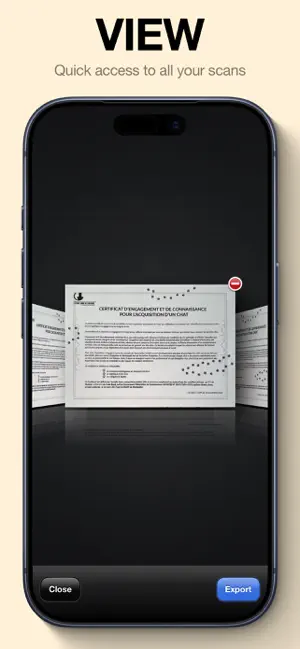


About Photos to PDF • Meizo
Meizo (明像) ⟶ « Clear image » No ads. No sign-up. No notifications. Just you and your documents. ■ MEIZO DESCRIPTION Some scanners feel bloated or intrusive. Meizo does only what you want: It lets you scan your documents quickly, cleanly, and privately. Just like your camera app does for your photos. No accounts. No cloud storage. No hidden surprises. Designed with a simple, vintage-inspired interface, Meizo helps you focus on what matters: capturing your documents with speed and clarity. ■ WHAT ABOUT YOUR PRIVACY? I believe privacy is a fundamental human right. That’s why I designed Meizo from the ground up without any external frameworks. There are no ads, no data mining, and nothing you scan is ever stored or shared. Everything stays on your device, just as it should. Simple. Honest. Yours. ■ ABOUT THE PRICE Most scanner apps on the App Store rely on weekly or monthly subscriptions. With Meizo, you can download the app and try it for free. If you like it, you can pay once and use it for life. $19.99. No subscriptions. Simple. An optional annual subscription is also available for $9.99/year. ■ HOW CAN YOU HELP ME? Since I don’t collect any data, your feedback means everything. Feel free to email me at [email protected] for suggestions, bugs, or just to say hello. I personally read and reply to every email. ********** ■ MEIZO PRO - Unlimited export - Support an indie developer. ********** Terms of Use: https://meizo.app/terms Privacy Policy: https://meizo.app/privacy
What’s new
Version 2026.6 · Updated September 13, 2026
Thank you so much for downloading and using Meizo! FEATURES & BUG FIXES - Improved automatic scanning with more responsive document detection. - Made automatic capture more reliable by waiting for stable framing, focus, and exposure. - Added a short pause between automatic scans to give you time to change pages. - Optimized image processing for smoother capture animations. - Fixed transition issues when opening a document immediately after scanning. HOW CAN YOU HELP ME? You can send me an email at [email protected] with any feedback, issues, or bugs related to this app or just to say “Hello!” I answer every email!
App privacy
The developer, Julien Lacroix, reported these privacy practices to Apple.
Data Not Linked to You
The following data, which may be collected but is not linked to your identity, may be used for the following purposes:
- Purchases: Purchase History
Used for: Analytics, App Functionality
Alternatives to Photos to PDF • Meizo
Looking for apps like Photos to PDF • Meizo? Here are 6 similar apps on the App Store. The highest rated is ScanOne - PDF Scanner (5.0/5), and all 6 are free to download.
-
 Scanify : Universal Scanner
-
 DocuMaster
-
 Relationship Tracker: WinPath
-
 My Photo Cleaner
4.7
My Photo Cleaner
4.7
-
 ScanOne - PDF Scanner
5.0
ScanOne - PDF Scanner
5.0
-
 Bridge2PS
3.0
Bridge2PS
3.0
| App | Rating | Price | Last updated | Compare |
|---|---|---|---|---|
| Photos to PDF • Meizo | 5.0 / 5 (1 rating) | Free | September 13, 2026 | |
| Scanify : Universal Scanner | – | Free | Oct 16, 2025 | Compare |
| DocuMaster | – | Free | May 1, 2026 | Compare |
| Relationship Tracker: WinPath | – | Free | Feb 4, 2026 | Compare |
| My Photo Cleaner | 4.7 / 5 (3) | Free | Apr 9, 2026 | Compare |
| ScanOne - PDF Scanner | 5.0 / 5 (1) | Free | Nov 24, 2025 | Compare |
| Bridge2PS | 3.0 / 5 (2) | Free | Jan 13, 2026 | Compare |