

PlaySafe Video
Brandon Smuin Entertainment iPhoneiPadiPod touch
PlaySafe Video is a free Entertainment app for iPhone and iPad by Brandon Smuin. Rated 5.0/5 from 1 ratings. Requires iOS 17.5. Updated August 26, 2025.
- Rating
- 5.0
- 1 ratings
- Price
- Free
- on the App Store
- Size
- 62 MB
- Age 4+
- Updated
- Aug 26
- 2025 · v1.2.0
Screenshots

About PlaySafe Video
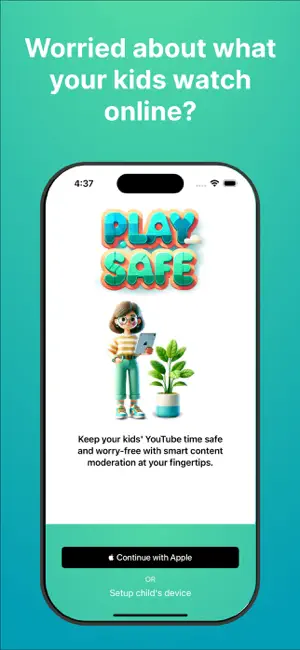
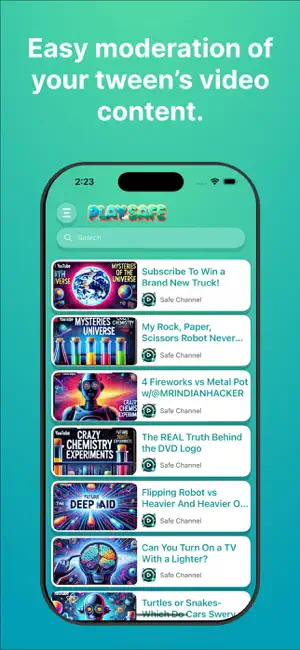
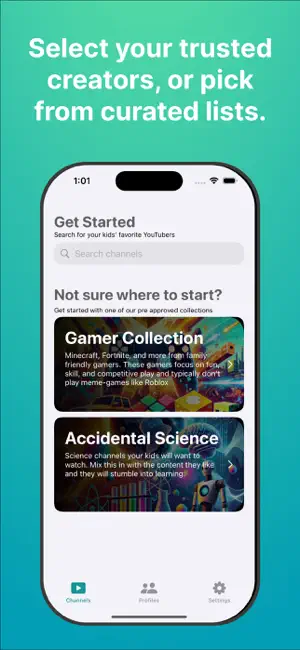
PlaySafe: Safe YouTube Viewing for Kids, Tweens, and Teens It's very difficult to keep inappropriate, harmful content out of YouTube feeds. If you're worried about what your kids view on YouTube, but still want them to access the valuable entertainment and education YouTube offers, PlaySafe is the answer. With PlaySafe, caregivers easily and quickly select trusted creators or pick from curated interest lists for their kids' profiles. Once on a kids' device, only the selected content is available for viewing. No autoplay, no recommended videos from unknown sources. Just what you've previously approved. Ensure that every video is age-appropriate and aligned with your family’s values. With a kid-friendly interface and robust parental controls, PlaySafe creates a safe and enjoyable viewing environment for children of all ages. Features: Custom Profiles for Each Child (Subscription Required for Unlimited Profiles) Easily create profiles for each child, tailored to their age and interests. Just add a nickname — no personal data required. Each profile provides a unique, personalized experience, allowing parents to customize approved content to fit each child’s individual preferences. Parental Control Dashboard The intuitive dashboard lets parents manage all settings in one place. You can add or remove approved channels, browse YouTube videos, and decide what your kids can watch. Approve Channels Search and select YouTube channels to approve for each child. If a video doesn’t meet your standards, you can block it with a single tap, preventing it from appearing in your child’s accessible content. Kid-Friendly Viewing Experience Once profiles are set up, kids can navigate their personalized viewing profile within the app. The colorful, engaging grid format makes it easy for kids to find videos and channels while keeping them from straying into unapproved content. Commitment to Privacy and Safety Play Safe is dedicated to protecting your family’s privacy. We only collect essential information needed for account setup, and we never store personal data about your children. Our app is designed to ensure that all family members can enjoy YouTube safely and confidently. How It Works: 1. Log in with Your Apple Account: Start by securely logging in to access and manage YouTube content. 2. Set Up Profiles: Add profiles with just a nickname to keep each child’s viewing experience personalized and separate. 3. Select Approved Content: Browse YouTube and add channels that you approve for your kids. 4. Enjoy a Safe Viewing Experience: Kids can navigate their approved content in a friendly, colorful interface designed just for them. Why PlaySafe? PlaySafe is designed by parents for parents, making it easier to guide your children’s online experience while they enjoy YouTube safely. With PlaySafe, you control what content is available, allowing your kids to explore age-appropriate videos without exposure to unsuitable, inappropriate, or low-quality content. Simple, Safe, and Fun Whether you’re tech-savvy or new to content moderation, PlaySafe’s intuitive setup makes it easy for everyone to get started. The simple controls, colorful design, and robust parental features make PlaySafe the ideal companion for family screen time. Take control of your family’s YouTube experience and keep screen time safe with PlaySafe. Download now and start your free trial! Terms of Use: https://www.apple.com/legal/internet-services/itunes/dev/stdeula/ Extended Terms of Use: https://playsafe.video/terms Privacy Policy: https://playsafe.video/privacy
What’s new
Version 1.2.0 · Updated August 26, 2025
- Fixes a bug where recommended videos outside of the whitelisted video could be clicked. - Removes the subscribe sheet after first signing in. Isn't triggered until the parent attempts to add more than 3 profiles.
App privacy
The developer, Brandon Smuin, reported these privacy practices to Apple.
Data Not Linked to You
The following data, which may be collected but is not linked to your identity, may be used for the following purposes:
- Contact Info: Email Address
- Identifiers: User ID, Device ID
Used for: App Functionality
Alternatives to PlaySafe Video
Looking for apps like PlaySafe Video? Here are 6 similar apps on the App Store. The highest rated is Nuggzy (5.0/5), and all 6 are free to download.
-
 Safe Stream App
3.7
Safe Stream App
3.7
-
 Visor: Family Approved YouTube
4.7
Visor: Family Approved YouTube
4.7
-
 Nuggzy
5.0
Nuggzy
5.0
-
 Fishtank - Curated Screentime
5.0
Fishtank - Curated Screentime
5.0
-
 Vidopick
5.0
Vidopick
5.0
-
 LearnWatchGo
4.0
LearnWatchGo
4.0
| App | Rating | Price | Last updated | Compare |
|---|---|---|---|---|
| PlaySafe Video | 5.0 / 5 (1 rating) | Free | August 26, 2025 | |
| Safe Stream App | 3.7 / 5 (3) | Free | Feb 5, 2026 | Compare |
| Visor: Family Approved YouTube | 4.7 / 5 (7) | Free | Sep 2, 2026 | Compare |
| Nuggzy | 5.0 / 5 (2) | Free | Feb 8, 2026 | Compare |
| Fishtank - Curated Screentime | 5.0 / 5 (1) | Free | Jul 21, 2026 | Compare |
| Vidopick | 5.0 / 5 (5) | Free | Jul 11, 2026 | Compare |
| LearnWatchGo | 4.0 / 5 (15) | Free | Jun 11, 2025 | Compare |
Compare PlaySafe Video with the top alternatives: ratings, updates, ASO score and keyword gaps →