

Novelwave: An Audiobook Player
Mihai Petrenco Book iPhoneiPadiPod touchApple Watch
Novelwave: An Audiobook Player is a free Book app for iPhone and iPad by Mihai Petrenco. Rated 4.8/5 from 68 ratings. Requires iOS 17.0.
- Rating
- 4.8
- 68 ratings
- Price
- Free
- on the App Store
- Size
- 40 MB
- Age 4+
- Updated
- Nov 13
- 2026 · v3.3.0
Screenshots
Save to Pinterest


About Novelwave: An Audiobook Player
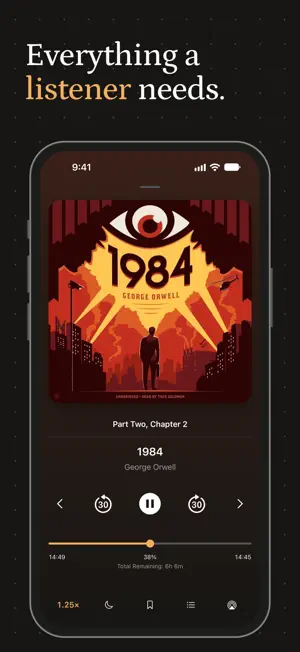
Novelwave plays the audiobooks you already own. Bring in your DRM-free files, organize them on shelves, and pick up exactly where you left off, on your iPhone, your iPad, your Apple Watch or in the car. IMPORT FROM FILES OR ICLOUD DRIVE • M4B, M4A, MP3, AAC, FLAC, WAV, AIFF, Ogg Opus and MP4 • Import many files as one book or several, and check each book’s title, author and cover before saving • Pick files and folders from iCloud Drive together, each folder becoming its own book • Drop files or whole folders onto your library, or open audiobooks from Files and other apps • Books in iCloud Drive stay there until you press play, so they don’t fill up your iPhone EVERYTHING A LISTENER NEEDS • Any speed from 0.5× to 6×, in 0.05× steps • A sleep timer from 5 to 90 minutes, or at the end of a chapter or file, counting down on your Lock Screen and in the Dynamic Island • Skip back and forward 5 to 45 seconds, and rewind a little when you pause • Jump to any chapter, and save bookmarks with names and notes in one tap • Autoplay the next book on the shelf when one ends • Control playback from the Lock Screen, AirPlay devices and your headphones IPAD • A layout made for the bigger screen, with your shelves in a sidebar and your library as a grid of covers • More than one window, side by side • Drag covers to rearrange your shelves, or drag a book out to another app • Menu bar commands with keyboard shortcuts, and controls that respond to the pointer APPLE WATCH • Control what’s playing on your iPhone from your wrist • Send audiobooks to your Apple Watch and leave your phone at home • Change the speed, set a sleep timer, jump between chapters and dictate bookmark notes • Turn the volume with the Digital Crown • Carry on listening on whichever device you pick up • A Now Playing complication and Smart Stack widget SEE HOW YOU LISTEN • Your listening time by week, month, year or all time • The books you finished, the days you listened and your speeds • Share your stats as a story image • Year in Listening sums up your year when a new one begins • Leave a book out of your stats, change when you finished it, and keep its time after you delete it CARPLAY, SIRI AND SHORTCUTS • In CarPlay, continue where you left off or browse your shelves, then change chapters and speed from Now Playing • Ask Siri to resume, skip, change chapters, set the speed, add a bookmark or start a sleep timer • Shortcuts actions for all of it, and your audiobooks in Spotlight SHELVES INSIDE SHELVES • Group books by author, series or mood, as deep as you like • Show each shelf as a grid of covers or a list • Hide a shelf behind Face ID, Touch ID or your passcode, and keep its books out of Search, Stats and widgets • Sort by title or date, filter by progress, and search across titles, authors and shelves EDIT EVERY DETAIL • Change the title, author, description, genre, composer, year and finish date • Add covers from Photos, Files or the clipboard, even for books still in iCloud PRIVATE BY DESIGN • Progress, shelves, bookmarks and listening stats sync through your own iCloud account • Novelwave only sees its own folder in iCloud Drive • No account to create AND MUCH MORE • Now Playing widgets for your Home Screen, plus Play/Pause and Sleep Timer controls for Control Center • Export your whole library to Files, bookmarks and notes included • Light, dark, true-black Midnight or system appearance, and a Minimal style without illustrations • Two alternate app icons, including the original Novelwave icon • In English, German, French, Spanish, Portuguese, Italian, Romanian and Russian • Built for VoiceOver, Larger Text and Increase Contrast Your next chapter starts here.
Ratings & reviews
4.8
68 ratings
What’s new
Version 3.3.0 · Updated November 13, 2026
iPad & Seven More Languages iPad A layout made for the bigger screen, with your tabs and shelves in a sidebar, and shelves and search results as grids of covers. Hidden Shelves Hide a shelf behind Face ID, Touch ID or your passcode. Its books stay out of Search, Stats, widgets, CarPlay and Apple Watch, and show as Private Audiobook on the Lock Screen. Importing, Simplified Everything happens on one screen: choose whether your files become one book or several, and check each book's title, author and cover before saving. New books are highlighted in your library once they're in. A New iCloud Drive Browser Pick files and folders together, search every folder at once, and sort the list. Each folder you pick becomes its own book. Drag and Drop Drop audio files or whole folders onto your library to import them. On iPad, you can also drag covers to reorder or move them, and drag a book out to another app. More Than One Window Open Novelwave side by side, with settings and imports kept in step across windows. Keyboard and Pointer Menu bar commands with shortcuts like ⌘O to import and ⌘, for Settings, and controls that light up under the pointer. A Player with Room to Breathe Chapters and bookmarks in a column beside the Player when the window is wide enough, and speed in a popover. A New Player on Apple Watch Laid out like Now Playing, over your cover's own colors. Turn the volume with the Digital Crown, swipe left for the sleep timer, speed, chapters and bookmarks, and see the chapter playing in a complication. Grid or List Show your shelves as a grid of covers or as a list, on iPhone too. Pick one from a shelf's More menu. Midnight A true-black theme beside Light and Dark, which OLED screens draw with their pixels off. Seven More Languages Use Novelwave on iPhone, iPad and Apple Watch in German, French, Spanish, Brazilian Portuguese, Italian, Romanian or Russian, and pick its language in Settings. What's New is translated too. Better with VoiceOver and Larger Text Clearer labels, layouts that adapt at the largest text sizes, bigger tap targets, and stronger colors when Increase Contrast is on. Autoplay Next Book When a book ends, the next one on its shelf or in Library starts playing. Turn it on in Settings. Edits Show Up Straight Away Change a book's details and the open Player follows along. Stats That Outlast a Book Delete a book and its listening time stays in Stats, where you can still edit its details.
App privacy
The developer, Mihai Petrenco, reported these privacy practices to Apple.
Data Not Collected
The developer does not collect any data from this app.
Alternatives to Novelwave: An Audiobook Player
Looking for apps like Novelwave: An Audiobook Player? Here are 6 similar apps on the App Store. The highest rated is Spine - Audiobook Player (4.7/5), and all 6 are free to download.
-
 Spine - Audiobook Player
4.7
-
 Audiobook Player: MP3 M4A M4B
4.7
-
 Audiobook Player Offline Books
4.4
-
 BookPlayer: MP3/M4B/M4A/MP4
4.5
-
 AudioBooks - MP3 & M4B player
4.3
-
 Booken
4.5
| App | Rating | Price | Last updated | Compare |
|---|---|---|---|---|
| Novelwave: An Audiobook Player | 4.8 / 5 (68 ratings) | Free | November 13, 2026 | |
| Spine - Audiobook Player | 4.7 / 5 (32) | Free | Nov 3, 2026 | Compare |
| Audiobook Player: MP3 M4A M4B | 4.7 / 5 (23) | Free | Nov 12, 2026 | Compare |
| Audiobook Player Offline Books | 4.4 / 5 (7) | Free | Jul 31, 2025 | Compare |
| BookPlayer: MP3/M4B/M4A/MP4 | 4.5 / 5 (248) | Free | May 12, 2026 | Compare |
| AudioBooks - MP3 & M4B player | 4.3 / 5 (20) | Free | Nov 11, 2026 | Compare |
| Booken | 4.5 / 5 (8) | Free | Jan 2, 2025 | Compare |