

Game Wall: game collection
Dinamic Area Software S.L Entertainment iPhoneiPadiPod touch
Game Wall: game collection is a free Entertainment app for iPhone and iPad by Dinamic Area Software S.L. Rated 5.0/5 from 1 ratings. Requires iOS 16.0.
- Rating
- 5.0
- 1 ratings
- Price
- Free
- on the App Store
- Size
- 69 MB
- Age 4+
- Updated
- Oct 10
- 2026 · v1.19.0
Screenshots

About Game Wall: game collection
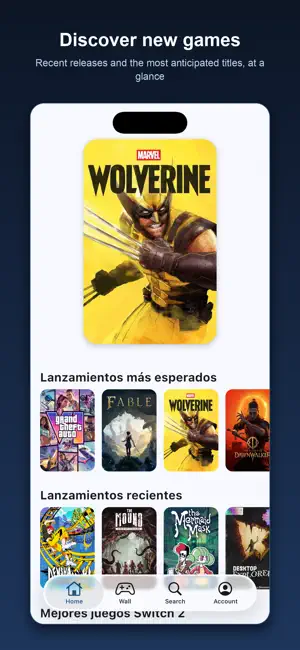
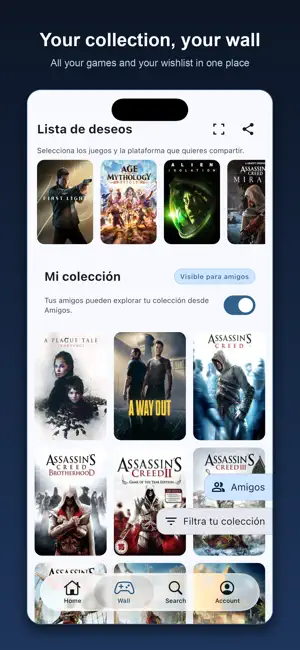
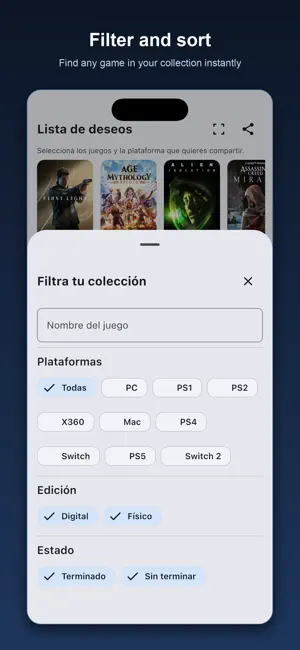
GameWall is your personal video game catalog: organize your collection, your wishlist and your backlog, and share them with your friends. YOUR COLLECTION, YOUR WAY A wall with every cover you own, grouped by platform with collapsible sections, or by series, with the covers fanned out. A copy counter when you own the same game on several consoles, and filters by platform, edition, status or name. ADD GAMES IN SECONDS Search by title, scan the barcode on the box, or sweep your whole shelf with the camera and review what it recognized before adding it. YOUR AMIIBO TOO Scan an amiibo by tapping your phone, or search for it by name in the catalog, and add it to your collection or your wishlist. Every figure has its own page, with the compatible games per console and what it does in each one. Group your amiibo collection by series or by amiibo line, just like your games. WISHLIST AND BACKLOG Save what you want to buy and what you still have to play. Share your wishlist by link: perfect for gifts, and for not buying the same game twice. FRIENDS Invite your friends, browse their collection and wishlist, and decide whether yours is visible. DISCOVER Curated sections with the most anticipated releases, new arrivals and the best of each platform. STATS How many games you own and how they split across your consoles. Works with collections across PlayStation (PS5, PS4, PS3, PS2, PSX, PSP, Vita), Nintendo (Switch, Wii U, Wii, GameCube, N64, SNES, NES, 3DS, DS, Game Boy), Xbox (Series, One, 360, original), PC and retro consoles. Built natively for iPhone and iPad, with a Liquid Glass tab bar on iOS 26. Game data provided by IGDB.
What’s new
Version 1.19.0 · Updated October 10, 2026
• Your amiibo wall now has its own filter, behind the same button as your games: show only figures, cards, bands, yarn or block amiibo, pick one or more series, or search by name. It only offers the types and series you own, works with the by-series and by-line views, and applies to your wishlist too. Active filters show up as chips under “My collection” and clear with a tap. • Amiibo search can now filter by yarn and block amiibo as well. • The Super Nintendo World Invincible band can now be marked as “I have it”, with its own page even though it shares a chip with the Mario band: you can have both. If it was already on your wishlist, it moves to your collection with nothing lost. • Amiibo you add from search show up on your wall right away, no restart needed. Same when you undo, edit, remove or share one. • On an amiibo's page, “I have it” and “I want it” now tell you when you need to sign in or when something went wrong, and you can retry right there. • Typing is smooth again: the cursor no longer jumps to the start mid-word when searching games, filtering platforms, setting a friend's nickname or accepting an invite.
App privacy
The developer, Dinamic Area Software S.L, reported these privacy practices to Apple.
Data Not Collected
The developer does not collect any data from this app.
Alternatives to Game Wall: game collection
Looking for apps like Game Wall: game collection? Here are 6 similar apps on the App Store. The highest rated is My Game Tracker (5.0/5), and all 6 are free to download.
-
 My Game Tracker
5.0
My Game Tracker
5.0
-
 GamrX
GamrX
-
 Gamers Companion
-
 GameTime: Game Library Tracker
5.0
GameTime: Game Library Tracker
5.0
-
 Video Game Tracker - VGT
4.8
Video Game Tracker - VGT
4.8
-
 Backloggr: Video Game Backlog
5.0
Backloggr: Video Game Backlog
5.0
| App | Rating | Price | Last updated | Compare |
|---|---|---|---|---|
| Game Wall: game collection | 5.0 / 5 (1 rating) | Free | October 10, 2026 | |
| My Game Tracker | 5.0 / 5 (2) | Free | Jun 27, 2026 | Compare |
| GamrX | – | Free | Jul 14, 2025 | Compare |
| Gamers Companion | – | Free | Jan 4, 2026 | Compare |
| GameTime: Game Library Tracker | 5.0 / 5 (9) | Free | Oct 4, 2026 | Compare |
| Video Game Tracker - VGT | 4.8 / 5 (6) | Free | Sep 25, 2026 | Compare |
| Backloggr: Video Game Backlog | 5.0 / 5 (24) | Free | Oct 22, 2026 | Compare |