

Pictopoem
Yingtao Guo Entertainment iPhoneiPadiPod touch
Pictopoem is a free Entertainment app for iPhone and iPad by Yingtao Guo. Rated 5.0/5 from 4 ratings. Requires iOS 17. Updated August 19, 2026.
- Rating
- 5.0
- 4 ratings
- Price
- Free
- on the App Store
- Size
- 46 MB
- Age 4+
- Updated
- Aug 19
- 2026 · v1.12.0
Screenshots



About Pictopoem
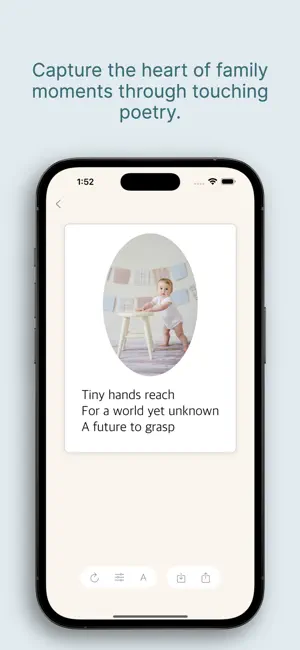
Unleash your creativity with Pictopoem! Turn any photo into a beautiful short poem using the power of AI. Whether it's a landscape, a city view, or a cherished moment with loved ones, Pictopoem transforms your images into poetic expressions, perfect for sharing with friends or on social media. With just a few taps, discover new perspectives and emotions hidden in your photos. Upgrade to our premium membership for exclusive layouts, unlimited poem generation, and more. Features: AI-generated short poems from your photos (3 photo analyses daily for non-premium users). Custom fonts, colors and frames Share your poetic creations with ease Premium option to unlock unlimited creativity and exclusive features Capture life's moments, and let the poetry flow with Pictopoem! ----------- Terms of Service: https://www.apple.com/legal/internet-services/itunes/dev/stdeula/ Privacy Policy: https://www.pictopoem.com/privacy-policy.html
What’s new
Version 1.12.0 · Updated August 19, 2026
Thanks for using Pictopoem! Chinese poems are here. • Write in Simplified or Traditional Chinese — each is composed on its own terms, not transcoded from the other. • Eight forms to choose from: five- and seven-character jueju, lüshi, ci, ancient-style verse, modern verse, doggerel, and a single line. • Chinese poems stand vertically by default, set in an embedded kai typeface made for verse, with adjustable line spacing. Also new • Not in the mood for a poem? The new one-line mode writes a single sentence meant to stay with you — in English, Japanese or Chinese. • Your poems no longer have to follow your phone's language. Pick it under Settings → Poem Language, so you can get a haiku on an English phone, or an English poem on a Japanese one. • Japanese poems now stand vertically by default, and you can tune the line spacing to taste. • Haiku, tanka, waka, chōka, senryū — and every Chinese form — now come with a one-line explanation, so you know what you're choosing. • Print your poem cards straight from the app with AirPrint, and shared images are sharper. • A new app icon. • Open source licenses for the bundled typefaces now live under Settings. Fixed • The Age Type setting now actually reaches the poem — it had been silently dropped before it ever got there. • A garbled font name in the font picker, and a typo in the Japanese text on shared poem cards.
App privacy
The developer, Yingtao Guo, reported these privacy practices to Apple.
Data Not Collected
The developer does not collect any data from this app.
Alternatives to Pictopoem
Looking for apps like Pictopoem? Here are 6 similar apps on the App Store. The highest rated is PoetryCam (5.0/5), and all 6 are free to download.
-
 PoetryCam
5.0
PoetryCam
5.0
-
 PoeticÁI: Write a Poem
4.2
PoeticÁI: Write a Poem
4.2
-
 PhotoPoem- AI Poem Generator
-
 Bongo VIP
-
 VISTA - Movie Taste Profiles
5.0
VISTA - Movie Taste Profiles
5.0
-
 Versiviva
| App | Rating | Price | Last updated | Compare |
|---|---|---|---|---|
| Pictopoem | 5.0 / 5 (4 ratings) | Free | August 19, 2026 | |
| PoetryCam | 5.0 / 5 (3) | Free | Dec 14, 2025 | Compare |
| PoeticÁI: Write a Poem | 4.3 / 5 (4) | Free | Sep 18, 2026 | Compare |
| PhotoPoem- AI Poem Generator | – | Free | Jul 29, 2026 | Compare |
| Bongo VIP | – | Free | Apr 4, 2025 | Compare |
| VISTA - Movie Taste Profiles | 5.0 / 5 (3) | Free | Mar 17, 2026 | Compare |
| Versiviva | – | Free | Mar 22, 2026 | Compare |
Compare Pictopoem with the top alternatives: ratings, updates, ASO score and keyword gaps →