

DigiFrame: Digital Photo Frame
Marc Aupont Photo & Video iPhoneiPadiPod touch
DigiFrame: Digital Photo Frame is a free Photo & Video app for iPhone and iPad by Marc Aupont. Requires iOS 17.0. Updated October 23, 2026.
- Price
- Free
- on the App Store
- Size
- 12 MB
- Age 4+
- Updated
- Oct 23
- 2026 · v2.1
Screenshots



About DigiFrame: Digital Photo Frame
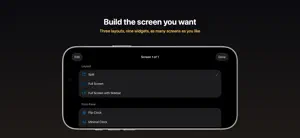
Give an old iPad a second life. DigiFrame turns the iPad or iPhone you stopped carrying into a digital photo frame that also shows the time, the weather and what is next on your calendar, arranged the way you want them. Stand it on a shelf, plug it in, and let your photos play. The screen stays awake while the frame is showing. WHY A FRAME APP INSTEAD OF A FRAME • No hardware to buy. The device in the drawer is the frame. • No account to create and nothing to upload. Your photos stay in your Photos library, on your device. • Works on the iPhone too, standing on a nightstand or a desk. BUILD THE SCREEN YOU WANT Standby mode lets you design what the frame shows. Choose a layout — Full Screen, Split, or Full Screen with Sidebar — then fill each pane with widgets. Build as many screens as you like and swipe between them. Swipe up and down inside a pane to move through the widgets stacked there. Free widgets: • Photo — your album, edge to edge • Minimal Clock • Date • Greeting With PRO: • Digital, Analog and Flip clocks, in four themes • Weather — current conditions and the days ahead • Calendar — what's next, from the calendars you choose PHOTOS ON YOUR TERMS Every album keeps its own playback settings: • Order — drag photos into any order, sort by the date each was taken, or shuffle • Fit — fill the screen, or show the whole photo without cropping • Zoom — a slow drift across each photo: subtle, standard, or off • Transition — crossfade, slide, or none • Speed — how long each photo holds When a photo is cropped to fill the screen, DigiFrame crops around the people in it rather than the centre, so faces near an edge stay in frame. LOCAL AND CLOUD ALBUMS Keep albums on the device, or make them cloud albums and they sync across your devices through iCloud: set up the frame once, then add photos from the phone in your pocket. Cloud albums stay readable even when iCloud is briefly unreachable. IN TWELVE LANGUAGES English, Arabic, French, German, Haitian Creole, Hindi, Italian, Japanese, Korean, Portuguese (Brazil), Simplified Chinese and Spanish. Choose one in Settings, whatever your device is set to. DIGIFRAME PRO PRO unlocks the Digital, Analog and Flip clocks, the Weather and Calendar widgets, the grid photo layout, and photo overlays that put the clock, date and your next event over your pictures. DigiFrame PRO is an auto-renewing subscription, available monthly or annually. Payment is charged to your Apple Account at confirmation of purchase. It renews automatically unless cancelled at least 24 hours before the end of the current period, and you can manage or cancel it any time in your Apple Account settings. Terms of Use: https://www.apple.com/legal/internet-services/itunes/dev/stdeula/ Privacy Policy: https://digiframe.netlify.app/privacy-policy Weather data provided by Apple Weather.
What’s new
Version 2.1 · Updated October 23, 2026
Mostly fixes this time. TRANSLATIONS German text was missing its umlauts, so some words read as misspellings. Arabic showed stray letters where the opacity percentage belongs. The Portuguese was European rather than Brazilian, and pointed you at a Settings app by a name iOS does not use. German and Chinese switched between formal and informal address from one screen to the next. All of that is corrected, along with smaller punctuation, spacing and wording repairs in French, Italian, Japanese and Chinese. PRIVACY Settings has a new Privacy section with a single switch: Share Anonymous Usage Data. Left on, DigiFrame counts which displays and widgets get used, so the next version improves the parts people actually use. No account, no photos, no names, no location, and nothing that identifies you or your device. Turn it off and nothing is sent. ALSO DigiFrame can now report a crash when one happens, so the problems that do occur get found and fixed instead of going unnoticed.
App privacy
The developer, Marc Aupont, reported these privacy practices to Apple.
Data Not Linked to You
The following data, which may be collected but is not linked to your identity, may be used for the following purposes:
- Purchases: Purchase History
- Usage Data: Product Interaction
- Diagnostics: Crash Data
Used for: Analytics
Alternatives to DigiFrame: Digital Photo Frame
Looking for apps like DigiFrame: Digital Photo Frame? Here are 6 similar apps on the App Store. The highest rated is EZ Photo Frame (4.4/5), and all 6 are free to download.
-
 Digital Frame Lite
-
 Storyframe - smart photo frame
-
 EZ Photo Frame
4.4
-
 Pad Frame
-
 Portrait | Photo Frame
1.0
-
 Family Frame: Photo Display
4.2
| App | Rating | Price | Last updated | Compare |
|---|---|---|---|---|
| DigiFrame: Digital Photo Frame | – | Free | October 23, 2026 | |
| Digital Frame Lite | – | Free | Jul 31, 2026 | Compare |
| Storyframe - smart photo frame | – | Free | Jan 7, 2025 | Compare |
| EZ Photo Frame | 4.4 / 5 (17) | Free | Mar 23, 2026 | Compare |
| Pad Frame | – | Free | Aug 1, 2026 | Compare |
| Portrait | Photo Frame | 1.0 / 5 (1) | Free | Jun 16, 2026 | Compare |
| Family Frame: Photo Display | 4.2 / 5 (6) | Free | Jul 2, 2024 | Compare |