

BlurApp: Private Photo Blur
Avi Shany Photo & Video iPhoneiPadiPod touch
BlurApp: Private Photo Blur is a paid Photo & Video app for iPhone and iPad by Avi Shany. Rated 5.0/5 from 3 ratings. Requires iOS 16.6.
- Rating
- 5.0
- 3 ratings
- Price
- 0.99 USD
- on the App Store
- Size
- 5 MB
- Age 4+
- Updated
- Sep 2
- 2026 · v3.0
Screenshots


About BlurApp: Private Photo Blur
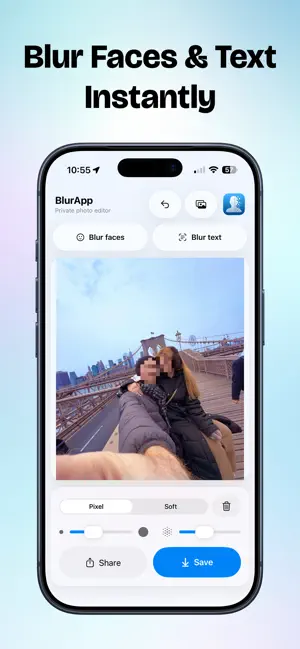
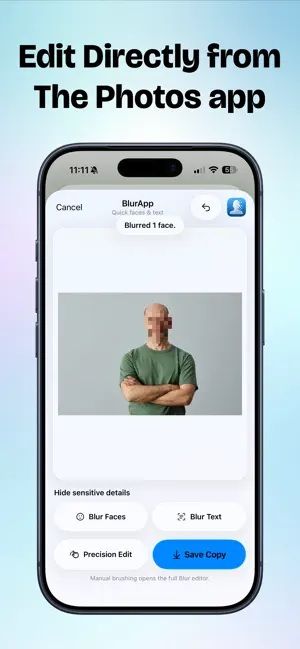
Hide faces, text, and private details before sharing a photo. BlurApp is a focused privacy photo editor that makes it easy to blur sensitive information in seconds. Automatically detect faces and text with one tap, or use the manual brush when you need precise control. You can even use BlurApp directly from the Photos share sheet for fast face and text blurring without opening the full app. AUTOMATIC FACE & TEXT BLUR • Detect and blur faces with one tap • Find and blur text in screenshots, documents, IDs, and photos • On-device detection keeps your images private • Use the Photos share extension for quick edits PRECISE MANUAL EDITING • Draw directly over any detail you want to hide • Adjust the brush size for more control • Change the blur strength to suit each photo • Undo individual edits or clear everything and start again • Open the full editor from the share extension when you need manual precision TWO BLUR STYLES • Mosaic Blur — pixelate faces, text, license plates, and other sensitive details • Gaussian Blur — apply a smooth, natural-looking blur effect QUICKLY EDIT FROM PHOTOS Open an image in Photos, select BlurApp from the share sheet, and blur detected faces or text immediately. Save a new copy or continue in the full app for detailed manual editing. PRIVATE BY DESIGN • All image processing happens on your device • Your photos are never uploaded to a server • No account or sign-up required • No advertising or tracking • No subscription BlurApp is ideal for hiding faces, names, addresses, messages, license plates, account details, and other private information before posting or sending an image. Choose a photo, protect what matters, and share with confidence.
What’s new
Version 3.0 · Updated September 2, 2026
What’s New in Version 3.0 BlurApp has been completely redesigned for a faster, simpler, and more private editing experience. • Automatically detect and blur faces with one tap • Automatically find and blur text in photos and screenshots • Blur faces and text directly from the Photos share sheet • Apply Gaussian or mosaic blur manually • Adjust brush size and blur strength • New onboarding experience • Redesigned interface with Light and Dark Mode support • Native Liquid Glass design on supported iOS versions • Improved performance, reliability, and privacy
App privacy
The developer, Avi Shany, reported these privacy practices to Apple.
Data Used to Track You
The following data may be used to track you across apps and websites owned by other companies:
- Usage Data: Advertising Data
Alternatives to BlurApp: Private Photo Blur
Looking for apps like BlurApp: Private Photo Blur? Here are 6 similar apps on the App Store. The highest rated is scallion - AI Compressor (5.0/5), and 4 of the 6 are free to download.
-
 scallion - AI Compressor
5.0
scallion - AI Compressor
5.0
-
 Photo Information:GPS, Exif...
1.7
Photo Information:GPS, Exif...
1.7
-
 Timestamp Camera: GPS Map
4.6
Timestamp Camera: GPS Map
4.6
-
 Remote Camera App for Selfie
3.0
Remote Camera App for Selfie
3.0
-
 Slo-mo-Remover
3.0
Slo-mo-Remover
3.0
-
 ElePhotos
5.0
ElePhotos
5.0
| App | Rating | Price | Last updated | Compare |
|---|---|---|---|---|
| BlurApp: Private Photo Blur | 5.0 / 5 (3 ratings) | 0.99 USD | September 2, 2026 | |
| scallion - AI Compressor | 5.0 / 5 (2) | 2.99 USD | May 16, 2024 | Compare |
| Photo Information:GPS, Exif... | 1.7 / 5 (6) | Free | Oct 23, 2026 | Compare |
| Timestamp Camera: GPS Map | 4.6 / 5 (65) | Free | Oct 30, 2024 | Compare |
| Remote Camera App for Selfie | 3.0 / 5 (2) | 3.99 USD | Sep 20, 2025 | Compare |
| Slo-mo-Remover | 3.0 / 5 (2) | Free | Oct 12, 2026 | Compare |
| ElePhotos | 5.0 / 5 (1) | Free | Dec 20, 2024 | Compare |