

Screen Time - AppStops
Yoshiharu Yamada Productivity iPhoneiPadiPod touch
Screen Time - AppStops is a paid Productivity app for iPhone and iPad by Yoshiharu Yamada. Rated 5.0/5 from 3 ratings. Requires iOS 17.5.
- Rating
- 5.0
- 3 ratings
- Price
- 4.99 USD
- on the App Store
- Size
- 11 MB
- Age 4+
- Updated
- Mar 25
- 2025 · v1.3.3
Screenshots



About Screen Time - AppStops
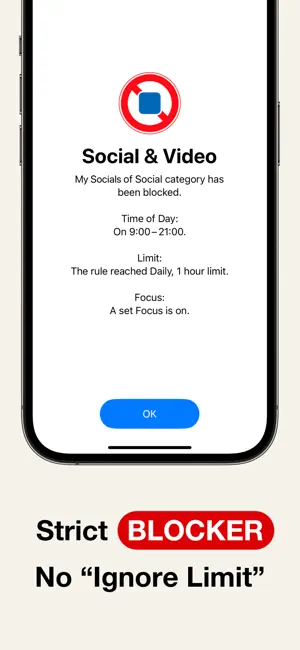
AppStops is a powerful tool to control your phone use. Based on your rules, it blocks all app actions except closing. It’s a one-time purchase—no subscriptions, no hidden fees. Just a simple tool you can rely on forever. ▼ Features • Strict blocking screen with no “Ignore Limit” button. • Block apps while in Focus Mode, e.g., “No entertainment apps during Work Mode.” • Set daily or weekly app limits, e.g., “Social apps limited to 1 hour per day.” • Usage time notifications, e.g., “20% (12 min) of today’s social app time remaining.” • Time-based app restrictions, e.g., “No video apps from 9 AM to 5 PM.” • Temporary app blocking with a timer, e.g., “Focus on studying for the next 90 minutes.” • Manually block apps via Control Center (*1), Action Button (*2), Lock Screen (*3), or Shortcuts app. ▼ User Guide The app includes user guides with images and texts for all rules, so you can use it with confidence. ▼ If You Need to Urgently Disable App Blocking By uninstalling the AppStops app, you can regain access to blocked apps and websites. If uninstalling does not disable the block (a rare occurrence due to OS issues), please reinstall the AppStops app and go to Settings App > Screen Time > APPS WITH SCREEN TIME ACCESS, then toggle off the switch for AppStops. ------------------------------------------------------------ *1: Control Center is available on iOS 18 or later *2: Action Button is available only on devices with an Action Button running iOS 18 or later. *3: Lock Screen control is available only on iPhone devices running iOS 18 or later. ※ The system screen for selecting apps and web domains may crash sometimes. While you can avoid crashes by following the steps outlined in the Help section, please be aware of this issue before making your purchase. Terms of Use https://yoshiharustudio.com/appstops/terms-of-use.html Privacy Policy https://yoshiharustudio.com/appstops/privacy-policy.html Specified Commercial Transaction Act https://yoshiharustudio.com/appstops/specified-commercial-transactions-act.html
What’s new
Version 1.3.3 · Updated March 25, 2025
- Fix shortcuts app error.
App privacy
The developer, Yoshiharu Yamada, reported these privacy practices to Apple.
Data Linked to You
The following data, which may be collected and linked to your identity, may be used for the following purposes:
- User Content: Customer Support
Used for: App Functionality
Data Not Linked to You
The following data, which may be collected but is not linked to your identity, may be used for the following purposes:
- Usage Data: Product Interaction
- Diagnostics: Crash Data, Performance Data
- User Content: Other User Content
Used for: Analytics, App Functionality