

PhotoForge 3D Capture
Eidria, Inc. Graphics & Design iPhoneiPadiPod touch
PhotoForge 3D Capture is a free Graphics & Design app for iPhone and iPad by Eidria, Inc. Rated 5.0/5 from 3 ratings. Requires iOS 17.4.
- Rating
- 5.0
- 3 ratings
- Price
- Free
- on the App Store
- Size
- 211 MB
- Age 4+
- Updated
- Apr 22
- 2026 · v2.0.0
Screenshots

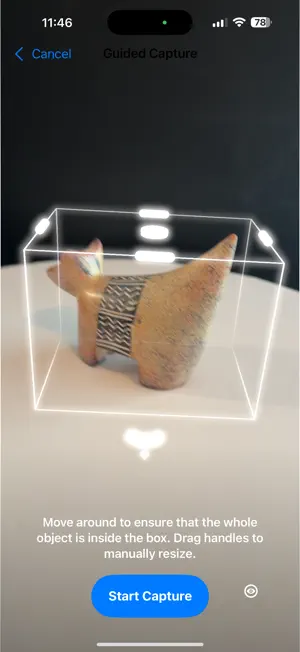


About PhotoForge 3D Capture
14 day free trial! Imagine snapping a few photos and making anything come to life in 3D. With PhotoForge 3D Capture, you can turn ordinary photos into stunningly realistic 3D objects. The possibilities are limitless: Print a perfect three-dimensional physical replica. Drop an object into the real world via augmented reality. Effortlessly create 3D models for games or illustrations. Enhance graphic designs with realistic 3D elements. Add interactive, rotatable products and content to an online store. No tech expertise or uploads required, just your smartphone, your imagination, and PhotoForge 3D Capture. Whether you're an artist, game designer, product developer, architect, or hobbyist, PhotoForge 3D Capture adapts to your workflow and empowers you with the magic of photogrammetry. Practical Uses • Showcase Your Products in AR - Quickly create lifelike augmented reality experiences so customers can explore your art, furniture, or products right in their own space—no showroom needed. • Replace Hard-to-Find Parts - Easily scan and 3D-print replacement parts for home repairs or custom projects—saving you time, money, and frustration. • Bring Reality into Your Games - Capture real-world places and textures to create immersive, realistic environments for game designs. • Rapid Production & Prototyping - Quickly scan a sample item and generate perfect digital replicas ready for production runs or rapid prototyping, streamlining your entire workflow. • Make Your VR & XR Creations Realistic - Capture physical objects and seamlessly bring them into your virtual reality worlds or XR experiences, impressing clients and audiences with unmatched authenticity. • DIY Fun with 3D Printing - Turn anything from quirky decor to a collectable into a personalized 3D-printed creation. • Preview Items Before Buying - Out shopping for home decor? Scan an item and instantly preview it in your home or share it with someone else for approval, ensuring it’s the perfect fit before purchase. Advanced Features • Easy, On-the-Go Capture - Scan objects anywhere using your iPhone, quickly review them, then refine them using PhotoForge 3D Studio on your Mac, whether at home, in a workshop, or on location. • Private & Secure Workflow - Your images and scans stay secure, with no cloud uploading. Work confidently, knowing you have complete control over your creations. • LiDAR Precision - Easily capture detailed, accurate 3D models directly on your LiDAR-enabled iPhone, ensuring precise dimensions and realistic textures. • Seamless Mac Integration - Effortlessly scan directly to your Mac (or upload later) for detailed refinements with PhotoForge 3D Studio. Adjust scale, position, rotation, and remove unwanted artifacts with intuitive desktop tools. • Multiple Output Formats - Export your creations in the formats you need most (USDZ, STL, OBJ) for AR, 3D printing, virtual reality, gaming, and more. • Instant Feedback with AR Previews - View your creations instantly in AR on your iPhone, making edits fast and easy, so your projects always look exactly how you want them. Monthly and yearly subscriptions available. Contact: https://www.photoforge3d.com/contact Support: https://www.photoforge3d.com/faqs Privacy Policy: https://www.photoforge3d.com/capture-privacy-policy Terms and Conditions: https://www.apple.com/legal/internet-services/itunes/dev/stdeula/ *LiDAR-equipped iPhone strongly recommended for optimum accuracy and realism.
What’s new
Version 2.0.0 · Updated April 22, 2026
PhotoForge 3D Capture Version 2.0.0 brings significant reliability improvements to connection, capture, and export: • Completely reworked networking - No Wi-Fi network connection required, just need Wi-Fi enabled to tether to PhotoForge 3D Studio! - Much faster image transfers in tethered mode. note: tethering requires PhotoForge 3D Studio and Capture both be at revision 2.0+ Bug fixes: • Portrait orientation: The app stays locked in portrait on all screens for a consistent one-handed experience. • Improved exports: Fixed a hang at 100% during 3D model creation, and a hang when cancelling and retrying an export. • Improved uploads: Fixed a hang when cancelling and restarting a file upload to PhotoForge 3D Studio. • New sample captures: Fresh sample content to help you explore the app's features right out of the box.
App privacy
The developer, Eidria, Inc., reported these privacy practices to Apple.
Data Not Collected
The developer does not collect any data from this app.
Alternatives to PhotoForge 3D Capture
Looking for apps like PhotoForge 3D Capture? Here are 6 similar apps on the App Store. The highest rated is Pic3D Maker - Image to 3D (5.0/5), and all 6 are free to download.
-
 2D Image to 3D Model Maker
2.7
2D Image to 3D Model Maker
2.7
-
 Modelify: AI 3D Model Maker
4.3
Modelify: AI 3D Model Maker
4.3
-
 Pic3D Maker - Image to 3D
5.0
Pic3D Maker - Image to 3D
5.0
-
 AI Image to 3D Model Maker
4.3
AI Image to 3D Model Maker
4.3
-
 3Dup - Image to 3D Model
4.6
3Dup - Image to 3D Model
4.6
-
 3D Print Designer CAD
4.6
3D Print Designer CAD
4.6
| App | Rating | Price | Last updated | Compare |
|---|---|---|---|---|
| PhotoForge 3D Capture | 5.0 / 5 (3 ratings) | Free | April 22, 2026 | |
| 2D Image to 3D Model Maker | 2.7 / 5 (3) | Free | Oct 18, 2026 | Compare |
| Modelify: AI 3D Model Maker | 4.3 / 5 (7) | Free | Jul 23, 2026 | Compare |
| Pic3D Maker - Image to 3D | 5.0 / 5 (1) | Free | Oct 7, 2026 | Compare |
| AI Image to 3D Model Maker | 4.3 / 5 (26) | Free | Oct 10, 2026 | Compare |
| 3Dup - Image to 3D Model | 4.6 / 5 (88) | Free | Feb 14, 2026 | Compare |
| 3D Print Designer CAD | 4.6 / 5 (32) | Free | May 26, 2026 | Compare |