

Nemonic - Memo, Label, Sticker
MANGOSLAB Co.,Ltd. Entertainment iPhoneiPadiPod touch
Nemonic - Memo, Label, Sticker is a free Entertainment app for iPhone and iPad by MANGOSLAB Co.,Ltd. Rated 5.0/5 from 5 ratings. Requires iOS 13.0.
- Rating
- 5.0
- 5 ratings
- Price
- Free
- on the App Store
- Size
- 197 MB
- Age 4+
- Updated
- Oct 12
- 2026 · v1.3.9
Screenshots
About Nemonic - Memo, Label, Sticker
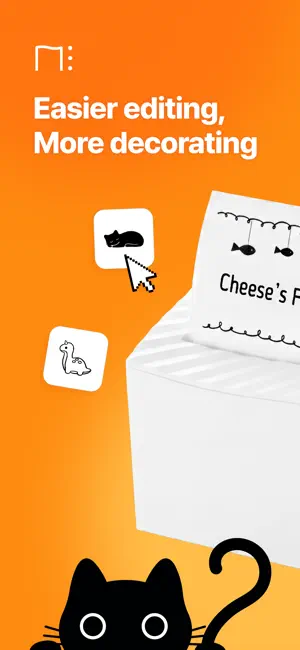
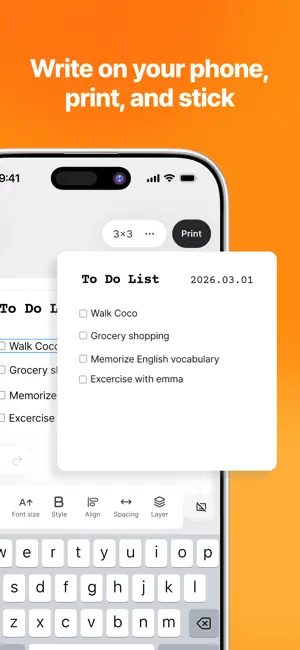
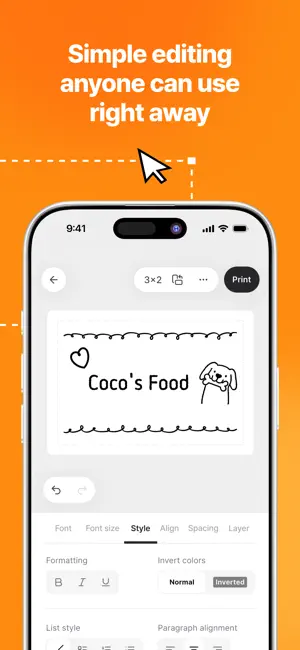
▶ Key Features 1. AI-Based Note Writing Support Utilize AI to write and edit notes. Whether you need help with automatic formatting, typo correction, or translation, ask the AI for assistance when you're short on ideas or facing difficulties. 2. Automatic Title Generation Write the content of your note, AI will generate a suitable title automatically. This feature improves the readability of your notes and helps you find what you need quickly. 3. Tag Recommendation Feature AI analyzes the content of your notes and suggests relevant tags. Tags help you categorize notes, manage them efficiently, and quickly search for the notes you need. 4. Print Notes with Nemonic Easily print your notes with Nemonic. You can print sticky notes that can be attached to places where you can easily view them Print and stick your notes at any time in your work environment or daily life. * Nemonic AI uses artificial intelligence services provided by Open AI. Not all questions may be answered correctly. ▶ About the Nemonic Printer The Nemonic Printer is a small printer that prints out sticky notes without ink or toner. It connects to the Nemonic app via Bluetooth and prints quickly, in about 5-10 seconds. It can also connect to a PC, and has other features like a dispenser function, and more. • Terms and Conditions - Terms of Service: https://mangoslab.oopy.io/terms-of-service - Privacy Policy: https://mangoslab.oopy.io/privacy • Optional Access Permissions - Location: Used to search for nearby Bluetooth printers. - Camera: For photo output. - Storage: Used for saving or importing to the gallery and camera functions. ※ Report any issues or errors with the app: [email protected]
Ratings & reviews
5.0
5 ratings
What’s new
Version 1.3.9 · Updated October 12, 2026
[What's New in v1.3.9] • Home templates are now organized by category, making it easier to find what you need. • Changing label orientation now rotates all content with the paper, 90° clockwise with each tap. • Fixed an issue on iOS where Korean characters split apart after deleting text. • Smoother label text editing: - Fixed text box jitter when typing the first character on Android. - Formatting now applies correctly to partially selected text on iOS. • Your current font is now shown at the top of the font list. • Fixed a crash while editing memos and improved overall stability.
App privacy
The developer, MANGOSLAB Co.,Ltd., reported these privacy practices to Apple.
Data Not Collected
The developer does not collect any data from this app.
Alternatives to Nemonic - Memo, Label, Sticker
Looking for apps like Nemonic - Memo, Label, Sticker? Here are 6 similar apps on the App Store. The highest rated is 마법천자문 공식앱 (마공앱) (4.7/5), and all 6 are free to download.
-
 마법천자문 공식앱 (마공앱)
4.7
마법천자문 공식앱 (마공앱)
4.7
-
 키자니아 줄서기
-
 EBS play
2.8
EBS play
2.8
-
 Wonder Park
-
 I'm Miri - AI Life Coach
4.5
I'm Miri - AI Life Coach
4.5
-
 HARIBO Happy World
2.0
HARIBO Happy World
2.0
| App | Rating | Price | Last updated | Compare |
|---|---|---|---|---|
| Nemonic - Memo, Label, Sticker | 5.0 / 5 (5 ratings) | Free | October 12, 2026 | |
| 마법천자문 공식앱 (마공앱) | 4.7 / 5 (16) | Free | Dec 9, 2024 | Compare |
| 키자니아 줄서기 | – | Free | Oct 16, 2023 | Compare |
| EBS play | 2.8 / 5 (9) | Free | Sep 29, 2026 | Compare |
| Wonder Park | – | Free | Jun 28, 2024 | Compare |
| I'm Miri - AI Life Coach | 4.5 / 5 (8) | Free | Sep 29, 2026 | Compare |
| HARIBO Happy World | 2.0 / 5 (3) | Free | Mar 6, 2025 | Compare |