

Quotid
COLBERG ENTERPRISES 2 LLC Education iPhoneiPadiPod touch
Quotid is a free Education app for iPhone and iPad by COLBERG ENTERPRISES 2 LLC. Rated 5.0/5 from 2 ratings. Requires iOS 26.0. Updated September 13, 2026.
- Rating
- 5.0
- 2 ratings
- Price
- Free
- on the App Store
- Size
- 47 MB
- Age 4+
- Updated
- Sep 13
- 2026 · v3.0.4
Screenshots
About Quotid
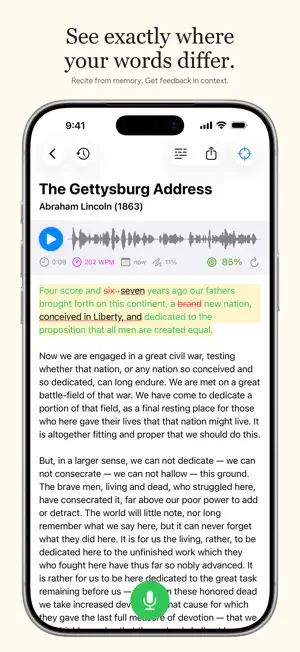
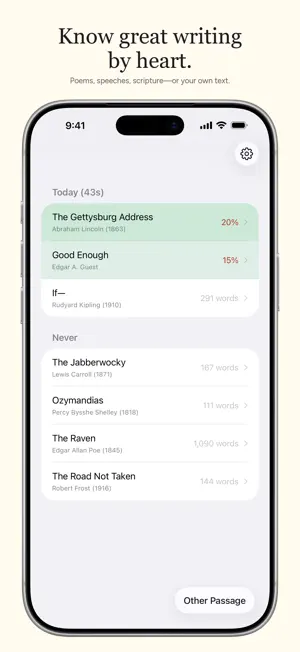
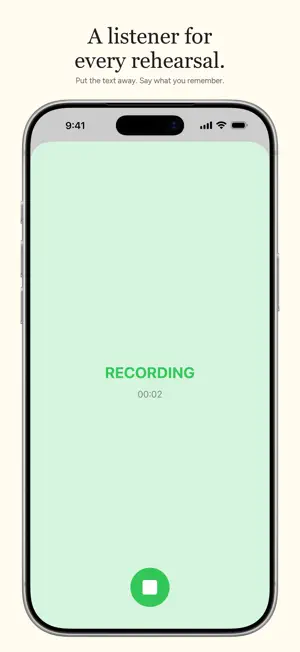
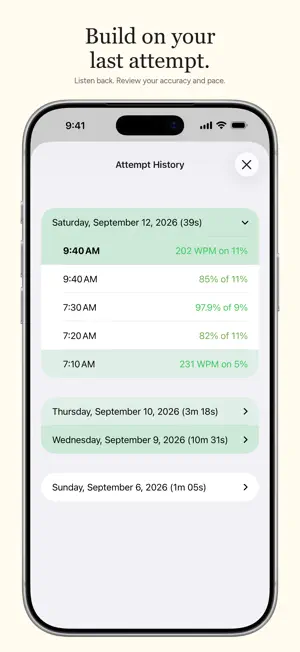
Know great writing by heart. Quotid helps you practice poetry, speeches, scripture, and other meaningful texts. Read a passage, recite it from memory, then see how your words compare. Listen back, correct a mistaken transcription, and try again. KNOW WHAT TO PRACTICE NEXT Turn on guidance to work through a passage in manageable sections. Start with a sentence, line, or paragraph, then build up to larger sections and the whole passage. Choose the accuracy and pace you want to reach. Guidance uses today's attempts to highlight your next step. FEEDBACK YOU CAN SEE Colored, word-level feedback shows matched words, omissions, additions, and substitutions in context. Review spoken corrections inline without losing the words you said. LISTEN BACK AND IMPROVE Save your recitations and follow each word during playback. Tap the text or scrub the waveform to jump to a point. Correct misheard words, undo a correction, or add words that sound alike in that passage. BUILD ON YOUR PRACTICE Review past attempts with accuracy and speaking-speed statistics. See how long you practiced each day and how much of your practice time you spent quoting. CHOOSE SOMETHING WORTH REMEMBERING Browse the library for classic poems, speeches, and Bible translations, or add your own text. Download passages and collections to keep them close at hand. RECORD YOUR WAY Practice with audio or front-camera video. Share a recording as audio or, when available, video. Quotid keeps the newest video for each passage to save space while preserving the audio from your attempts. PRACTICE WITH LESS FRICTION Your downloaded passages and recordings stay available on your device. Apple speech recognition follows your recitation, with targeted online checks of uncertain sections when you have an internet connection. Online checks send those audio sections for processing. Whether you're learning a poem, preparing a speech, or committing a chapter to memory, Quotid makes the loop simple: read, recite, see what changed, repeat. Privacy Policy: https://quotid.app/privacy Terms of Use: https://quotid.app/terms
What’s new
Version 3.0.4 · Updated September 13, 2026
Fixes a crash that could prevent the app from opening. Improves crash reporting and reliability. Makes it easier for users to load passages from their organizations.
App privacy
The developer, COLBERG ENTERPRISES 2 LLC, reported these privacy practices to Apple.
Data Not Linked to You
The following data, which may be collected but is not linked to your identity, may be used for the following purposes:
- User Content: Other User Content, Photos or Videos, Audio Data
- Identifiers: User ID, Device ID
- Usage Data: Product Interaction
- Diagnostics: Crash Data, Performance Data, Other Diagnostic Data
Used for: Analytics, App Functionality
Alternatives to Quotid
Looking for apps like Quotid? Here are 6 similar apps on the App Store. The highest rated is Verbatim Recall (5.0/5), and 5 of the 6 are free to download.
-
 paper's
-
 Verbatim Recall
5.0
Verbatim Recall
5.0
-
 Manette Community Church
-
 Mnemonica Major Memory System
4.0
Mnemonica Major Memory System
4.0
-
 Magic Focus+
-
 Audio_Cards
| App | Rating | Price | Last updated | Compare |
|---|---|---|---|---|
| Quotid | 5.0 / 5 (2 ratings) | Free | September 13, 2026 | |
| paper's | – | Free | Aug 30, 2026 | Compare |
| Verbatim Recall | 5.0 / 5 (2) | Free | May 30, 2026 | Compare |
| Manette Community Church | – | Free | Oct 16, 2026 | Compare |
| Mnemonica Major Memory System | 4.0 / 5 (1) | 3.99 USD | Aug 15, 2025 | Compare |
| Magic Focus+ | – | Free | May 17, 2024 | Compare |
| Audio_Cards | – | Free | Aug 31, 2026 | Compare |
Compare Quotid with the top alternatives: ratings, updates, ASO score and keyword gaps →